Inside a Cloud: From Data Centers to Your AI Model
You click deploy on a small AI app. A model endpoint appears. Storage mounts. Logs start streaming. A load balancer wakes up somewhere. It all feels abstract, almost like the app floated into existence.
That abstraction is useful, but it can also hide the parts that matter when your model gets slow, your bill jumps, or your data team asks where the training set lives. If you work in AI, you don't need to become a data center engineer. You do need a practical mental model of what’s inside a cloud.
There’s also a funny language trap here. People search for “inside a cloud” and often mean the literal sky version. But the available search results barely address the physical experience of being inside a meteorological cloud, and they leave major gaps around visibility, moisture, and safety. So let’s use that curiosity in a more useful direction. We’re going inside the digital cloud instead, from the building level down to the layers that make your AI workload run.
What's Really Inside a Cloud
“The cloud” typically refers to a service boundary, not a place. You upload data, train a model, host an app, and someone else manages the machines. That convenience is real. But the cloud isn’t air, fog, or magic. It’s hardware, software, automation, and policy stacked into a system that feels simpler than it is.

The first confusion people have
A literal cloud in the sky is a weather phenomenon. A cloud platform is a rented computing environment. The same word causes a lot of fuzzy thinking.
Search results reflect that confusion. It doesn’t offer much solid information about the actual sensory experience of being inside a meteorological cloud, and that gap is exactly why the digital meaning has become so dominant in everyday tech conversations. For most of us, “inside a cloud” now means “inside the infrastructure that runs software.”
What you’re actually interacting with
When you use AWS, Azure, or Google Cloud, you’re usually touching several layers at once:
- Physical infrastructure like buildings, power systems, cooling, racks, and network links
- Compute abstraction such as virtual machines and containers
- Storage systems that hold datasets, checkpoints, logs, and application assets
- Network controls that decide how traffic moves
- Automation tools that create, scale, and repair resources
- Security controls that govern access, encryption, and isolation
If you’re an AI practitioner, these layers aren’t trivia. They shape training speed, inference latency, reliability, and cost.
Mental model: The cloud is a giant, programmable operating environment built on very real machines.
Why AI people should care
AI workloads stress infrastructure differently from ordinary web apps. Models pull large datasets, use bursty compute, depend on fast storage access, and often need GPUs. A chatbot demo and a training pipeline can both “run in the cloud,” but they lean on different internal pieces.
That’s why understanding inside a cloud helps so much. It explains why one model deploys instantly while another stalls, why one workload fits neatly in a container while another needs a specialized machine, and why storage design can make or break a training loop.
From Concrete and Steel to Global Data Centers
You fine-tune a model in us-east-1, keep the training data in Europe, and serve users in Asia. The code may be correct, yet the job still runs slower than expected and costs more than planned. The reason often starts far below your Python environment, in the physical design of the cloud itself.
A cloud provider begins with buildings filled with power equipment, cooling systems, fiber links, and racks of hardware. Those buildings are data centers. Calling them “the cloud” can make them sound abstract, but they are industrial facilities engineered to keep computing equipment running around the clock.
A data center works a lot like a high-capacity archive. It stores information, protects it, organizes access to it, and serves it on demand. The difference is scale and speed. Instead of shelves and paper, you have servers, flash storage, network switches, backup power, and automation systems coordinating millions of requests.
Walk through one and you would see long rows of racks. Inside those racks are machines with CPUs, memory, network interfaces, and storage devices. Around them sit the systems that keep everything usable:
- Power distribution to keep equipment running during utility problems
- Cooling infrastructure to remove the heat dense compute creates
- Physical security controls to limit access to the facility and the hardware
- Redundant network paths so traffic can keep flowing when links or devices fail
Cloud providers plan for component failure from the start. Disks fail. Power supplies fail. Switches fail. The service stays up because the surrounding design expects those failures and routes around them.
That matters a lot for AI workloads. Training jobs and vector databases can put sustained pressure on storage throughput, network bandwidth, and specialized accelerators. If a provider cannot deliver stable power, cooling, and high-speed interconnects at scale, your GPUs spend expensive time waiting instead of training.
Where your data actually lives
Your datasets, model checkpoints, logs, and embeddings live on physical media in one or more facilities. The console may make provisioning feel instant, but the underlying storage still has a location, failure domain, and network path.
For AI teams, that physical reality shows up in very practical ways. A training run may slow down because the dataset is stored far from the compute cluster. An inference service may feel inconsistent because requests cross regions before reaching the model. A data pipeline may become expensive because each transfer moves large files over long distances.
If you are packaging preprocessing or inference services, the same location choices still matter, even if the application itself ships in a container. A team following a step-by-step Docker container workflow can deploy cleanly and still run into latency or data-transfer costs if compute and storage are poorly placed.
Why geography matters
Cloud providers divide infrastructure into regions and smaller zones so customers can choose where workloads run and how widely they are replicated. For AI and machine learning, that choice affects both system behavior and budget.
| Concern | Why it matters |
|---|---|
| Latency | Model APIs respond faster when inference runs closer to users or upstream applications |
| Compliance | Regulated datasets may need to stay within specific countries or regions |
| Resilience | Replicating across locations reduces dependence on one facility |
| Data gravity | Large datasets, checkpoints, and feature stores are slow and expensive to move |
Data gravity is one of the easiest cloud ideas to underestimate. Small web apps can move code around with little drama. AI systems often move terabytes or petabytes. Once data grows large, it pulls compute decisions toward it because moving the data becomes the slower and more expensive option.
A simple rule helps here. Before tuning model code, check where the users, compute, and data sit relative to one another.
The physical layer still shapes cloud behavior
Managed services hide a lot of operational detail, and that is part of their value. But the physical layer still influences everything above it. Region choice affects latency. Hardware availability affects how quickly you can get GPUs. Facility design affects uptime. Network topology affects training speed when many machines need to exchange gradients or fetch shared data.
So when someone asks what is inside a cloud, the honest answer starts with buildings, cables, power systems, cooling, and carefully arranged hardware. Software makes those resources programmable. It does not make the underlying machinery disappear.
How One Server Becomes Many Virtual Computers
Virtualization solves a very practical cloud problem. A provider may buy a server with a large pool of CPU cores, memory, and attached disks, but customers rarely need that entire machine all the time. To sell cloud compute efficiently, the provider needs a way to split one physical box into many isolated environments that behave like separate computers.
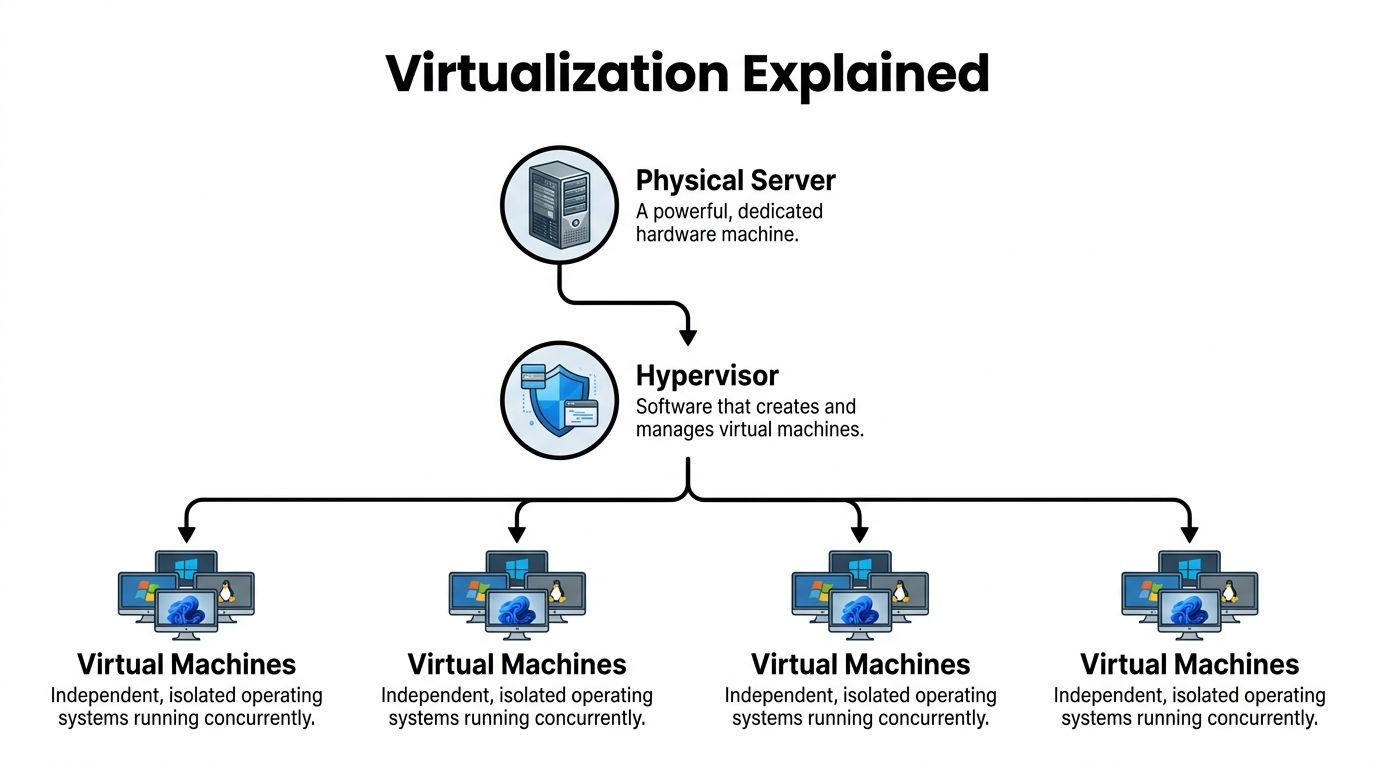
That split is created by the hypervisor.
What the hypervisor actually does
A hypervisor sits between the hardware and the operating systems running above it. Its job is to allocate slices of CPU time, memory, storage access, and network access to each virtual machine, while keeping those VMs isolated from one another.
If you rent a VM, your operating system believes it has its own machine. It sees virtual CPUs, virtual memory, virtual disks, and virtual network interfaces. Under the hood, the hypervisor is mapping those virtual resources onto real hardware.
That abstraction matters because it turns fixed hardware into inventory a cloud provider can package and sell in many sizes. It also gives customers a familiar unit. A VM feels close to a traditional server, which is why teams often start there.
Google Cloud’s explanation of cloud architecture describes this virtualization layer as the abstraction between hardware and higher-level services, where hypervisors such as KVM or VMware ESXi partition physical servers into isolated virtual machines, as explained in Google Cloud’s cloud architecture overview.
Why this matters for AI workloads
For an AI team, virtualization is not just an infrastructure trick. It shapes how you get compute, how consistently jobs run, and how safely different workloads share hardware.
A few examples make that concrete:
- Experimentation: Data scientists can launch separate environments for different projects without waiting for dedicated hardware
- Isolation: A training job with heavy dependencies does not need to interfere with a production inference service
- Reproducibility: Teams can keep known-good machine images for specific CUDA, driver, and library combinations
- Access to scarce hardware: Providers can package GPU-backed machines into rentable instances instead of requiring you to buy and operate the full server
This is especially useful in AI because environment drift breaks things fast. One minor version mismatch in Python, CUDA, PyTorch, or a driver can turn a working notebook into a failed training run.
What a VM gives you
A virtual machine includes its own operating system, its own processes, and its own filesystem. That makes it heavier than a simple application package, but also more self-contained.
Use a VM when you need:
- Strong isolation between workloads
- A specific operating system or low-level system configuration
- Kernel-level control for drivers or specialized runtimes
- Compatibility with older software that expects a full machine
For AI work, VMs are common for GPU training, custom research environments, and workloads that need tight control over drivers, libraries, or security boundaries.
Containers solve a different problem
Containers are often introduced right after VMs, and that is where confusion starts. A container does not pretend to be a whole computer. It packages an application and its dependencies while sharing the host operating system kernel.
A good way to frame the difference is scope. A VM packages a machine environment. A container packages an application environment.
That smaller scope makes containers faster to start and easier to replicate across many systems. If your team has ever fought the "works on my machine" problem, containers are the practical fix. You build the app once with its dependencies, then run that same package in development, testing, and production. If you want a hands-on example, this guide on how to create a Docker container is a useful next step.
Why containers became so important for AI
AI systems usually involve more than one process. You may have an API serving predictions, a separate worker for batch inference, a scheduled job for data preparation, a vector index service, and monitoring agents around all of it. Packaging each part as a container makes those components easier to deploy and replace.
Containers are especially helpful for:
- Inference services that need quick startup and consistent dependencies
- Batch pipelines that run the same job repeatedly
- Training jobs that must pin exact library versions
- Supporting services such as feature APIs, queues, and background workers
For model serving, containers also fit the way modern platforms operate. Orchestrators such as Kubernetes can place containers across clusters, restart failed ones, and scale replicas up or down based on demand.
VMs and containers usually work together
Treating VMs and containers as rivals creates the wrong mental model. In many clouds, containers run on top of VMs. The VM provides the infrastructure boundary. The container provides the application package.
Here is the practical distinction:
| Layer | Best mental model | Typical AI use |
|---|---|---|
| Virtual machine | A full rented computer | GPU training box, specialized runtime, secure host |
| Container | A packaged application unit | Model API, worker service, pipeline step |
A simple rule helps. Choose VMs when you need machine-level control. Choose containers when you need repeatable application deployment.
Inside a cloud, virtualization is one of the key mechanisms that turns raw hardware into programmable compute. For AI teams, it is the reason you can request a training box for six hours, deploy the same inference service across multiple replicas, or preserve a working runtime before a fragile dependency stack changes.
Connecting and Storing Your Data Across the Globe
Your training job starts on time. GPUs are allocated. Containers launch. Then throughput collapses because the data is in the wrong place, moving over the wrong path, or stored in a format that does not match the job.
That is a very common cloud failure mode for AI teams.
Compute gets most of the attention, but cloud performance often depends just as much on two quieter systems. Networking decides how services reach each other and how traffic flows. Storage decides what data persists, where it lives, and how fast it can be read or written.
Networking is the cloud’s traffic system
Inside a cloud, your application is rarely one thing talking to one database on one machine. A request might hit a load balancer, pass to an API, call a model endpoint, fetch features from storage, and send logs to monitoring. Every hop uses the network.
Cloud networking works like a global traffic system with software controls. It routes packets, isolates private paths, filters who can talk to what, and shifts traffic away from unhealthy routes. In practice, that means networks are not just cables and switches hidden in a provider building. They are part of the product you configure.
For AI and machine learning workloads, that shows up in a few predictable places:
- Distributed training jobs need fast coordination between nodes
- Inference APIs need low latency and stable request paths
- Data pipelines move large volumes between storage, jobs, and services
- Hybrid systems need secure links between on-prem data and cloud resources
A common mistake is treating networking like wall power. You plug in and expect it to disappear. For AI systems, network design often shapes training speed, inference latency, and even cloud cost.
Storage is a set of tools, not one place
“Store it in the cloud” sounds simple, but cloud providers offer different storage models for different jobs. Choosing the wrong one can slow a pipeline or make costs drift upward.
| Storage type | Best for | AI example |
|---|---|---|
| Block storage | Disks attached to machines | Training VM boot disk, fast local volume for a database |
| File storage | Shared folders and familiar directory structures | Team-shared project assets, mounted datasets |
| Object storage | Massive scalable collections of files and metadata | Data lakes, model artifacts, checkpoints, images, logs |
The easiest way to remember the difference is by behavior.
Block storage behaves like a disk attached to a machine. File storage behaves like a shared network drive. Object storage behaves like a huge internet-accessible library where each item has an address and metadata.
Why object storage shows up everywhere in AI
Object storage sits under many modern AI workflows because AI teams tend to collect large, messy, fast-growing datasets. Images, PDFs, video, audio, checkpoints, embeddings, and experiment outputs all fit naturally there.
Services like Amazon S3, Google Cloud Storage, and Azure Blob Storage are built for that pattern. They scale well, support replication, and work cleanly with batch jobs, training systems, event pipelines, and model artifact storage. For many teams, object storage becomes the default home for the raw material that models train on and the outputs they produce.
If your data comes from several systems before it reaches a model, cloud-based data integration is the next layer to understand.
A practical example
Suppose you are building an image classifier for a product search system used across several regions.
Your raw images land in object storage. A preprocessing job reads them, resizes them, and writes cleaned versions back to another location. A training job pulls batches from storage into cloud compute. The resulting model artifact is saved again as an object. Then an inference service downloads that artifact at startup, or mounts it from a managed store close to the serving environment.
Nothing about that flow is “just storage.” Performance depends on where the data sits, how often it moves, whether copies are cached, and how far the training or inference job is from the data it needs.
This short overview helps if you want a visual reset before going deeper:
If your model is slow, check whether the bottleneck is data movement. Many “compute” problems are storage or network problems wearing a disguise.
Inside a cloud, data is constantly being copied, cached, replicated, and served across systems and regions. For AI workloads, understanding that movement is often the difference between a pipeline that looks correct on paper and one that performs well in production.
Meet the Brains Behind Cloud Operations
A cloud full of VMs, containers, networks, and storage would be chaos without coordination. Something has to decide where workloads run, when they restart, how they scale, and what happens when a machine disappears.
That “something” is orchestration.
Think orchestra, not server room
An orchestra has many instruments, each with its own role. The conductor doesn’t play them all. The conductor keeps them aligned. Cloud orchestration works the same way.
Tools such as Kubernetes coordinate containers across clusters of machines. They track desired state. If you ask for three copies of a model-serving API, Kubernetes works to keep three copies running. If one crashes, the system starts another. If traffic grows, it can add more, assuming you configured scaling rules.
That’s why orchestration matters so much for AI apps. A single notebook can live on one machine. A production AI service usually can’t.
What orchestration actually does
Here are the jobs people often assume happen “automatically.” In reality, orchestration systems are doing them on purpose.
- Scheduling workloads onto available machines
- Restarting failed services when a process dies
- Spreading replicas to reduce risk from a single host failure
- Exposing services so apps can find each other
- Managing rollouts during updates
- Scaling instances based on demand
This is one reason containers became operationally practical at scale. Packaging an app is useful. Managing hundreds of packaged apps is a separate problem.
Infrastructure as code changes the game
The next leap is Infrastructure as Code, often shortened to IaC. Instead of clicking around in a dashboard, teams define infrastructure in files and apply it through tools. The result is repeatable, reviewable, and easier to version.
If you’ve worked with machine learning pipelines, the mindset will feel familiar. You want environments to be reproducible, not hand-built from memory.
A typical IaC workflow might define:
| Component | Example purpose |
|---|---|
| Network rules | Control which services can talk |
| Compute resources | Create the machines or clusters |
| Storage buckets | Hold datasets and artifacts |
| Permissions | Limit access by role |
Why auto-scaling matters for AI
Traffic for AI apps can be unpredictable. A model endpoint may sit quiet for hours, then spike after a product launch or a social post. You don’t want to pay for the peak all day, and you also don’t want a user-facing failure when demand rises.
That’s where auto-scaling helps. The platform watches signals such as request volume or resource use and adjusts capacity. In simpler cases, this means adding more application replicas. In more specialized cases, it can mean starting larger machines or shifting jobs to another pool.
Good cloud operations are less about “big servers” and more about systems that keep adjusting without drama.
Self-healing is not magic
People often describe cloud systems as self-healing. That sounds almost biological, but the process is more boring and more reliable. The platform checks health, compares it to the desired state, and takes corrective action when they don’t match.
For AI teams, this matters when:
- a model server crashes during a dependency issue
- a node disappears in the middle of a batch job
- a rollout introduces a broken container image
- one zone has trouble but another is healthy
The cloud feels elastic because these control loops are always working in the background. They are the brains behind the visible infrastructure, and they’re a big reason cloud systems can support messy, real-world AI demand.
Protecting Your Work and Your Wallet
Security and cost are where cloud conversations get serious. Organizations often start with speed. They stay for convenience. Then they hit two questions. Is this safe, and how do we stop the monthly bill from getting weird?
Those are good questions, especially for AI workloads, where datasets can be sensitive and compute can get expensive quickly.

Security starts with shared responsibility
Cloud providers secure the underlying infrastructure. You still secure what you build on top of it. That’s the shared responsibility model in plain English.
If you leave storage too open, grant broad permissions, or deploy a sloppy configuration, the provider’s data center guards won’t save you. Many cloud incidents come from setup mistakes, not dramatic attacks on server buildings.
Cloud security data underlines that risk. Exabeam’s roundup reports that 82% of data breaches in 2023 involved cloud-stored data, and 45% of all breaches occurred in the cloud, often due to misconfigurations, in its summary of cloud security statistics and risk trends.
The basics that matter most
Beginners often overfocus on advanced threats and underfocus on access control. Start with the fundamentals.
- Identity and access management matters first. Give people and services only the permissions they need.
- Encryption protects data at rest and in transit, but only if you enable and manage it well.
- Network segmentation limits unnecessary communication between systems.
- Logging and monitoring help you see misuse before it becomes a bigger problem.
- Configuration review catches public exposure, stale credentials, and over-permissioned roles.
If you want a plain-language refresher, this guide to cloud security fundamentals is a helpful reference.
Most cloud security failures are ordinary. A permission was too broad. A resource was exposed. A secret lived too long.
AI adds specific security wrinkles
AI systems often combine proprietary data, third-party APIs, model artifacts, and fast-moving experiments. That creates extra opportunities for drift.
A few examples:
| Risk area | Why AI teams should care |
|---|---|
| Training data exposure | Datasets may contain confidential business or user information |
| Model artifact access | A stolen model can expose intellectual property |
| Service accounts | Automation often accumulates broad permissions over time |
| Temporary experiments | “Just for testing” resources tend to linger |
The safe habit is boring but effective. Treat experimental cloud assets like production assets unless you’ve isolated them on purpose.
Cost control is a design skill
Now the wallet part. Cloud pricing feels friendly when you start because you can launch resources cheaply. The danger is that many services are metered independently. Storage, compute time, requests, data transfer, logs, and premium accelerators can all add up in different ways.
AI workloads make this sharper because GPU-backed machines, long training runs, and large datasets don’t forgive sloppy planning.
A few practical habits help a lot:
- Shut down idle resources so development machines and test endpoints don’t run overnight for no reason
- Right-size instances because bigger isn’t always faster for your workload
- Separate experiments from production to see who is spending what
- Set budgets and alerts before you need them
- Store data intentionally so old checkpoints and duplicates don’t pile up forever
Where beginners usually overspend
The common pattern isn’t one giant mistake. It’s many small ones.
One GPU VM left running over a weekend. Several model versions stored indefinitely. Verbose logs retained too long. Data copied across regions. A proof-of-concept endpoint that nobody removed after the demo.
Those aren’t infrastructure mysteries. They’re operating habits.
Running Your AI Models Inside the Cloud
The easiest way to understand inside a cloud is to follow one AI workflow from start to finish.
Say you’re building an image recognition model for a business app. You collect images, clean them, train a model, deploy an inference API, and then serve predictions to users. Every cloud layer we discussed shows up along the way.
Step one is data landing
Your raw files usually begin in object storage. That’s the durable, scalable home for images, labels, and later model artifacts. A preprocessing job reads from that storage, transforms the data, and writes cleaned results back.
At this point, networking and storage design matter more than model architecture. If the dataset is hard to access or scattered across systems, everything downstream gets slower.
Step two is training on cloud compute
Training often runs on a specialized VM or a managed service backed by GPU-enabled infrastructure. Underneath, virtualization isolates your job from others even though you’re sharing the provider’s broader environment.
If you package training code in containers, orchestration tools can place and manage those jobs more consistently. That’s where cloud internals start paying off. You’re not just renting a machine. You’re using a system that can reproduce environments, schedule workloads, and recover from failures.
Step three is packaging for deployment
Once the model is trained, you package the inference service, often as a container. Then an orchestrator such as Kubernetes can keep the service available, roll out updates, and scale replicas when demand changes.
If you’re working through that phase, this guide on machine learning model deployment is a solid next read.
Step four is serving and operating
Now your users send requests. Traffic flows through cloud networking. The service reads the model artifact from storage or a mounted volume. Monitoring tracks health. Security policies control who can call what. Cost controls start to matter because inference workloads can stay live much longer than training jobs.
For teams trying to tighten spending once traffic grows, these top AWS cost optimization recommendations are a useful operational checklist.
The cloud works best for AI when you stop seeing it as “someone else’s server” and start seeing it as a stack of coordinated systems.
One interesting frontier
There’s also an underserved angle here for AI readers. As of 2026, there’s emerging interest in AI-driven meteorological tools related to cloud behavior, but the available material in the provided research set doesn’t explain machine learning applications for cloud analysis in depth. That gap is a good reminder that “inside a cloud” still has two meanings, and AI is beginning to touch both the digital one and the atmospheric one.
For your day-to-day work, though, the important point is simpler. When your model runs in the cloud, it’s sitting on top of physical infrastructure, sliced by virtualization, connected by software-defined networking, fed by scalable storage, coordinated by orchestration, and constrained by security and cost choices. Once you see those layers clearly, cloud architecture stops feeling vague.
If you want more practical, plain-English breakdowns of AI infrastructure, tools, and deployment choices, YourAI2Day is a smart place to keep learning. It’s especially useful if you’re bridging the gap between AI ideas and the actual systems that make them work.