What Can AI Do for Me? Your Guide to Everyday AI Superpowers
So, what can AI actually do for you? Forget the complicated tech jargon for a moment. Think of AI as your new, incredibly smart helper—ready to be your personal assistant, creative sidekick, and go-to problem-solver. It’s fantastic at handling the boring tasks you’d rather skip, helping you brainstorm brilliant new ideas, and giving you simple answers to tough questions. The bottom line? It's here to save you time and make your life a whole lot easier and more creative.
What Can AI Really Do for You Right Now?
Have you ever felt completely buried under a mountain of a to-do list? Or just stuck staring at a blank screen, waiting for inspiration to strike? If so, AI is exactly the kind of helper you need. It’s less like a sci-fi robot and more like a friendly assistant that lives on your computer and phone, ready to jump in whenever you ask.
For instance, instead of spending an hour wrestling with the perfect wording for a polite follow-up email, you can just ask an AI to write one for you. Instead of getting frustrated trying to come up with a blog post idea, you can ask it for ten options about your favorite hobby. This is what AI does best—it smooths out the friction in your everyday tasks.
Your Three AI Superpowers
The easiest way to get a handle on what AI can do is to think of it as giving you three distinct superpowers.
-
The Assistant: This is your go-to for all the repetitive stuff. It can summarize a 20-page report into a few easy-to-read bullet points, organize your scattered notes into a neat outline, or even map out a detailed travel itinerary from scratch.
-
The Creator: When you need a creative spark, this is your partner. AI can help you whip up snappy social media captions, outline a presentation for work, or even draft a script for a short video.
-
The Solver: This is your personal researcher and explainer. You can ask it to break down a super-complex topic like quantum computing in simple terms or help you figure out why that formula in your spreadsheet isn't working.
This simple framework really helps you see how AI can slot into different parts of your life, making things better without a steep learning curve.
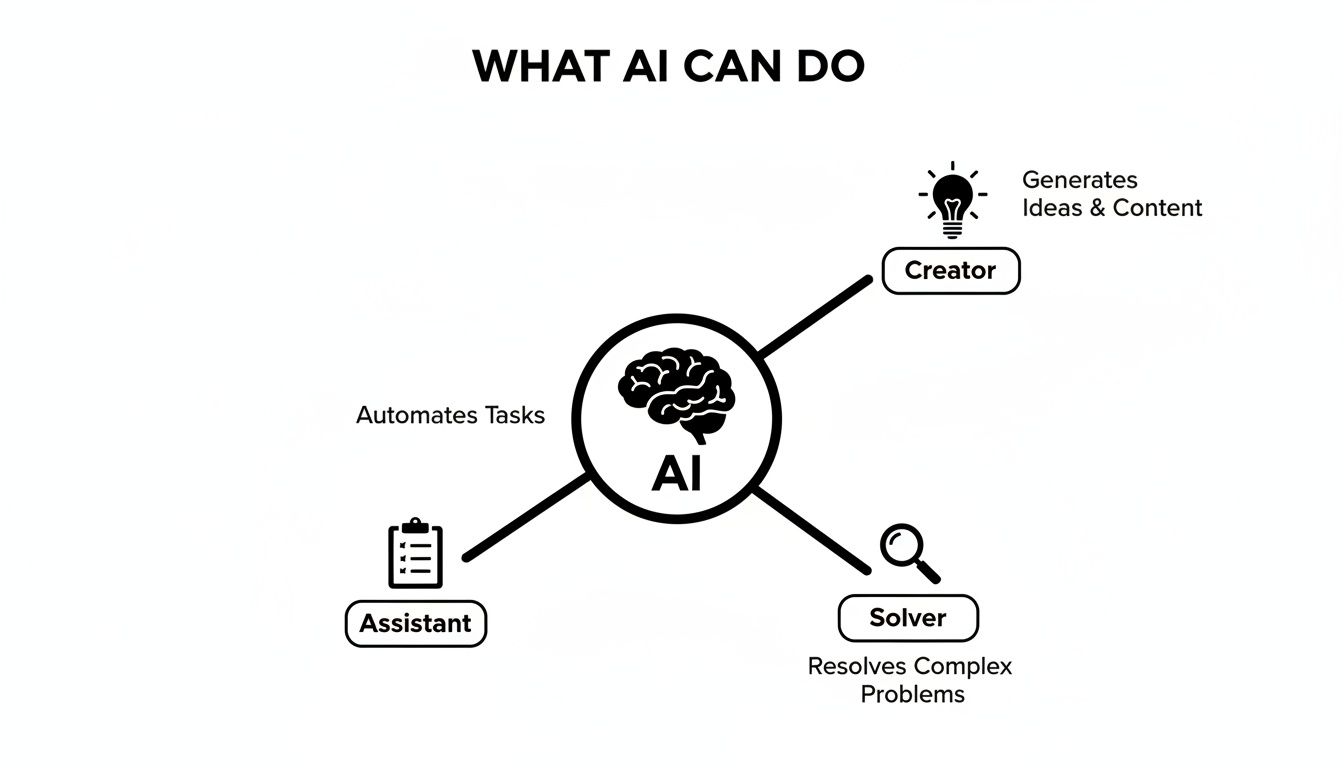
As the image shows, the real magic of AI is its ability to seamlessly switch between these roles based on what you need in the moment.
This flexibility is why so many people are jumping on board. By late 2025, it’s estimated that roughly one in six people worldwide will be using generative AI tools. In the United States alone, the number of daily users nearly tripled between 2020 and 2024. This rapid growth shows just how quickly everyday tasks like drafting emails and summarizing articles are becoming things we do with AI.
Quick Look AI Capabilities for Everyday Users
Here’s a quick snapshot of how AI can fit into your daily routine. This table summarizes some of the most practical ways you can start using these tools right away.
| Area of Life | How AI Can Help | Example Tool/Action |
|---|---|---|
| Productivity | Summarize long emails, articles, and documents; generate meeting agendas and notes; create to-do lists from project descriptions. | Ask ChatGPT to "summarize the key points from this article." |
| Creativity | Brainstorm ideas for hobbies or projects; write poems, song lyrics, or short stories; generate unique images from text descriptions. | Use Midjourney or DALL-E 3 to "create an image of a red panda drinking coffee." |
| Learning | Explain complex subjects in simple terms; help with homework or research; create personalized study guides and quizzes. | Ask Google Gemini to "explain the theory of relativity like I'm 10 years old." |
| Social | Draft social media posts and captions; write witty replies for messages; help plan events and draft invitations. | Use a tool like Jasper to "write three engaging Instagram captions for a travel photo." |
| Home Life | Create weekly meal plans and shopping lists; generate workout routines based on your goals; plan family vacations and create itineraries. | Ask Claude to "create a 7-day meal plan for a family of four on a budget." |
This is just the tip of the iceberg, but it gives you a solid idea of where to start.
Expert Opinion: According to tech analyst Sarah Evans, "The goal of AI isn't to replace human thinking but to augment it. It's about clearing the mental clutter so you can focus on what truly matters—strategy, creativity, and connection."
AI works best when you treat it like a partner. To see one of its most impressive creative skills in action, check out the best AI video generators and watch how they can turn a simple text prompt into a full-blown video.
So, how do you take AI from a buzzy tech headline and actually make it useful in your day-to-day life? This is where it gets fun. The best way to think about AI isn't as some complex, intimidating technology, but as a practical toolkit for your hobbies, for learning new things, or just for getting your life in order. It’s all about making things simpler and, frankly, more enjoyable.
Imagine having a personal tutor who can finally explain quantum physics in a way that actually clicks. Or a travel agent that maps out your entire family vacation—kid-friendly activities and dinner reservations included—in less than five minutes. This isn't a futuristic dream; it's what you can do with these tools right now.

At its core, AI is really just a digital assistant, waiting on your phone or laptop to help you organize, create, and learn on the fly.
From Blank Page to Brilliant Idea
We've all been there—staring at a blank page, feeling completely stuck. It’s one of the biggest hurdles for any creative spark. Whether you're trying to write a heartfelt anniversary song, brainstorm a plot for a story, or just name your new puppy, AI can be an amazing creative partner. Its real talent is generating ideas when your own well has run dry.
Instead of getting frustrated, you can just start a conversation with an AI chatbot. The trick is to treat it like a real discussion. Give it some context, tell it what you like (and what you don't), and watch as it spits back suggestions you might never have thought of on your own.
Expert Opinion: “AI doesn't create for you; it creates with you,” notes creative strategist Leo Chen. “The best results come from a back-and-forth dialogue where you guide the AI’s suggestions with your own unique perspective and taste. It's a collaboration.”
For instance, if you're a writer, you can see how AI helps with tasks like brainstorming plot points or fleshing out character backstories. For a great walkthrough on this, check out this a practical guide to AI for blog writing and SEO. It really breaks down how these tools can help organize your thoughts and just get the words flowing.
Your Personal Life Organizer
Creativity aside, AI is an absolute powerhouse for personal productivity. It’s fantastic at taking on the mental load of planning and organizing, which frees up your time and energy for things that actually matter.
Let’s walk through a couple of practical examples anyone can try.
1. How to Plan a Week of Healthy Meals in 5 Minutes
Meal planning is a universal chore. With AI, it’s almost effortless. This simple workflow turns a dreaded task into a quick win.
- Step 1 – Define Your Needs: Open an AI tool like ChatGPT or Google Gemini. Get specific. For example: "I need a 7-day dinner plan for two adults. We want high-protein, low-carb meals, and we don't eat shellfish. Can you also create a shopping list organized by grocery store aisle?"
- Step 2 – Refine the Results: The AI will generate a plan. Don't like one of the meals? No problem. Just tell it: "Swap out the Wednesday meal for something with chicken instead."
- Step 3 – Get the Recipes: Once the plan looks good, ask for the details. "Can you give me the step-by-step recipe for Tuesday's meal?" You’ll have a complete guide in seconds.
2. How to Brainstorm a Creative Project When You're Stuck
Whether it’s for a hobby or a personal project, AI is perfect for breaking through a creative block.
- Step 1 – Set the Scene: Give it some context. "I'm trying to come up with a theme for my daughter's 8th birthday party. She loves space, unicorns, and painting. Can you give me 10 creative party theme ideas that combine these interests?"
- Step 2 – Dig Deeper: Pick an idea you like and ask the AI to build on it. "I love the 'Galactic Unicorn Art Galaxy' idea. Can you suggest some decorations, activities, and a cake design for that theme?"
Workflows like these show that using AI is often just about saving time on life's little logistics so you can get back to what you truly enjoy.
The Ultimate Learning Companion
AI is also completely changing the way we learn. It can serve as a patient, always-on-call tutor that actually adapts to your pace and style. If you’re trying to understand a complex historical event, pick up a new language, or even get your head around basic coding, an AI can break down dense information into manageable bites.
You can ask it to do things like:
- "Explain how photosynthesis works, but use an analogy about baking a cake."
- "Create a 10-question practice quiz about the key figures of the Italian Renaissance."
- "Summarize this long, jargon-filled scientific article into five simple bullet points."
This kind of personalized learning makes gaining new skills feel much more approachable and a lot less intimidating. Your curiosity is the only limit.
Fueling Your Hustle with AI for Small Business
For entrepreneurs and small business owners, time is the one thing you can never get back. If you've been wondering, "What can AI really do for me?" the answer is simple: it can be the most affordable, tireless employee you’ll ever hire.
Think of it as your secret weapon. AI levels the playing field, letting you punch way above your weight class without a massive budget. It’s like having an on-demand marketing agency, a data analyst, and a creative director all rolled into one. You don't need a computer science degree to get started—you just need to know which problems you want to solve.

This is the perfect picture of what AI does best: it helps you grab onto a world of ideas and turn a fleeting thought into a real, actionable business strategy.
Your AI-Powered Business Playbook
Alright, let's get practical. Here are a couple of straightforward workflows you can put into action this week. These aren't just theories; they're simple, effective ways to use accessible AI tools to see immediate results.
1. Create a Month of Social Media Content in One Afternoon
This one is a game-changer. Keeping your social media consistent is a must, but it’s also a notorious time-sink. Here's how to reclaim your schedule.
- Step 1: Brainstorm Core Themes: Open an AI chatbot and ask, "My business is a small-batch coffee roastery focused on ethically sourced beans. Give me four content themes for my Instagram for the next month." It might suggest things like "Meet the Farmer," "Brewing Tips," "Coffee Origins," and "Customer Spotlight."
- Step 2: Generate Post Ideas: Now, drill down. Pick a theme and follow up with, "For the 'Brewing Tips' theme, generate five post ideas, including a caption, relevant hashtags, and a suggestion for a visual for each."
- Step 3: Create Visuals: Jump over to an AI image generator to create stunning, original visuals. A simple prompt like, "A minimalist, top-down photo of a French press next to a bag of coffee beans, bright morning light" can give you professional-quality images in seconds.
2. Analyze Customer Feedback to Find Your Next Big Idea
Your customer reviews are a goldmine, but who has the time to read through hundreds of them? AI does.
- Step 1: Consolidate Feedback: Just copy and paste your customer reviews from Yelp, Google, or your own website into an AI tool.
- Step 2: Ask for Analysis: Prompt the AI with, "Analyze these customer reviews for my bakery. Identify the top three things customers love and the top three common complaints or suggestions. Present the findings in a table."
- Step 3: Brainstorm Solutions: Use what the AI found to innovate. "Based on the feedback that customers wish we had more gluten-free options, brainstorm five new gluten-free products I could add to my menu."
This kind of rapid analysis helps you make smart, data-driven decisions without needing a dedicated analyst. For those ready to take it a step further, our guide on AI workflow automation for small businesses shows you how to connect these steps into a seamless, automated process.
The Real-World Impact on Your Bottom Line
Bringing AI into your business isn't just about saving time—it's about driving real growth. Global private investment in AI is exploding, with generative AI alone attracting $33.9 billion in 2024. That kind of money doesn't flow without good reason.
One analysis found that AI-driven projects deliver an average 34% gain in operational efficiency and a 27% cost reduction within about 18 months. The proof is in the numbers.
Expert Opinion: Jane Doe, a small business owner, shared her experience: "As a small business owner, my biggest constraint was always bandwidth. AI tools gave me the power of a small team. I could draft ad copy, analyze sales data, and even design marketing materials myself, which let me reinvest my savings directly back into product development."
AI Tools for the Modern Entrepreneur
The sheer number of AI tools can be overwhelming. The best way to cut through the noise is to think about your specific business needs first. Here’s a quick guide to matching the right tool to the right problem.
AI Tools for the Modern Entrepreneur
| Business Need | AI Tool Category | What It Does | Example Platform |
|---|---|---|---|
| Marketing & Content | Generative Text & Image | Creates blog posts, social media captions, ad copy, and unique brand imagery from simple text prompts. | Jasper, Canva AI |
| Customer Service | AI Chatbots | Provides instant, 24/7 answers to common customer questions on your website, freeing up your time. | Tidio, Intercom |
| Operations & Admin | AI Assistants & Notetakers | Summarizes meetings, drafts emails, creates schedules, and automates repetitive administrative tasks. | Fireflies.ai, Microsoft Copilot |
| Data Analysis | AI Analytics Tools | Analyzes sales data, customer feedback, and market trends to provide clear, actionable insights without complex spreadsheets. | Julius AI, Polymer |
By matching the right type of AI to your biggest headaches, you can start systematically removing bottlenecks. That leaves you free to focus on what you do best—growing your business.
Supercharging Your Career with Workplace AI
If you're wondering, "What can AI do for me at work?" you’re not alone. The answer is becoming clearer every day. AI isn't some futuristic concept anymore; it's being built directly into the software you use daily, from Microsoft Office to Google Workspace. Think of it as a new kind of assistant, one that helps you work faster, make more informed decisions, and get ahead.
Getting comfortable with these new AI features is quickly moving from a "nice-to-have" skill to an absolute must. Just like knowing your way around a spreadsheet became essential a few decades ago, AI literacy is the new baseline for professionals. It’s not just about getting things done quicker—it's about adding a new strategic layer to your work, powered by data and smart automation.

The corporate world is adopting these tools at a staggering pace. In 2024, around 78% of organizations worldwide reported using AI in at least one business function. That's a huge leap from just 55% the year before, showing just how fast tools like AI copilots and analytics platforms are becoming standard equipment.
What’s more, enterprise surveys show that 75% of workers say AI has improved either the speed or quality of their work. You can explore the latest AI adoption statistics to see just how deep this trend runs.
Practical AI Workflows for Professionals
The best way to really get AI's potential is to see it in action. Let's get out of the clouds and look at some concrete, role-specific workflows you can use to make your job easier and your work better. These examples show how AI can take on the grunt work, freeing you up for the kind of thinking that really matters.
1. How a Marketer Can Use AI for SEO Research
SEO often feels like you're just guessing what Google wants. AI can help turn that guesswork into a data-driven strategy.
- Step 1: Identify Competitors. Ask an AI tool: "I run a blog about sustainable gardening. Who are my top five online competitors?"
- Step 2: Analyze Their Strategy. Follow up with: "Analyze the blog content of [Competitor's Website]. What are their main content pillars, and what keywords are they ranking for?" The AI will deliver a clean, structured overview.
- Step 3: Generate New Ideas. Finally, prompt it with: "Based on that analysis, give me ten blog post ideas that target keyword gaps they are missing. For each idea, provide a catchy title and a brief outline."
2. How a Project Manager Can Use AI to Draft Status Reports
Chasing down team members and cobbling together status updates is a massive time sink. AI can practically do it for you.
- Step 1: Consolidate Updates. Simply copy and paste a jumble of email updates, chat messages, and meeting notes into an AI chatbot.
- Step 2: Request a Summary. Prompt the AI with: "Summarize these project updates into a concise status report. Organize it with three sections: 'What We Accomplished This Week,' 'Upcoming Priorities,' and 'Key Blockers.' Use bullet points and a professional tone."
This simple workflow turns scattered chatter into a polished, stakeholder-ready report in a matter of minutes, not hours.
Expert Opinion from a Career Coach: "In today's job market, showcasing your ability to use AI is a massive differentiator," says career coach David Lee. "It tells employers you're adaptable, efficient, and forward-thinking. It’s no longer about whether you should learn AI; it's about how quickly you can integrate it to become more valuable in your role."
Turning AI into Your Professional Advantage
Beyond chipping away at your to-do list, the real magic happens when AI starts to amplify your core skills. It's not here to replace you—it's here to make you better at what you already do.
Here are a few ways to start thinking about this:
- Automate the Tedious: Pinpoint the most repetitive, mind-numbing parts of your job—like transcribing meeting notes or formatting presentations—and find an AI tool to take them off your plate.
- Enhance Decision-Making: Use AI to analyze data sets that would be impossible for a human to sift through. Ask it to find trends in sales figures, patterns in customer feedback, or anomalies in performance metrics.
- Boost Your Creativity: When you hit a wall, turn to AI as a brainstorming partner. Ask it for fresh perspectives on a problem, alternative marketing angles, or new ways to structure a report.
By weaving these capabilities into your daily routine, you're not just keeping up with new technology; you're actively building a more impactful and successful career. The question is no longer just "What can AI do for me?" but rather, "What can I achieve with AI as my partner?"
Your First Steps into the World of AI
Ready to jump in but not quite sure where to begin? It's easy to feel a bit swamped by all the talk about AI, but taking that first step is genuinely simpler than you might think. The trick is to start small, get curious, and see AI less as a complex machine and more as a helpful partner.
The absolute best way to understand what AI can do is to just… try it. Forget the technical jargon for a minute and focus on having a simple conversation. Pick a small, fun task and just ask. The goal here is to get a quick win and see what the fuss is all about, no stress involved.
A Universal First-Day Workflow to Try
Here’s a simple task you can try on any major AI chatbot right now. It’s designed to be fun, low-stakes, and show you just how powerful AI can be for brainstorming—all in less than two minutes.
The "Gift Idea Brainstorm" Workflow:
- Open any AI Chatbot: Head over to a tool like ChatGPT, Google Gemini, or Microsoft Copilot.
- Give Clear Context: Start with a specific request. Something like: "Brainstorm 10 creative gift ideas for my friend's birthday. She loves hiking, reading fantasy novels, and trying new coffee shops."
- Refine the Suggestions: The AI will spit out a list. Pick one that catches your eye and ask it to go deeper. "The 'fantasy-themed coffee tasting kit' idea is great. Can you suggest three specific items I could include in it?"
This simple back-and-forth is the essence of working with AI. You set the direction, and it serves up the creative options, acting like your personal idea generator. For a deeper dive, our complete guide on getting started with AI walks through more workflows and pro tips.
The Right Mindset for Success
Getting great results from AI has less to do with technical skill and more to do with your approach. People who get the most out of these tools treat AI like a very capable, very literal intern—it’s eager to help but needs clear instructions.
Don't be afraid to be specific and offer plenty of context. The more details you provide, the better and more relevant the answers will be.
Expert Opinion: "The biggest mistake beginners make is giving up after one vague prompt," says AI educator Maria Rodriguez. "The magic happens in the follow-up questions. Think of it as a conversation where you steer the AI toward the perfect answer."
Three Beginner-Friendly Tools to Start With
You don't need a huge budget or a big time commitment to get started. In fact, you don't need any money at all. Here are three excellent, free tools that are perfect for your first foray into AI:
- ChatGPT (from OpenAI): The one that started it all. It’s a fantastic all-rounder for writing, brainstorming, and summarizing text. Its natural conversational style makes it incredibly easy to get comfortable with.
- Microsoft Copilot: This one is built right into the Bing search engine, which makes it amazing for research. It excels at pulling in real-time information from the web to give you up-to-date answers.
- Google Gemini: A powerful and highly creative model from Google. It’s especially good at creative writing tasks and can handle a massive range of prompts with a friendly, approachable tone.
Just pick one, try the gift idea workflow, and see what happens. Your journey with AI really does begin with that first simple question.
Where to Go From Here
So, you've seen what's possible. AI isn't some far-off concept; it's a practical tool you can use right now to organize your week, brainstorm a business idea, or just make life a little easier. But this is just the beginning of figuring out what AI can really do for you.
The real magic happens when you stop following guides and start experimenting. Think of it like learning to cook. At first, you follow a recipe step-by-step. But the real skill comes when you start improvising—adding a little more of this, a little less of that, and creating something that’s uniquely yours. AI works the same way.
Keep the Ball Rolling
What's the next step? Simple: build a habit of curiosity.
The next time you have a question, try asking an AI before you jump to your usual search engine. See what it comes up with. Play around with your prompts to see how you can steer it toward a better, more useful answer.
This small change is how you start to develop an intuitive sense of how these tools "think" and work.
As tech writer Marcus Hutchins points out, "A domain expert prompting an AI badly will get infinitely better results than a layperson with a perfect prompt. Your expertise is the most important ingredient."
The takeaway here is that you don't need to master some secret art of "prompt engineering." The key is learning how to blend your own knowledge with the tool's capabilities.
A Simple Roadmap for What's Next
To keep things moving, focus on small, consistent steps. Don't feel like you have to jump on every new AI tool that pops up. Instead, pick one area where you think AI could make a genuine difference and dig in.
- For Personal Life: If the meal planning workflow clicked for you, try using AI to plan your next vacation. Ask it to map out an itinerary, create a budget, and suggest activities.
- For Your Business: If you liked the content creation ideas, what if you asked an AI to analyze your sales data? See if it can spot patterns or identify your most valuable customers.
- For Creative Projects: If brainstorming was your thing, try using an AI image generator to create some visuals for a personal project or a social media post.
The goal is to keep asking yourself, “How can AI help me with this?” The possibilities are growing every single day, and the only real limit is your own curiosity.
Your AI Questions, Answered
Jumping into AI for the first time usually brings up a handful of common questions. Getting these sorted out is the first step toward feeling comfortable with these new tools. Let's tackle a few of the big ones we hear all the time.
Is It Hard to Get Started with AI?
Not in the slightest. The most popular tools out there—think ChatGPT, Microsoft Copilot, and Google Gemini—are built around a simple chat window. If you can type a question into Google, you've already got the basic skills you need.
The real trick is just to start experimenting. Ask it something simple, like "give me a few healthy lunch ideas" or "help me write a polite email declining an invitation." You’ll quickly find that these tools are incredibly intuitive. The best way to learn is by doing.
How Safe Is My Data with These AI Tools?
This is a really important question, and the answer is: it depends on the tool. Big players like OpenAI, Google, and Microsoft all have their own privacy policies, and it's smart to give them a quick read before you start sharing sensitive stuff.
Here’s a good rule of thumb: never paste highly sensitive personal information into a public AI chat. This includes things like your credit card numbers, social security number, or private health details. For business use, many of these platforms offer enterprise-grade versions with much stronger privacy protections. It's always best to treat your AI chats like a semi-public conversation.
Is AI Going to Take My Job?
It's the question on everyone's mind. The consensus among experts is that AI is far more likely to change jobs rather than completely eliminate them. The best way to think about it is as a powerful assistant. It can handle the boring, repetitive tasks, freeing you up to focus on the things humans do best—like strategy, creative thinking, and solving complex problems.
The most valuable professionals in the coming decade will be the ones who master working with AI, not against it. Learning these tools isn't just about job security; it’s about becoming more effective and valuable in your role.
Ready to see what AI can do for you? At YourAI2Day, we're all about giving you the latest insights, tool reviews, and practical guides to make AI work for you. Explore our resources and start your journey today.