A Practical Guide to Transfer Learning in Deep Learning
Imagine you want to teach someone to recognize a specific type of car, like a vintage Mustang. You could start from scratch, explaining what a wheel is, what a headlight looks like, the concept of a door, and so on. Or, you could start with someone who already knows what a car is and just point out the unique features of the Mustang.
Which person do you think will learn faster? The second one, of course.
That, in a nutshell, is the intuition behind transfer learning. It's a friendly and incredibly powerful machine learning technique where we take a model that has already learned to master one task and repurpose its knowledge to get a huge head start on a new, related task. Think of it as giving your AI a top-notch education before it even starts its first day on the job.
What Is Transfer learning and Why Is It a Game Changer
At its core, transfer learning is about not starting from zero. Instead of building and training a deep learning model from a completely blank slate—a process that can devour millions of data points and weeks of expensive computation—you begin with a pre-trained model.
This base model has already gone through the heavy lifting. It’s been trained on a massive, general-purpose dataset, like the famous ImageNet database, which contains over 14 million labeled images. Through this intense training, the model has already figured out how to see the world.
For an image model, this means it has learned to recognize fundamental visual building blocks—things like edges, textures, colors, and simple shapes. It has developed a rich, hierarchical understanding of what visual information looks like. Transfer learning takes all this hard-won knowledge and applies it directly to your specific problem.
The Power of Recycled Knowledge
Let's stick with the image example. A model trained on ImageNet already knows what eyes, fur, feathers, and snouts look like in a general sense. If your goal is to build an app that classifies different breeds of dogs, you don't need to re-teach it these fundamental concepts.
Instead, you can take that pre-existing knowledge and just focus on teaching it the finer details—the subtle differences that distinguish a Golden Retriever from a German Shepherd. This shift in approach completely changes the game for building AI.
Here's why it's so important for beginners and pros alike:
- Drastically Reduces Data Needs: You no longer need a colossal dataset. The model’s foundational knowledge means a much smaller, targeted dataset is often sufficient to get excellent results. For example, you might only need a few hundred pictures of dog breeds, not millions.
- Saves Time and Resources: Training large neural networks is incredibly computationally expensive. Transfer learning can slash training time from weeks to mere hours or even minutes, saving both time and money.
- Boosts Model Performance: Starting with a well-trained model provides a much better initialization point. This often leads to higher accuracy and better generalization, especially when your own dataset is limited.
Expert Opinion: According to AI researcher and educator Andrew Ng, "Transfer learning will be the next driver of ML commercial success after supervised learning." He emphasizes that it allows developers to build high-performance models even with limited data, which is the reality for most real-world applications.
This method of "recycling" knowledge is what makes so many modern AI applications practical. From a hobbyist building a bird-watching identifier to a startup developing a tool to spot diseases in medical scans, transfer learning is the key that turns an overwhelming challenge into a manageable and successful project.
Understanding the Core Transfer Learning Strategies
When you get into transfer learning, you’ll find it really boils down to two main game plans. Think of them as different ways to tap into an expert’s knowledge. One is like getting a quick, brilliant consultation, while the other is more like bringing that expert onto your team to learn the specifics of your business.
Let's break them down.
But first, how do you even know if transfer learning is the right move? This handy flowchart can help you decide.
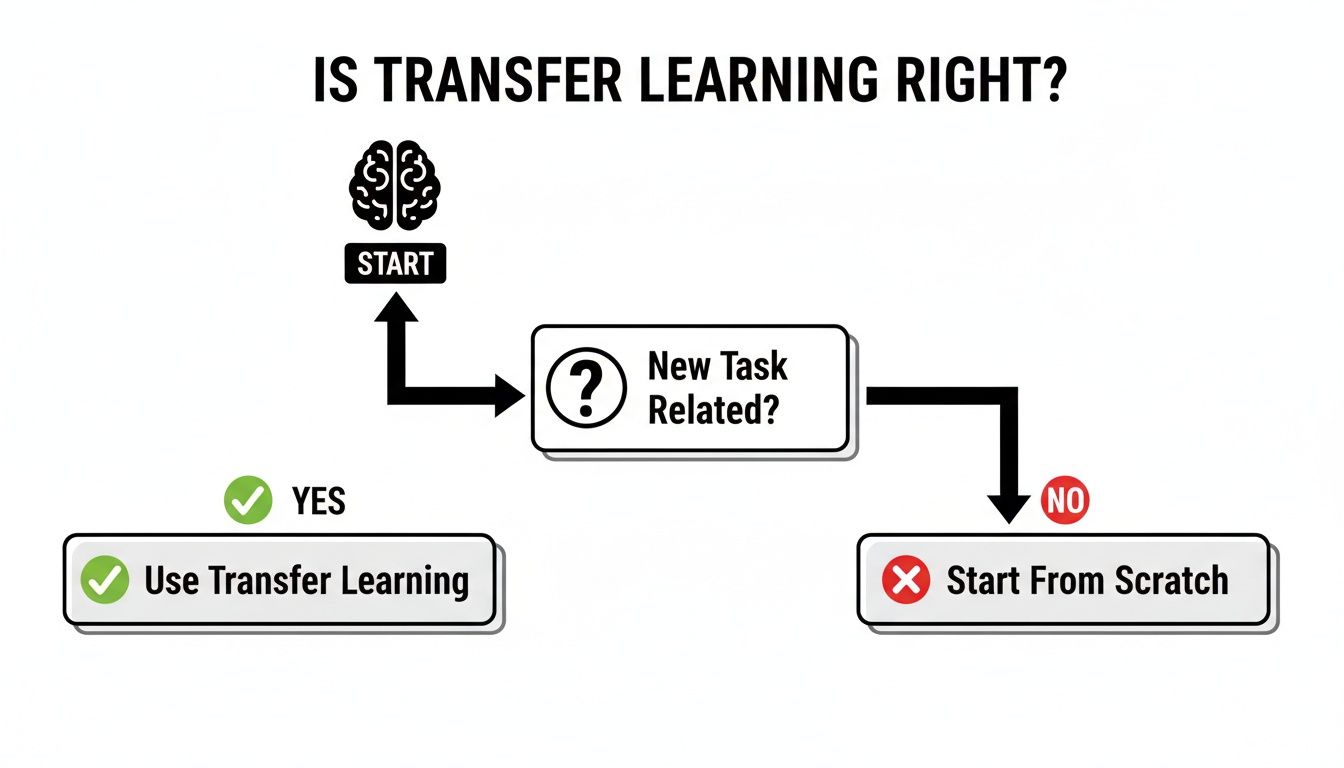
The logic is simple: if your new problem is related to what the model already knows, transfer learning is almost always the way to go. If not, you’re better off starting from scratch.
Feature Extraction: The Quick And Efficient Approach
The first strategy is called feature extraction. Picture a pre-trained model that's world-class at recognizing general things like edges, textures, and basic shapes in images. With feature extraction, you're basically using this model as a powerful pre-processor.
You pass your data through the pre-trained network but chop off the final classification layer. The output you get is a rich, numerical "summary" of your data—the features. You then take these highly informative features and feed them into a new, much simpler model that you train yourself.
This is a fantastic approach because it’s fast and doesn't demand a ton of computing power. You essentially "freeze" the weights of the pre-trained model, so you aren't changing its core knowledge. You're just borrowing its expert eye.
When should you use feature extraction?
- You have a very small dataset. Trying to train a deep network from scratch would be a recipe for overfitting, but using it as a feature extractor works beautifully.
- Your new task is very similar to the original one. If the pre-trained features are already a great fit, there's no need to alter them. For example, using an ImageNet model to classify different types of flowers.
- You need a solution up and running, fast. It’s the quicker of the two methods.
Fine-Tuning: The Deeper Adaptation Method
The second strategy, fine-tuning, is more hands-on but often gives you better results, especially if you have a decent amount of data to work with. Instead of just using the pre-trained model as a static tool, you actually let it continue learning from your new dataset.
You start the same way: take a pre-trained model and swap out its final layer for one that suits your task. But here's the key difference—you then "unfreeze" some of the later layers of the original model. This allows them, along with your new layer, to be updated during training. It's like letting the model adjust its high-level understanding to better fit the nuances of your specific problem.
This technique has been a game-changer ever since models like AlexNet blew everyone away at the 2012 ImageNet competition. Modern research has shown that transfer learning can slash data requirements by up to 90% and boost accuracy by 20-30% on average.
Expert Opinion: "When you're fine-tuning, always use a very low learning rate. If it’s too high, the model can rapidly unlearn all the valuable knowledge it started with, completely defeating the purpose. It's like shouting at an expert you've hired—they'll just get confused and forget what they knew."
Fine-tuning allows the model to specialize. For example, while a feature extractor knows what "fur" is in general, fine-tuning can teach it to distinguish the specific texture of a Persian cat's fur from a Siamese cat's. This is especially effective in complex models; you can see why by digging into our guide on how the transformer architecture explained on our blog. It’s all about gently nudging the expert’s knowledge in a new direction.
Feature Extraction vs Fine-Tuning: Which To Choose
Deciding between these two methods can feel tricky, but it often comes down to two things: how much data you have and how similar your task is to the original one. This table breaks it down.
| Factor | Feature Extraction | Fine-Tuning |
|---|---|---|
| Dataset Size | Best for very small datasets. | Needs a small to medium-sized dataset. |
| Task Similarity | Ideal when tasks are very similar. | Works well for similar and somewhat different tasks. |
| Computational Cost | Low. Freezing layers makes it fast. | Higher. Training more layers requires more resources. |
| Implementation | Simpler. Treat the pre-trained model as a black box. | More complex. Requires careful unfreezing of layers. |
| Potential Performance | Good, but performance may be limited. | Often leads to higher accuracy and better results. |
Ultimately, if you're short on data or time, start with feature extraction. If that gets you good results but you think you can do better (and you have the data to back it up), then move on to fine-tuning.
How to Find the Perfect Pre-Trained Model
You don't need to build an expert AI from scratch—the community has already done the heavy lifting for you. Kicking off a transfer learning in deep learning project feels less like being an inventor and more like being a clever assembler, picking the best pre-built components for your specific goal. The world of AI is full of powerful pre-trained models, each a specialist in its own right.
The trick is knowing which component to grab. Think of these models as celebrities, each famous for a particular skill. Let’s meet a few of the superstars.
The A-List of Pre-Trained Models
When it comes to understanding images, a few names always pop up. These models have been trained on millions of photos, giving them a sophisticated ability to recognize patterns, textures, and objects.
-
VGG Models (e.g., VGG16, VGG19): These are the reliable, classic all-rounders. With a straightforward architecture, they are excellent for feature extraction. If you're just starting out on a general computer vision task, like building an app to identify common flowers, a VGG model is a solid, dependable choice.
-
ResNet (e.g., ResNet50): ResNet, short for Residual Network, is the heavyweight champion for deeper, more complex visual challenges. Its unique design lets it be incredibly deep without losing performance, making it a go-to for tasks that require a very nuanced understanding of images, such as identifying subtle defects in manufacturing.
These models are fantastic examples of Convolutional Neural Networks (CNNs) in action, which form the backbone of most modern computer vision. To get a better feel for how they "see," check out our detailed guide on how Convolutional Neural Networks are explained on our blog.
Of course, the world isn't just images. For understanding human language, there’s another star player.
- BERT (Bidirectional Encoder Representations from Transformers): BERT is a master of context. Unlike older models that read text in one direction, BERT reads entire sentences at once. This allows it to grasp a word's meaning based on its surroundings, making it exceptional for tasks like sentiment analysis, question answering, and text summarization. A practical example would be fine-tuning BERT to sort customer reviews into "positive," "negative," and "neutral" categories.
Where to Go Model Shopping
Knowing the names is one thing, but where do you actually find these models? Thankfully, there are amazing online libraries, or "hubs," that make it incredibly easy to browse, compare, and download pre-trained models for your projects.
Expert Opinion: "Think of these hubs as app stores for AI models," says Dr. Sarah Hooker, a leading AI researcher. "They provide documentation, usage examples, and performance metrics, helping you make an informed decision without having to sift through dozens of academic papers."
Two of the most popular hubs are:
- TensorFlow Hub: A comprehensive library from Google that hosts a massive collection of models for TensorFlow. It's well-organized and offers models for images, text, audio, and video, making it a great one-stop shop.
- Hugging Face Hub: While it started with a focus on Natural Language Processing (NLP) models like BERT, Hugging Face has exploded into a vibrant community hub for all kinds of models. Its easy-to-use
transformerslibrary has become an industry standard.
When choosing, the most important rule is to match the model’s original purpose with your goal. A model trained on medical X-rays is a much better starting point for analyzing medical scans than one trained on photos of cats. Making that simple connection is the first and most critical step to success.
Your First Transfer Learning Project: A Practical Walkthrough
Theory is one thing, but getting your hands dirty is where the real learning kicks in. Let's walk through a typical project to show you how transfer learning in deep learning actually works. Our goal is a fun one: we're going to build a "Pizza Classifier" that can tell the difference between a Margherita and a Pepperoni pizza from a photo.
Think of this process less like writing complex code from scratch and more like assembling a custom machine from high-quality, pre-built parts.
We'll follow a simple, four-step recipe that mirrors thousands of real-world AI projects.
Step 1: Choose and Load Your Pre-Trained Model
First, we need a solid foundation. Instead of grabbing a huge, power-hungry model, we'll go with something more practical: MobileNetV2. It's a lightweight, efficient model that was pre-trained on the massive ImageNet dataset. This makes it perfect for our task without requiring a supercomputer to run.
In a framework like TensorFlow or PyTorch, loading it is usually just a single line of code. The key is to grab the ImageNet-trained version but without its final classification layer. We’re going to build our own.
Step 2: Freeze the Foundational Layers
This next step is where the magic of transfer learning really happens. MobileNetV2 already has a deep understanding of fundamental visual patterns—it knows how to see edges, textures, circles, and colors. We need to protect that knowledge.
To do that, we "freeze" the early layers of the model. Freezing simply locks their existing weights, preventing them from changing during our training process. It's like telling an expert chef, "Don't forget everything you know about cooking; just focus on learning this specific pizza recipe."
Step 3: Add Your Own Custom Layers
With the base model locked in, it's time to bolt on our own trainable layers. This new "head" is the part of the model that will learn the specifics of our task: telling pizzas apart.
These new layers take the high-level features that MobileNetV2 extracts (things like "round crust," "melted cheese," "red sauce") and learn how to map them to our pizza classes. Here's a simple recipe for what we'd add:
- A Global Average Pooling layer to neatly summarize the features from the base model.
- A dense (or fully connected) layer to learn the specific combinations of features that scream "Pepperoni."
- The final Output Layer with just two nodes—one for "Margherita" and one for "Pepperoni"—using a softmax function to output a probability for each.
These new layers start with random weights. They're the only part of the model we'll be training, at least for now.
Step 4: Train and Fine-Tune the Model
Now for the fun part. We feed our labeled pizza images to the model and let it train. Because it’s only updating the weights of our small, custom head, it learns incredibly fast.
Once that initial training is done, we can push for even better accuracy with fine-tuning. This is a delicate process. We unfreeze a few of the top layers from the MobileNetV2 base and continue training the whole thing, but this time with a very small learning rate. This allows the model to make tiny adjustments to its existing knowledge, turning it from a general image expert into a pizza specialist.
The principles behind this apply to more than just images. For a deeper dive into advanced techniques, you can explore our guide on how to fine-tune an LLM, which covers similar concepts in the context of language.
Expert Opinion: "This approach isn't just for fun projects," explains a data scientist from a leading public health institute. "In public health, transfer learning is used to forecast flu hospitalizations. We pre-trained models on vast amounts of general illness data to infer hospitalization rates, cutting forecast errors by 20-35% and earning top rankings from the CDC." You can read the full research about these public health findings.
By following these four steps, we've built a high-performing classifier without a massive dataset or weeks of training time. That’s the practical power of transfer learning.
Real-World Examples of Transfer Learning in Action
Transfer learning isn't just a research concept; it’s the practical secret behind many of the AI tools we use every single day. Its power lies in recycling knowledge, making it incredibly adaptable and turning once-impossible problems into solvable ones across dozens of industries.
You've probably seen its magic in your own email inbox. The spam filter that’s so good at catching junk mail wasn't trained from scratch just on your personal messages. More likely, it started as a massive language model like BERT or GPT, already pre-trained on a huge chunk of the internet to grasp grammar, context, and nuance. This general language understanding is then fine-tuned to spot the specific tells of a spam message, like phrases such as "urgent action required" or "congratulations, you've won!".
The same principle applies to the helpful customer service chatbots that pop up on websites or the apps that translate foreign languages on the fly. They all stand on the shoulders of these pre-trained giants, using transfer learning to specialize their broad knowledge for a narrow, specific task.
From Medical Scans to Crop Fields
One of the most powerful applications of transfer learning in deep learning is in medical imaging. Think about this: a model can be trained on millions of everyday photos from the ImageNet dataset, where it learns to tell the difference between cats, dogs, and cars. That very same model can then be fine-tuned with a much smaller, specialized dataset of medical scans.
Suddenly, it can help doctors detect diseases like cancer from X-rays or spot diabetic retinopathy in eye scans with incredible accuracy. This gives medical professionals a powerful second opinion, helping them make faster, more confident diagnoses.
But the applications don't stop at the hospital doors.
- Agriculture: Drones with fine-tuned models can scan entire fields, identifying specific crop diseases or nutrient deficiencies long before a human eye could.
- E-commerce: Recommendation engines take what they know about general user behavior and fine-tune it to suggest products you’ll actually want to buy.
- Manufacturing: A model originally trained to identify common objects can be repurposed to spot microscopic defects on a fast-moving assembly line.
Expert Opinion: "The efficiency here is game-changing," states a senior AI strategist at a major tech firm. "By starting with a knowledgeable foundation, companies can build highly specialized AI tools with a fraction of the data and time it would otherwise take. This democratizes AI, allowing smaller players to innovate right alongside the giants."
The financial impact is just as impressive. For example, Apple's research into graph neural networks showed that pre-training led to 11.05% better results while using only 1/16th of the data. Extrapolating this kind of efficiency, McKinsey estimates that AI, largely enabled by low-data methods like transfer learning, could add $13 trillion to the global economy by 2030. You can read more about the economic impact of transfer learning and the research behind it.
These real-world successes make it clear: transfer learning isn't just a shortcut. It's a smarter, more resourceful way to build the future of AI.
Common Questions About Transfer Learning
As you start exploring transfer learning, you're bound to have some questions. It's totally normal. This section is here to tackle the most common ones we hear, clearing up the confusion so you can start your first project with confidence.
When Should I Avoid Using Transfer Learning?
Transfer learning is a fantastic shortcut, but it's not a silver bullet. Knowing when to not use it is just as important as knowing when to use it.
The biggest red flag is a huge disconnect between the pre-trained model's original job and your new one. For example, trying to use a model that's an expert at identifying dog breeds to predict stock market fluctuations is a non-starter. The knowledge about "floppy ears" and "curly tails" is completely useless for financial data. This is a classic case of negative transfer, where the pre-trained knowledge actually hurts performance.
Another scenario is when you’re sitting on a mountain of high-quality, labeled data for your specific problem. If you have millions of examples, training a model from scratch might actually be better. With that much data, a custom model can learn the exact nuances of your domain, potentially outperforming a more generalized, pre-trained one.
Finally, think about the features themselves. If your pre-trained model learned to identify everyday objects like cars and trees, but you need to spot microscopic defects in a silicon wafer, its knowledge is probably too high-level. For hyper-specialized tasks, you're often better off starting fresh or finding a model trained on something much more similar.
How Do I Decide How Many Layers to Freeze or Fine-Tune?
This is the million-dollar question, and the honest answer is that it's more art than science. But there's a reliable, step-by-step approach that works incredibly well, especially when you're starting out.
The best strategy is to start simple. Always begin by freezing the entire pre-trained base model. Just tack on your new custom layers at the end and train only those. This is called feature extraction, and it’s fast, computationally cheap, and gives you a solid performance baseline. A lot of the time, this is all you need.
If the results are good but you think you can squeeze out a bit more accuracy, then you can move on to fine-tuning. The golden rule here is to unfreeze layers from the top down—that is, starting with the layers closest to your new output layer.
Expert Opinion: "Early layers in a deep network learn incredibly generic features like edges, colors, and textures. These are almost universally useful. The later layers learn features more specific to the original task. By unfreezing these later layers first, you allow the model to adapt its high-level understanding without disrupting its fundamental 'sight'."
As you unfreeze more layers, you absolutely must use a very low learning rate. This is critical. Using a high learning rate can trigger "catastrophic forgetting," where you essentially scramble the model's valuable pre-trained knowledge, wiping out the very advantage you were trying to gain.
Can I Use Transfer Learning for More Than Just Images and Text?
Absolutely! While computer vision and NLP get most of the attention, the core ideas behind transfer learning are incredibly flexible and apply to all sorts of data.
At its heart, transfer learning is about transferring knowledge, and that knowledge can come in many forms. Here are a few examples to get you thinking outside the box:
- Audio Processing: You could take a model pre-trained on a massive general audio library like AudioSet and fine-tune it for a specific task. This could be anything from identifying the calls of a rare bird species to detecting emotion in a person's voice or even recognizing the tell-tale sounds of a failing machine part.
- Time-Series Data: A model trained on years of historical weather data has a deep understanding of seasonal cycles and atmospheric patterns. You could adapt this model to do something more specific, like forecasting energy demand for a particular city.
- Medical Waveforms: Think about ECG (electrocardiogram) signals. A model pre-trained on a huge dataset of normal heart rhythms can be fine-tuned to spot the subtle signs of a rare cardiac condition. It already knows what a healthy heartbeat looks like, which makes finding the anomalies much easier.
The principle is always the same: as long as the knowledge baked into the pre-trained model is somehow relevant to the patterns in your new problem, transfer learning can give you a powerful head start.
What Are the Biggest Mistakes to Avoid When Starting Out?
Getting your hands dirty with transfer learning in deep learning is exciting, but a few common slip-ups can easily derail a project. If you know what they are ahead of time, you can sidestep a lot of frustration.
Here are the top three mistakes to watch out for:
- Using the Wrong Learning Rate for Fine-Tuning: This is, by far, the most common error. If your learning rate is too high, you'll effectively erase the valuable weights the pre-trained model came with. Always start with a very small learning rate for fine-tuning, often 10 to 100 times smaller than what you'd use to train a model from scratch (think 0.0001 or even lower).
- Mismatched Data Preprocessing: This one is subtle but deadly. Your input data must be preprocessed in exactly the same way the original model's training data was. This covers everything from image size and pixel normalization (e.g., scaling pixel values to [0, 1] or [-1, 1]) to the specific text tokenization method used. Always dig into the model's official documentation to find these preprocessing steps.
- Overcomplicating Things Too Early: It's tempting to jump straight to fine-tuning the whole network, but that's often overkill. Simple feature extraction (freezing the entire base model) is surprisingly effective, especially on smaller datasets. It’s faster, less demanding on your hardware, and less likely to overfit. Always try the simplest approach first.
Keep these points in your back pocket, and you'll be well on your way to successfully applying transfer learning to your own projects.
Ready to dive deeper into the world of AI and stay ahead of the curve? At YourAI2Day, we provide the latest news, expert insights, and practical guides to help you master artificial intelligence. Explore our resources and join a community of learners and builders today. Visit us at https://www.yourai2day.com.