
Optimizing Resource Allocation: A Friendly Guide for AI Teams
Let's be honest, "resource allocation" sounds a bit like corporate jargon. But really, it's just the art of putting your team's time, budget, and tools exactly where they'll make the biggest impact. Think of it as making sure your most valuable assets—your people and your capital—are focused on the right things without burning out or breaking the bank.
Why Smart Resource Allocation Is Your Secret Weapon
Ever feel like your team is constantly underwater, juggling a dozen projects with only enough time for five? Or maybe you've stared at a surprisingly high cloud bill, wondering where it all went? That feeling is a classic symptom of a resource allocation process that needs a tune-up. This isn't just about shuffling names on a Gantt chart; it’s a core strategy that separates the projects that succeed from the ones that limp past deadlines and go way over budget.
Think of it like cooking a gourmet meal. You can have the best ingredients in the world, but if your timing is off or your measurements are wrong, you end up with a mess. The same goes for your team. Even the most brilliant AI engineers or the beefiest cloud servers won't move the needle if they're stuck on low-impact tasks or sitting idle half the time.

This really gets to the heart of the challenge every engineering leader faces: making intelligent trade-offs to get the most out of what you have. Nailing that balance is what effective resource management is all about.
Here's a quick look at why this is so critical.
Core Benefits of Smart Resource Allocation
| Benefit | What It Means for Your Team | Real-World Impact |
|---|---|---|
| Increased Productivity | Engineers work on tasks that match their skills and priorities, reducing context switching and wasted effort. | Projects get delivered faster, and your team's output climbs without adding headcount. |
| Reduced Costs | You stop overprovisioning cloud instances and avoid paying for idle talent or unnecessary tools. | Your cloud spend drops, and your project budget goes further, improving overall ROI. |
| Improved Team Morale | Workloads are balanced, preventing burnout and showing your team that their time is valued. | Higher employee retention and a more engaged, proactive team culture. |
| Better Project Outcomes | The most critical projects always have the people and tools they need to succeed. | You consistently hit deadlines, meet quality standards, and deliver on your promises to stakeholders. |
Getting this right isn't just a "nice-to-have"—it fundamentally changes how your team operates for the better.
The Real Cost of Getting It Wrong
When resource allocation goes sideways, the fallout is felt everywhere. Projects stall, team morale nosedives from overwork, and budgets balloon out of control. It's a much more common problem than you'd think.
One revealing survey found that while 64% of organizations called improving resource allocation a top priority, a shockingly low 16% actually planned to invest in the tools to do it. The same research shows that pushing your team to 125% utilization is a recipe for project delays, while keeping it around a healthy 80% is the sweet spot for success. You can dig into more of the data by reading the full research on resource management statistics.
"My stress is way down because my team members are in the driver’s seat, and I know what’s happening every day. I’m focused on priorities, mentoring, resources, and supporting them with clients… This is what a CEO needs to do." – Pravda Media Group on effective resource management.
This gets to the core of it. Good allocation isn't about micromanagement; it's about empowerment. It frees you up to focus on the big picture—strategy, mentoring, and steering the ship—instead of constantly putting out fires. Mastering this skill helps you build a team that's more resilient, productive, and frankly, a lot happier.
Setting the Stage for Success: What to Measure First
Before you can start optimizing how your team's time and resources are spent, you have to get a clear picture of where you stand right now. It's like trying to navigate without knowing your starting point—you'll just end up going in circles. This first step is all about creating a solid "before" snapshot so you can actually measure progress and prove the value of your changes down the line.
I've seen so many teams jump straight into new tools or strategies without this baseline, and it almost never works. You first need to agree on what "success" even looks like. Are you trying to get spiraling cloud costs under control, ship projects faster, or just give your overworked engineers some breathing room?
Defining Your Objectives and KPIs
Your goals need to be specific, measurable, and, most importantly, realistic. A vague objective like "be more efficient" is impossible to track and ultimately meaningless. You have to get more granular.
Here are a few concrete examples I've seen work well in practice:
- Financial Goal: Cut our monthly cloud spend by 15% within the next quarter by shutting down zombie VMs and rightsizing our instances.
- Productivity Goal: Shrink the average completion time for our AI model training pipeline by 20% over the next six months.
- Team Health Goal: Reduce unplanned overtime logged by the engineering team by 25% to improve work-life balance and prevent burnout.
Once you’ve nailed down your objectives, you need Key Performance Indicators (KPIs) to track your progress. These are the hard numbers that tell you if you're on the right path. To track that financial goal, your main KPIs would be cloud instance utilization rate and total monthly cloud expenditure. For the productivity goal, you'd be watching cycle time or lead time for key tasks.
A great way to get everyone aligned is to build out a clear plan. You can learn more about this process in our guide on creating an AI implementation roadmap.
How to Assess Your Current Resource Usage
With your goals and KPIs set, it's time to dig into the data and see what’s really happening on the ground. This audit doesn't have to be some massive, complex undertaking. Start simple: map out who is doing what, what tools they're using, and where the budget is actually going.
A practical first step is to create a simple resource map. This can be a spreadsheet or a basic dashboard in your project management tool. Just list all your team members and their primary projects over the past month. Next to each project, note the estimated hours versus the actual hours logged. This simple exercise alone often reveals surprising gaps between perception and reality.
You also need to keep an eye out for the early warning signs of poor allocation. These are the little red flags that tell you something is off.
Expert Opinion: "Pay attention to the subtle stuff," advises Sarah Chen, a project management consultant with over 15 years of experience. "Consistent, low-level friction—like developers always waiting for a specific testing environment or key people becoming bottlenecks on multiple projects—is a dead giveaway that your current strategy is creating drag."
Look out for these common symptoms:
- Frequently Missed Deadlines: Are the same kinds of projects always running late? This often points to a systemic underestimation of the resources they require.
- Team Burnout: Is one person or team consistently working late while others seem to have downtime? That imbalance is a classic sign of poor workload distribution.
- Scope Creep Without Adjustment: When project requirements inevitably expand, do you actually add more resources? If not, you're just setting your team up to fail.
- High "Time-in-Waiting": How long do tasks just sit in a queue waiting for someone to become available? If that number is high, you've found a bottleneck that needs fixing.
By defining clear objectives, picking the right KPIs, and doing an honest assessment of where you are today, you build the foundation for everything else. This data-driven approach takes the guesswork out of the equation and lets you make targeted improvements you can actually prove are working.
Choose Your Allocation Strategy: From Simple Rules to Smart AI
With a clear baseline of your current resource usage, it's time to decide how you'll actually allocate them. This isn't a one-size-fits-all decision. Think of it more like a toolkit, where you pick the right tool for the job. You don’t always need a complex, AI-powered system to see real improvement; sometimes, a simple rule of thumb is all it takes to make a massive difference.
The trick is to match your strategy to your team's reality. A five-person startup managing a couple of projects has wildly different needs than a global enterprise juggling dozens of AI model training pipelines across multiple GPU clusters.
Start Simple with Heuristics
Heuristics are just a fancy word for rules of thumb. They're simple, experience-based guidelines that help you make quick allocation decisions without getting lost in the weeds of complex analysis. I always recommend starting here, especially for smaller teams or those just dipping their toes into formal resource management. They're dead simple to implement and don't require any special software.
Here are a few common ones I've seen work well:
- First-In, First-Out (FIFO): You tackle tasks in the order they come in. It’s fair and straightforward, but it completely ignores urgency or strategic importance.
- Highest Priority First: Resources go to the projects with the highest business value first. This ensures your most critical work always gets the attention it deserves—a huge leap over FIFO.
- Skills-Based Assignment: You match tasks to the person with the best skills for the job. This is great for quality and speed, but watch out for bottlenecks. If only one person has a critical skill, they can quickly become a chokepoint.
For example, a small marketing agency might use a priority-based system. The lead designer always gets the projects for key accounts first, no matter when the requests arrived. It's a simple heuristic that keeps the most important clients happy.
Expert Opinion: "I've seen so many teams overcomplicate this from the get-go," says startup advisor Ben Carter. "My advice is always to start with a simple, visible system—even a well-managed spreadsheet. Once you hit its limits, you'll know exactly what features you need in a more powerful tool. Don't buy a sports car when you're just learning to drive."
This decision tree is a great way to frame that initial choice. Are you chasing hard metrics, or are you trying to solve for "softer" issues like team burnout?
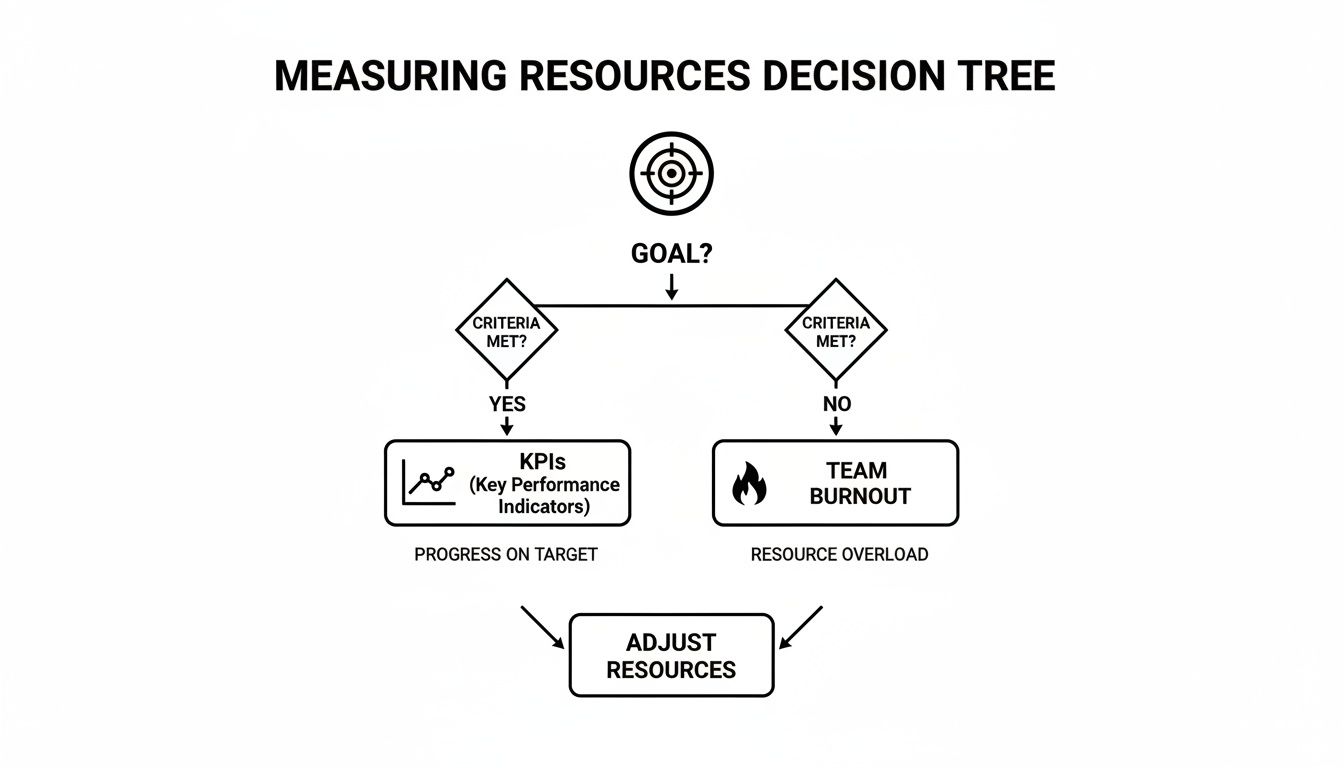
As the flowchart shows, both quantitative goals (like hitting a KPI) and qualitative ones (like preventing burnout) are valid starting points for picking your strategy.
Level Up with Optimization Algorithms
Eventually, as your projects get more complex and interconnected, simple rules of thumb start to fall short. That’s when you need to bring in the bigger guns: optimization algorithms. These are more mathematical approaches, usually handled by project management software, designed to find the best possible solution from a sea of options.
A classic example is the Critical Path Method (CPM). It identifies the longest sequence of dependent tasks that directly impacts the project's finish date. By assigning your top resources to this "critical path," you give the project the best chance of staying on schedule. Another powerful technique is resource leveling, which adjusts project timelines to make sure no one is over-allocated, smoothing out workloads to keep your team healthy and productive.
Think of a software development sprint. The critical path might be: backend API development -> frontend integration -> QA testing. A delay in any of those holds up the entire release. The team lead would ensure the backend devs have what they need to finish on time so the frontend team isn't left waiting. For a deeper dive, this guide on resource planning in project management is an excellent resource.
Comparing Resource Allocation Strategies
Choosing the right approach depends entirely on your team's scale, complexity, and goals. Here’s a quick breakdown to help you decide which strategy fits your current needs.
| Strategy Type | Best For | Example Use Case | Pros & Cons |
|---|---|---|---|
| Heuristics | Small teams, simple projects, or organizations new to resource management. | A small creative agency using a "highest priority first" rule to manage client work. | Pro: Easy to implement, no special tools needed. Con: Inefficient for complex projects, can create bottlenecks. |
| Optimization Algorithms | Medium-to-large teams with complex, interdependent projects. | A construction company using the Critical Path Method to manage building timelines and subcontractors. | Pro: Finds the most efficient path, prevents overallocation. Con: Requires specialized software and expertise. |
| ML-Driven Methods | Large enterprises, cloud infrastructure teams, and complex operational environments. | A cloud engineering team using an ML model to predict server load and autoscale resources. | Pro: Proactive, highly automated, and cost-effective at scale. Con: High implementation cost and complexity, needs lots of data. |
Ultimately, the goal is to find the right-sized solution for your current problems. Don't be afraid to start simple and evolve as you grow.
The Future: AI-Driven Allocation
The real cutting edge of resource allocation is in machine learning (ML) and AI. Instead of just reacting to what’s happening now, ML-driven systems use historical data to predict future demand, spot potential bottlenecks before they happen, and even suggest the best resource assignments automatically.
For an engineering team managing a massive cloud infrastructure, this is a game-changer. An ML model can analyze past usage patterns to predict a spike in server demand for an upcoming holiday sale. It can then automatically scale up resources just before the rush and scale them back down afterward to save a ton of money. You move from being reactive to being predictive.
This isn't just theory; it's delivering real-world results. One study found that 31.1% of global enterprises slashed operating costs by using this kind of scenario planning. In manufacturing, predictive analytics has led to expense reductions of up to 25%.
The key takeaway is that this is a journey. Start with simple rules, and as your team and projects grow, you can gradually bring in more sophisticated methods. The goal is always to find the solution that gives you control without burying you in unnecessary complexity.
Putting Your Plan into Action with Tools and Automation
A brilliant strategy for resource allocation is a great start, but it's just a plan on paper until you have the right tools to make it real. This is where the rubber meets the road—moving from theory to a living, breathing system that does the heavy lifting for you.
The right tech stack can turn resource management from a constant firefight into a smooth, almost invisible process. It’s all about getting the right tools in place that give you both visibility and control, whether that's balancing your team's workload or just keeping cloud costs from getting out of hand.

Choosing the Right Tools for the Job
Your resource optimization toolbox will probably be a mix of different software, each tackling a specific piece of the puzzle. You don't need a dozen platforms; you just need a few solid ones that solve your biggest headaches and play nicely together.
Here are the main categories I always look at:
- Project Management Software: Think of these as your command center. Most modern platforms have resource schedulers baked in, so you can see who’s working on what at a glance. I find the workload planners that visualize team capacity are invaluable for spotting who’s overbooked and who has bandwidth.
- Cloud Cost Management Platforms: If you’re working in AI or cloud engineering, these are non-negotiable. They give you a granular view of your spend, sniff out waste like idle servers, and even suggest ways to save money.
- Automation and Orchestration Tools: This is where you really start to scale your efforts. These tools can handle all the repetitive grunt work, like spinning up dev environments or adjusting server capacity on the fly. To really see the benefits, you should streamline business processes using AI automation.
By knitting these tools together, you create a system that actually works. For more ideas on how to connect these pieces, check out our in-depth guide: https://yourai2day.com/ai-workflow-automation-guide/
Embracing Automation to Free Up Your Team
Automation is where you'll see the biggest bang for your buck. Every manual task you automate is time your team gets back to solve real problems instead of just clicking buttons. This is especially true in dynamic cloud environments where things can change in an instant.
Expert Opinion: "We built a suite of automation scripts for our CI/CD pipeline and cloud monitoring," shares a Senior DevOps Engineer from a leading tech firm. "The result? We cut the time our team spent on manual configurations and emergency fixes by nearly 40%. That’s basically two full days a week they got back to improve system architecture instead of just keeping the lights on."
A classic example is autoscaling. Instead of trying to guess your server needs for the day, you set up rules that automatically add or remove capacity based on real-time traffic. When a user surge hits, the system scales up. When it quiets down, it scales back down. You only pay for what you actually use. It’s simple, but it works.
Another easy win is setting up automated budget alerts. Let’s say your team has a $5,000 monthly cloud budget. You can configure an alert to ping you and the team lead in Slack when spending hits 50%, 75%, and 90%. This tiny bit of automation stops those end-of-month bill surprises and gets everyone thinking about costs proactively.
A Practical Look at Cloud Cost Controls
For AI and ML teams, compute power is almost always the biggest budget item. This is where getting strategic with your cloud provider can save you a fortune. So many businesses miss out on discount programs that are sitting right there.
For instance, an analysis of over $250 million in Google Cloud usage found that companies using Committed Use Discounts (CUDs) see a median Effective Savings Rate of 45.1%. For the big players spending over $10 million a year, that number jumps to a staggering 54.3%.
That’s real money. By committing to a certain level of usage over one or three years, you can slash your costs and free up that capital to reinvest in actual innovation.
Ultimately, building a resilient and efficient system isn’t about finding one magic tool. It's about creating an ecosystem that gives you visibility, automates the mundane, and empowers your team to focus on the work that actually matters.
Monitoring and Iterating for Continuous Improvement
Getting your resource allocation right isn't a "set it and forget it" task. It’s more like tuning an instrument—you don't just do it once and assume it'll stay perfect forever. It’s a constant rhythm of listening, adjusting, and refining to keep your team and projects in perfect harmony. Your initial strategy is simply the opening note.
The real magic happens when you build a feedback loop, using real-world performance data to make smarter decisions down the road. This iterative approach is what separates the teams that just get by from those that consistently hit their marks.
Revisiting and Tracking Your KPIs
Remember those Key Performance Indicators (KPIs) you defined earlier? Now’s their time to shine. These aren't just vanity metrics for a weekly report; they are your team's GPS, telling you if you’re actually moving toward your destination. Tracking them with discipline is non-negotiable.
The key is making this data visible and easy to digest. A well-designed dashboard that pulls real-time information from your project management tools and cloud consoles is your best friend. It should give everyone an at-a-glance view of the metrics that truly matter.
Here are a few essential KPIs to keep front and center:
- Resource Utilization Rate: This is a quick health check on how much of your team's available time is being channeled into productive work. It’s the fastest way to spot who’s overloaded and who might have capacity to help.
- Task Effort Variance: Are tasks consistently taking longer than you thought? This metric compares the estimated effort against actual logged time, flagging potential issues with scoping or hidden roadblocks.
- Budget vs. Actual Spend: This is absolutely critical for any team running on the cloud. Real-time spend tracking helps you avoid those nasty end-of-month surprises and fosters a culture of cost-awareness. Managing this data properly is a cornerstone of good governance. To dive deeper, you can explore these data governance best practices to help maintain control and visibility.
The Power of the Weekly Review: A Case Study
Let's make this real. Picture an AI startup, we'll call them 'InnovateAI.' They were consistently missing deadlines, even with a team of top-tier engineers. Frustrated, the leadership team kicked off a simple, 30-minute metrics review every Friday, focusing entirely on their new resource allocation KPIs.
In one of these meetings, their dashboard lit up with a clear signal: Alex, a senior developer, had a utilization rate of just 40% for the past two weeks. It turned out he was assigned to a project that was completely stalled by a third-party dependency. At the same time, another high-priority project was falling behind, desperately needing senior backend expertise.
With the data right there for everyone to see, the solution was obvious. The project lead immediately reassigned Alex to the struggling project. The impact was immediate—Alex’s skills helped them overcome a major technical hurdle, and they ended up launching three weeks ahead of the revised schedule. That small, data-driven adjustment made a massive difference. Without that weekly checkpoint, Alex could have stayed underutilized for weeks while another key project burned.
Don't Forget the Human Element
Dashboards tell you what is happening, but they rarely tell you why. That’s where talking to your team comes in. True optimization isn’t just about the numbers; it’s about the people behind them. All the data in the world won't tell you if a key engineer is feeling uninspired, overwhelmed, or heading for burnout.
Gathering qualitative feedback is just as vital as tracking quantitative metrics. Here's how:
- Regular one-on-ones: This is your chance to create a safe space where team members can talk openly about their workload, challenges, and what they need to succeed.
- Anonymous surveys: Sometimes, a simple quarterly survey can uncover systemic problems that people aren't comfortable bringing up directly.
- Retrospectives: Use your sprint or project retros to ask pointed questions about resources. A simple prompt like, "Did everyone have what they needed to get their work done?" can open up a valuable conversation.
This human feedback is what makes your system resilient. When your team feels heard and supported, they're more engaged and ultimately more productive. A healthy, balanced team will always outperform one that’s been "optimized" on paper but is quietly burning out. When you combine hard data with genuine human feedback, you build a powerful, adaptive system for managing resources effectively.
Common Questions About Resource Allocation
Getting started with resource management naturally brings up a lot of questions. It's a tricky mix of strategy, tech, and people skills, so there are always nuances. Let's dig into some of the most common things people ask, so you can handle the finer points of getting this right.
What Is the Biggest Mistake Beginners Make with Resource Allocation?
The most common trap I see is teams aiming for 100% resource utilization. It looks great on a spreadsheet—maximum efficiency, right? But in the real world, it’s a recipe for disaster.
A team that’s booked solid has zero wiggle room. There’s no capacity to jump on an unexpected bug, handle an urgent client request, or even spend a few hours on creative problem-solving. This approach leaves no buffer for reality. When a small, inevitable issue pops up, it creates a domino effect of delays across everything else on the schedule. Before you know it, deadlines are slipping and your team is on a fast track to burnout.
Expert Opinion: "A much healthier, more realistic target is around 80% utilization," says Agile coach Maria Flores. "That intentional buffer gives your team the breathing room they need to adapt, innovate, and handle surprises without derailing the entire roadmap. It’s what makes a plan resilient instead of brittle."
How Can a Small Team with a Limited Budget Start Optimizing Resources?
You don't need to shell out for a fancy, enterprise-level software suite to make a huge difference. For small teams, the best tools are often the simplest ones: visibility and communication.
Start with what you have. A shared spreadsheet or a free version of a project management tool is more than enough to get going. The first objective is just to build a basic resource plan.
- List Your People: Who is on the team? What are their core skills and general availability?
- Map Your Work: What projects are you juggling right now and what’s coming up? Rank them by priority.
- Assign and Talk: Start matching people to tasks based on their skills and the project's importance.
The real secret sauce here is communication. Hold quick, regular check-ins—maybe daily, maybe just a few times a week—to talk about workloads. These simple conversations are where you'll spot potential bottlenecks and can rebalance tasks before anyone gets swamped. It’s the most cost-effective strategy you've got.
How Often Should I Review My Resource Allocation Plan?
There’s no magic number here; the right review cadence really depends on the pace of your work.
If you’re in a fast-moving field like AI development or running agile sprints, you absolutely need to be looking at your plan weekly or bi-weekly. Priorities can change on a dime, and that frequency lets you make quick adjustments to stay on track.
On the other hand, for teams with longer, more predictable project cycles, a monthly review is probably fine. This gives you enough time to collect meaningful performance data without bogging everyone down in constant meetings.
The most important thing is to just pick a rhythm and stick to it. Put a recurring meeting on the calendar and treat it as a non-negotiable. Proactive, regular check-ins let you make small course corrections that prevent big problems down the road. It ensures your resource plan stays a living, useful guide instead of a static document that’s outdated the day after you write it.
At YourAI2Day, we provide the insights and knowledge you need to master concepts like resource optimization and apply them in the real world. Explore our platform for more guides, news, and tools to stay ahead in the world of AI at https://www.yourai2day.com.