Mastering How to Write AI Prompts: A Practical Guide for Beginners
Ever feel like you're talking to a brick wall when you use an AI? You ask for something simple, and what you get back is… well, not quite right. It's a common frustration, but the fix is simpler than you think. The secret isn't just what you ask, but how you ask it.
This guide is all about moving past that guessing game. We're going to turn that hit-or-miss process into a predictable, creative partnership with your AI, even if you're just starting out.
From Vague Ideas to Brilliant AI Outputs
Learning how to write a great AI prompt is a genuine skill. It’s the difference between feeling frustrated by a confusing machine and feeling excited about what you can create with a reliable collaborator. The trick is to stop asking simple questions and start giving clear, detailed instructions.
The whole process boils down to providing three key things: context, a role for the AI, and a clearly defined desired outcome. When you nail these three elements, you can transform a fuzzy idea into a brilliant, AI-generated response.
Why Your Prompts Matter So Much
Think of an AI model like a super-smart intern. This intern has read nearly the entire internet but has zero real-world experience or context about your specific needs. If you give a vague command like "write about marketing," you're essentially telling that intern, "Go do some marketing stuff." You'll get something back, but it probably won't be what you actually wanted.
Expert Opinion: According to AI consultant Sarah Lum, "A piece of advice I always give newcomers is to stop treating AI like a search engine and start treating it like a new team member. You wouldn't hand a human colleague a one-sentence task with no background, right? You'd explain the goal, provide details, and set expectations. The same logic applies here."
That simple shift in perspective is the first real step toward mastering prompts. When you get a handle on the basics of how models like ChatGPT work, you can start predicting how your instructions will be interpreted. This insight is what helps you craft prompts that lead to more accurate, relevant, and genuinely creative results time and time again.
My goal here is to arm you with practical techniques and real-world examples you can use right away. We'll cut through the jargon of "prompt engineering" and show you how to apply the core ideas in a straightforward, friendly way. Before you know it, you'll be writing prompts that deliver exactly what you're picturing in your head.
The Core Ingredients of a Powerful Prompt
Ever feel like you're just not getting what you want from an AI? It’s a common frustration. You have a great idea in your head, but the AI gives you something bland, generic, or just plain wrong.
Think of it this way: you wouldn't just hand a chef a tomato and expect a perfect pasta sauce. You'd give them a full recipe—the other ingredients, the steps, the cooking time. A powerful prompt works the same way. It’s a recipe for the AI, with each component adding the necessary flavor and direction to get you from a vague idea to a polished result.
When you start layering these core ingredients into your requests, you'll see a night-and-day difference in the quality of your outputs.
This cycle of frustration is something most of us have experienced. It starts with a fuzzy idea, leads to a disappointing output, and forces you back to the drawing board to refine your prompt.
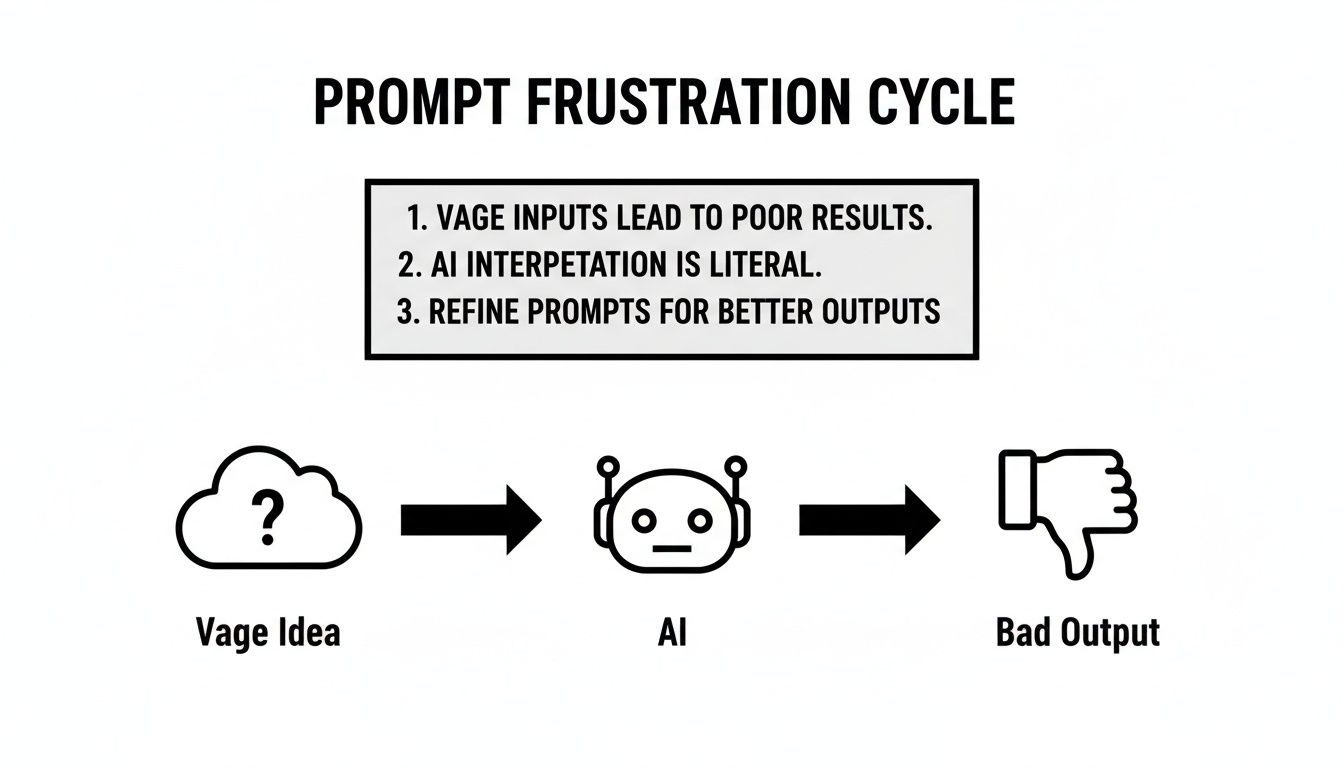
The trick is to break this cycle by adding structure and clarity before you even hit enter.
Give the AI a Clear Role
If there's one tip I tell everyone to start with, it's this: give the AI a role or a persona. This is easily the fastest way to level up your results. Instead of treating the AI like a generic search engine, you're telling it to put on a hat and act as a specific expert.
This simple tweak frames the entire conversation. It clues the AI into how it should think and what specific knowledge base it should tap into.
- Before: "Write about email marketing."
- After: "Act as a seasoned email marketing strategist for a small e-commerce brand."
See the difference? The second prompt instantly narrows the AI’s focus. It's no longer just spitting out a textbook definition; it's preparing to deliver specialized, actionable advice from a specific point of view.
Provide Essential Context
Context is the "why" behind your request. It’s the background story the AI needs to truly understand your situation, your audience, and what you’re trying to achieve. Without it, the AI is just taking a shot in the dark.
Think about it—you wouldn't ask a friend for advice without filling them in on the situation first. The AI is no different. You need to provide the surrounding details that give your request meaning.
Practical Example: Let's say you're asking for a blog post outline. Good context would include:
- Target Audience: "My readers are beginner gardeners in urban areas who have never grown anything before."
- Goal of the Content: "The goal is to make them feel confident enough to start their first balcony vegetable garden."
- Key Information: "The post must mention that our new 'CityPot' self-watering planter is the perfect tool for this."
Expert Opinion: "The explosion of generative AI tools between 2022 and 2024 revealed a major disconnect," says tech analyst Greg Kihlstrom. "While over 84% of organizations are pouring money into AI, only about 17% are seeing meaningful business results. The problem often comes down to poor 'last-mile' execution—teams feeding the tools vague prompts and then wasting hours trying to fix the messy outputs."
This shows that providing context isn't just a nice-to-have; it's a critical skill. Professionals who build structured prompts with clear context, roles, and rules consistently report productivity boosts of 10–30%. You can learn more about how structured prompts are closing the AI success gap.
State Your Instructions Clearly
This is the most direct part of your prompt: what, exactly, do you want the AI to do? Your instructions need to be specific, direct, and impossible to misinterpret. Subjective words like "make it cool" or "write something interesting" are a recipe for disappointment.
Instead, use strong action verbs and clearly define what you want the output to be.
- Vague Instruction: "Give me some social media content."
- Clear Instruction: "Generate five tweet ideas, each under 280 characters. Each tweet must ask an engaging question related to remote work productivity."
That level of clarity leaves no room for guessing and ensures the AI delivers something you can actually use right away.
Set the Tone and Define Constraints
Finally, you need to set the guardrails. What should the output sound and look like? This comes down to two final, crucial ingredients.
- Tone of Voice: Define the personality you're looking for. Should it be professional, witty, empathetic, formal, or casual? Specifying the tone ensures the final text aligns perfectly with your brand or personal style.
- Constraints & Format: This is where you lay down the rules. Define the format (e.g., "Format the output as a bulleted list," "Write in three short paragraphs"), set a word count, and—just as important—tell the AI what not to do (e.g., "Do not use technical jargon," "Avoid mentioning our competitors by name.").
Adding these final layers turns a simple request into a comprehensive brief for the AI. You've given it a role, the necessary background, a clear task, and the rules of the game.
The table below shows just how dramatic the difference is when you move from a vague prompt to one that includes these core ingredients.
Prompt Ingredients Before and After
| Prompt Component | Vague Prompt (Before) | Structured Prompt (After) |
|---|---|---|
| Role | (None) | "Act as an experienced copywriter specializing in B2B SaaS marketing." |
| Context | "I need a blog post." | "The blog post is for a project management tool called 'TaskFlow'. The target audience is busy startup founders who are struggling with team organization." |
| Instruction | "Write about productivity." | "Write a 500-word blog post titled '5 Ways Founders Can Reclaim Their Time with Better Project Management.' Focus on actionable tips." |
| Tone & Constraints | (None) | "Use an encouraging and authoritative tone. Format the post with an intro, 5 numbered points with bolded headings, and a concluding call-to-action. Do not mention any competitors." |
As you can see, the structured prompt leaves nothing to chance. This methodical approach is the key to getting predictable, high-quality results from any AI model, every single time.
Everyday Prompting Techniques That Actually Work
Alright, you've got the core ingredients of a good prompt down. Now, let’s get into the practical side of things. Knowing what to put in a prompt is one thing, but knowing how to structure your request using proven techniques is where you start getting seriously impressive results.
Think of these as reliable frameworks you can pull out for all sorts of common tasks. These aren't complicated coding tricks; they're just smart, conversational ways to guide the AI’s thinking process. Let's dig into a couple of my favorites that you can start using right away.

Use Few-Shot Prompting to Teach by Example
One of the most powerful and intuitive methods I use is called Few-Shot Prompting. It sounds a bit technical, but the idea couldn't be simpler: you show the AI exactly what you want by giving it a few examples to copy.
Instead of just describing your desired output, you provide a couple of clear examples that demonstrate the input-output pattern you're after. This gives the AI a concrete template for the style, format, and tone you need. It’s a lot like showing a new hire a few completed reports so they can get a feel for the company standard.
Let's say you run a small e-commerce business and need to write short, compelling product descriptions that all have a similar vibe.
A standard (Zero-Shot) prompt might look like this:"Write a product description for a handmade leather journal."
The AI will give you something, but it’ll probably be generic. It has no sense of your brand's unique voice.
Now, let's try a Few-Shot Prompt:"Act as a copywriter for a rustic, artisanal brand. Write a product description for a handmade leather journal. Follow this format exactly:
Example 1:Product: Ceramic Coffee MugDescription: Start your morning with a piece of the earth. Our ceramic mugs are hand-thrown by local artisans, featuring a speckled glaze that feels like holding a story in your hands.
Example 2:Product: Woven Wool BlanketDescription: Wrap yourself in warmth. This blanket is woven from 100% merino wool, perfect for cozy nights by the fire or adding a touch of rustic charm to your living room.
Now, do the same for:Product: Handmade Leather Journal"
See the difference? By providing clear examples, you've effectively trained the AI on your brand's voice in seconds. The description it generates for the journal will now capture that specific artisanal and story-driven tone. This technique is a lifesaver for tasks needing a consistent style, like social media updates, email subject lines, or customer service replies. If you're looking for more ideas, you can find a ton of examples of prompts for different tasks to adapt for your own use cases.
Guide the AI with Chain of Thought Prompting
Ever ask an AI a complex question and get an answer that’s just… wrong? It often happens because the model tries to leap straight to the conclusion without actually reasoning through the problem. This is where Chain of Thought (CoT) prompting comes in. You simply ask the AI to explain its reasoning step-by-step.
This is my go-to technique for logic puzzles, math problems, or any task that requires a sequence of steps to get to the right answer. Just adding the simple phrase, "Let's think step by step," can make a world of difference in the accuracy of the output.
Expert Opinion: "Chain of Thought prompting forces the model to slow down and show its work," explains Dr. Evelyn Reed, an AI researcher. "By breaking a problem down into smaller, sequential pieces, it's far less likely to make weird logical jumps or calculation errors. It's basically mimicking how we solve tough problems—by talking ourselves through the process."
Imagine you're trying to map out a content calendar and need to work out a tricky publishing schedule.
Your first attempt might be a simple prompt:"I need to publish 12 blog posts over the next 3 months, but I can't publish on weekends or on the first Friday of each month. What's the schedule?"
The AI might just spit out a list of dates, and there's a good chance it'll miss one of the constraints.
A much better prompt uses Chain of Thought:"I need to create a publishing schedule for 12 blog posts over the next 3 months (October, November, December). I cannot publish on weekends (Saturdays or Sundays) or on the first Friday of each month. Please outline the schedule. Let's think step by step to figure this out."
Adding that one little sentence completely changes the output. Instead of just a list of dates, the AI will show its work:
- Identify the timeframe: October, November, December.
- Calculate the total number of posts needed: 12.
- Identify the constraints: No weekends, no first Fridays (Oct 6, Nov 3, Dec 1).
- Calculate the average posts per month: 12 posts / 3 months = 4 posts per month.
- List the available weekdays for October, avoiding the constraints…
This methodical breakdown is not only more likely to be correct, but it’s also incredibly easy for you to double-check. You can see the AI's logic, which helps you trust the final answer. This technique is an absolute game-changer for anyone using AI for planning or analysis.
How to Refine and Iterate on Your Prompts
Let's be honest: your first prompt is almost never going to hit a home run. If you’re getting generic, slightly off, or just plain weird responses, welcome to the club! This is a totally normal part of the process.
The real skill isn't about crafting the perfect prompt on the first try. It's all about the art of iteration. The goal is to shift your mindset from simply writing prompts to engineering them.
Think of a mediocre AI output not as a failure, but as a clue. The AI is showing you exactly where your instructions were fuzzy or incomplete. Learning to read these clues and tweak your prompt is how you turn a frustrating experience into a productive one.
It’s a trial-and-error process, but it doesn’t have to be random. With a simple framework, you can troubleshoot your prompts strategically and get the results you want, faster.
A Simple Troubleshooting Framework
When an AI gives you a disappointing response, don't just scrap it and start over. Instead, take a moment to diagnose what went wrong. I personally use this simple three-question checklist to pinpoint the issue.
- Was my context clear enough? Did the AI really understand the audience, the goal, and the "why" behind my request?
- Was my instruction specific? Did I use fuzzy words like "short" or "interesting," or did I give concrete, measurable commands?
- Did I provide a good example? Could a quick "few-shot" example have shown the AI the exact format or style I was after?
Nine times out of ten, a lackluster output can be traced back to a "no" on one of these questions.
Expert Opinion: "As a prompt engineer, I've seen that the biggest difference between a novice and an expert is how they react to a bad output," notes David Chen, a leading AI trainer. "A beginner gets frustrated and blames the tool. An expert gets curious and refines the prompt. They see the first draft as a conversation starter, not a final product."
For instance, if the tone is completely off, the problem was likely a lack of context or a missing instruction about the persona you wanted it to adopt. If the formatting is a mess, a clear example would have solved it in seconds. This iterative loop is where the magic really happens.
From Vague to Valuable: An Example
Let's walk through a real-world scenario. Imagine you want the AI to help you whip up some marketing copy for a new productivity app.
Initial Vague Prompt:"Write some social media posts about my new app."
The output you'll get will be painfully generic because you've given the AI almost nothing to work with. It's like asking a chef to "make some food" without mentioning any ingredients or cuisine.
Now, let’s iterate using our framework. The original prompt was missing context, the instructions were vague, and there were no examples to guide it.
Refined Prompt (Iteration 1):"Act as a social media marketer. Write three Instagram post captions for a new productivity app called 'Momentum.' The target audience is busy college students. The goal is to highlight how the app helps them manage deadlines. Use an encouraging and slightly witty tone."
See the difference? This is so much better! You’ve added a role, context (audience and goal), a specific instruction (three captions for Instagram), and a defined tone. The output will be far more relevant.
You might still find the AI is making up features or the captions are a bit bland. This is where you might bring in more advanced techniques. For complex topics, you could even explore strategies like Retrieval-Augmented Generation (RAG), which you can learn more about in our guide on what is Retrieval-Augmented Generation.
This refinement process isn't just a good habit; it reflects a major industry trend. While the early hype promised massive productivity gains, real-world data shows AI tools typically raise output by a modest but significant 10–30% when used with good prompts.
The problem is, about 95% of AI pilots fail to deliver sustainable value, largely because teams don't move beyond simple, unstructured questions. This has pushed smart companies to focus on operationalizing prompt engineering—creating internal libraries of effective prompts and training staff on these best practices. As a result, usage patterns for enterprise AI tools show a 19× increase in structured, detailed workflows. It's clear proof that iterative, well-engineered prompting is the key to unlocking real business value. For more on this, check out these insights about how prompt engineering is closing the AI value gap.
Common Prompting Mistakes to Avoid
Learning how to write great AI prompts is a skill, and just like any other, you'll hit a few snags along the way. That's perfectly normal. If the AI's responses feel a little flat or off-target, it’s almost always because of a few common, easily corrected mistakes. Think of these as learning opportunities, not failures.
Let's break down the most frequent missteps I see and, more importantly, how to fix them. A few small tweaks can make a massive difference in the quality of your results.

The Ambiguity Trap
The number one mistake I see is using vague, subjective language. Words like "short," "interesting," or "detailed" are practically meaningless to an AI because it has no personal opinions or real-world experience to draw from. It's just guessing what you want.
This is why a prompt like, "Write a short, fun blog post about coffee," almost always spits out a bland, generic article. What does "fun" even mean to a machine?
The Simple Fix: Be brutally specific. Swap those fuzzy words for concrete, measurable instructions.
- Instead of "short": Try "in 250-300 words" or "in three paragraphs."
- Instead of "interesting": Try "with a witty and humorous tone, including one surprising historical fact."
- Instead of "detailed": Try "covering the three main types of coffee beans and their flavor profiles."
By giving the AI clear targets, you eliminate the guesswork and get much closer to what you envisioned.
Forgetting to Provide Context
Another classic pitfall is asking the AI to do something without giving it the necessary background. It's like asking a coworker to summarize a meeting they didn't attend. The AI can't read your mind, and for good reason, it can't access your private data.
A prompt like, "Summarize our weekly team meeting," is doomed from the start. The AI has no clue what happened.
The Simple Fix: Give the AI the raw materials it needs to do its job. It’s that simple.
- Bad Prompt:
Summarize our meeting. - Good Prompt:
Summarize the following meeting transcript. Focus on key decisions made and action items assigned to each team member. Format the output as a bulleted list. [Paste meeting transcript here]
That one addition—the actual transcript—turns a useless prompt into a powerful productivity tool.
Giving Conflicting Instructions
It's easy to do this by accident, especially when you're trying to be thorough. You end up giving the AI mixed signals in the same prompt, which forces it to choose which instruction to follow and often leads to a messy, confusing output.
Expert Opinion: "Giving conflicting instructions is like telling a GPS to take the fastest route but also avoid all highways," says AI usability expert Maria Flores. "The system gets stuck trying to reconcile two opposing commands, and you end up with a less-than-optimal result. Your AI works the same way."
A common example is asking for "a concise, in-depth analysis." Well, which one is it? "Concise" means brief, while "in-depth" suggests a long, detailed explanation. The AI can't do both at once.
The Simple Fix: Before you hit send, give your prompt a quick once-over for contradictory terms. Make sure your instructions for tone, length, and content all point in the same direction and serve a single, clear goal.
Your Journey to Becoming a Prompt Pro
So, you've made it through the fundamentals. We've broken down what makes a prompt truly effective, walked through techniques you can start using immediately, and emphasized that all-important cycle of testing and refining. If there's one thing to take away from all this, it's that learning how to write AI prompts is a genuine skill—one that opens up what these incredible tools can really do.
This isn't just a neat party trick anymore; it's quickly becoming a strategic advantage. Look at the forecasts for 2026—AI is moving from a personal gadget to a central part of how organizations operate. The quality of your prompts will directly shape the quality of the results that drive business decisions.
It's a real challenge out there. A recent report found that 36% of organizations hit a wall when trying to scale up their AI projects, and a huge reason for that is the unreliable output they get from poorly structured prompts. When you master how to build prompts that specify audience, tone, and clear constraints, you're not just getting better answers; you're building a reliable, scalable process. You can read more about these AI trends on MIT Sloan Review.
You now have a solid foundation to move beyond simple questions and start creating some truly impressive work. The next step is all about practice. Keep experimenting, stay curious, and push the boundaries of what you thought was possible.
You've got this.
Got Questions About AI Prompts? We've Got Answers.
When you first start experimenting with AI, a lot of questions pop up. That’s a good thing. It means you’re already thinking like a pro and trying to figure out how to get the most out of these tools. Let's tackle some of the most common hurdles I see beginners face.
How Long Should a Prompt Be?
Honestly, there's no single right answer. A prompt just needs to be long enough to get the job done right.
For something quick, like coming up with a tweet, a sentence or two is probably all you need. But if you're asking the AI to draft a comprehensive business plan, you'll need to feed it several paragraphs loaded with background info, key data points, and maybe even a few examples of what you're looking for.
Expert Opinion: As prompt engineer Alex Rivera puts it, "The key isn't length; it's clarity. A short, sharp prompt that gives the AI everything it needs will always beat a long, confusing one. If you’ve laid out the mission clearly, the prompt is the perfect length."
What's the Biggest Mistake Newcomers Make?
Vagueness. Without a doubt, the number one mistake is being too vague. I know we've covered this, but it’s so important it’s worth saying again.
Throwing subjective terms at an AI like "make it cool" or "write a short blog post" is a guaranteed way to get a bland, useless response. The AI doesn't know your definition of "cool," and it has no idea if "short" means 50 words or 500. It's just guessing, and its guesses are usually boring.
Here’s how you fix it: Swap subjective words for objective instructions.
- Instead of "make it interesting," try "write in a witty, conversational tone and include a surprising statistic."
- Instead of "short," give it a hard limit: "keep it under 150 words."
This simple shift is probably the single most effective thing you can do to get better results, fast.
Can I Just Copy-Paste Prompts Between Different AI Models?
You can, but don't be surprised when the results are different. The fundamentals of a good prompt—clear context, a defined role, and specific instructions—are universal. They'll work on ChatGPT, Gemini, or Claude.
That said, every model has its own flavor. Each was trained differently and has a unique "personality." A prompt that gets a hilarious, snappy response from one might give you a formal, by-the-book answer from another.
My advice is to have a solid base prompt and then tweak it for each model. Think of it like fine-tuning. A little experimentation will quickly show you which AI is your go-to for certain kinds of tasks.
Ready to move beyond the basics and start creating truly incredible things with AI? YourAI2Day is where you'll find the best tools, research, and practical guides to help you master artificial intelligence. Check out our resources and connect with a community of pros and fellow enthusiasts.