
Master how to automate business processes
You’re probably looking at a process right now that feels heavier than it should.
Maybe invoices sit in someone’s inbox until Friday. Maybe new customer inquiries get copied from email into a spreadsheet, then into a CRM, then into a follow-up template. Maybe your team is doing solid work, but too much of their day disappears into clicking, checking, retyping, and reminding.
That is usually where business automation starts. Not with a grand digital transformation plan. Not with AI replacing everything. It starts when a business owner or department head says, “Why are we still doing this by hand?”
The good news is that learning how to automate business processes does not require a technical background. It requires judgment. You need to choose the right process, map it clearly, use the simplest tool that fits, and test it in a way that does not put the business at risk.
That low-risk mindset matters. Automation works best when it solves one painful problem well, earns trust, and then expands from there.
Finding Your Automation Starting Point
Most beginners make the same mistake. They look for a task to automate instead of a pain point to remove.
A task is “sending follow-up emails.” A pain point is “leads go cold because follow-ups depend on one busy employee remembering to send them.” That difference matters because it changes what you automate and how you measure success.

Look for friction, not hype
The best first automation candidates usually have a few traits in common. They happen often. They follow rules. They involve copying information between systems. They create delays when one person is unavailable.
Examples include:
- Invoice handling: Creating invoices, sending reminders, and updating payment status
- Employee onboarding: Collecting forms, assigning accounts, and notifying managers
- Lead follow-up: Routing inquiries, sending acknowledgments, and creating tasks
- Approval workflows: Vacation requests, purchase approvals, or simple expense review
If you are new to this space, a plain-English overview of robotic process automation can help you separate practical use cases from buzzwords: https://yourai2day.com/what-is-robotic-process-automation/
Use two lenses at once
Good process selection is not guesswork. It works best when you combine quantitative signals with qualitative team input, as described in NetSuite’s guidance on process automation strategy: https://www.netsuite.com/portal/resource/articles/business-strategy/automate-business-processes.shtml
Numbers tell you where time and rework are piling up. Your team tells you where irritation lives.
One process may not look dramatic in a spreadsheet, but everyone may complain about it because it constantly interrupts better work. Another may look expensive on paper, yet be too messy and inconsistent for a first automation project.
Start where the work is frequent, rule-based, and annoying. That combination usually creates the fastest win.
A practical shortlist test
When I help teams choose their first project, I ask them to score each candidate process against a simple checklist.
- Frequency: Does this happen often enough to justify setup effort?
- Clarity: Can someone explain the current process step by step without guessing?
- Rules: Are decisions mostly based on known conditions, not personal judgment?
- Pain: Does the process waste time, create errors, or delay customers?
- Scope: Can you pilot it without touching every department at once?
If a process scores well on all five, it is a strong candidate.
If it depends on lots of exceptions, undocumented tribal knowledge, or high-stakes judgment, it is usually a poor first project. Save those for later.
Avoid the islands of automation trap
Many small businesses automate one tiny piece at a time with no shared logic. They add a form tool here, a chatbot there, a script somewhere else, and soon nobody knows what connects to what.
That creates fragile workflows and unnecessary maintenance.
A more grounded way to think about the journey is to choose one meaningful process, solve it end to end, and document what you learn. If you want a beginner-friendly walkthrough of that broader mindset, A Practical Guide to AI Business Process Automation is a useful companion read because it frames automation as operational change, not just tool selection.
Mapping Your Process Before You Automate
Most failed automation projects break long before the software goes live. They break when the team assumes they already understand the process.
They usually understand the happy path. They do not understand the exceptions, delays, handoffs, and workarounds that happen in real life.
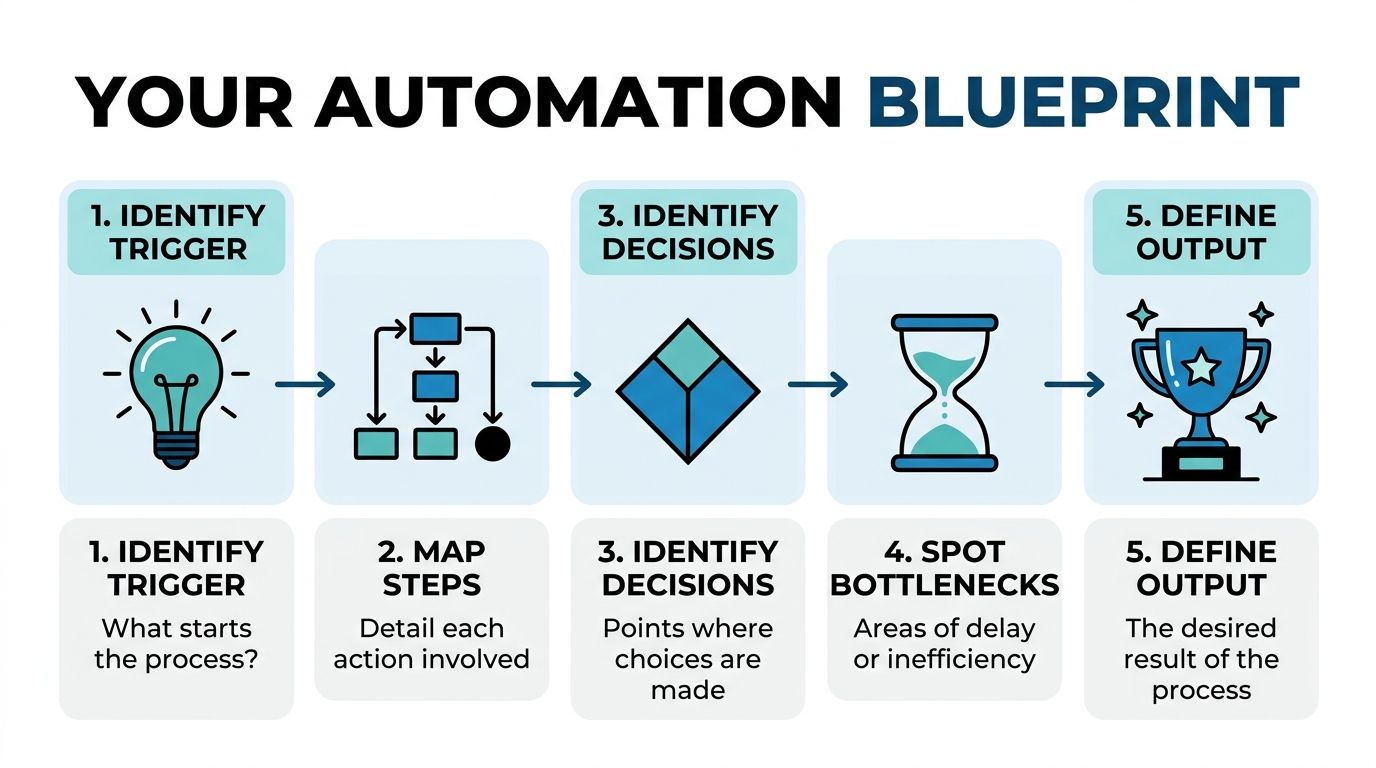
Build a map a human can follow
Your process map does not need to look like something from a consulting slide deck. A whiteboard, Miro, Lucidchart, Google Drawings, or even sticky notes on a wall can work.
What matters is that the map answers five questions:
- What starts the process
- What happens next
- Where decisions are made
- Where delays or mistakes happen
- What result counts as complete
A useful format is simple:
- Trigger
- Step
- Step
- Decision
- Exception path
- Output
That structure works for everything from purchase approvals to customer onboarding.
Capture the unofficial process too
The official version of a process is rarely the actual one.
A finance manager may say, “Invoices are approved by the department head.” The accounts team may tell you, “Unless the department head is traveling, in which case we email the operations lead, unless the amount is disputed, in which case we hold it in a separate folder.”
That hidden logic is exactly what you need to capture.
Write down:
- Normal flow: What happens when everything is straightforward
- Exceptions: Missing fields, disputed data, duplicate requests, unusual customer cases
- Decision rules: Who approves what, based on which conditions
- Fallback steps: What people do when the system fails or someone is unavailable
If a process depends on one experienced employee “just knowing what to do,” you are not ready to automate it until that knowledge is written down.
Map inputs and outputs carefully
A beginner mistake is focusing only on the actions and ignoring the data.
For each step, identify:
- Input: Email, form submission, spreadsheet row, CRM field, PDF, message
- Action: Review, route, update, approve, notify, generate
- Output: Sent email, updated record, task created, invoice issued, status changed
Tools automate data movement as much as they automate decisions, and this is important.
If the data is messy, duplicated, or inconsistent across systems, your process map will expose that early. That is a win. It is easier to clean up confusion on paper than inside a live workflow.
Make the map usable after launch
Your map should not die after implementation. It should become part of your operating playbook.
Use it for:
- Build guidance: So whoever configures the automation understands the logic
- Training: So staff know what the system does and when they need to step in
- Troubleshooting: So issues can be traced to the exact step or condition
- Improvement: So future versions can be updated without starting from scratch
A good process map is not paperwork. It is the control panel for your first automation project.
Choosing Your Automation Toolkit
Once the process is clear, the next question is usually, “What kind of tool do I need?”
That question gets harder than it should because the market throws around terms like workflow automation, RPA, and AI as if they all mean the same thing. They do not.
The simplest way to think about them is this:
- Workflow automation moves work between people and systems.
- RPA imitates the clicks and actions a person takes in software.
- AI handles interpretation, prediction, or language-heavy tasks that fixed rules struggle with.
Three tool types in plain English
Workflow automation
This is the best starting point for most small businesses.
Workflow tools act like a traffic controller. A form comes in, the system routes it, sends notifications, updates a record, and creates the next task.
Good uses include vacation requests, lead routing, onboarding checklists, approval chains, and follow-up reminders.
If you are comparing options, a curated look at modern https://yourai2day.com/ai-workflow-automation-tools/ can help you narrow the field without diving straight into enterprise software.
Robotic process automation
RPA is useful when a process lives inside systems that do not integrate cleanly.
Think of it as a careful digital operator. It logs in, copies data, pastes values, downloads files, updates records, and follows a fixed sequence. That makes it useful for older software, desktop apps, and repetitive back-office tasks.
Typical examples include invoice entry, order processing across disconnected systems, or transferring data from one portal to another.
RPA is powerful, but it can be brittle. If a screen layout changes, the automation may need maintenance.
Artificial intelligence
AI helps when the process includes unstructured information or soft judgment.
It can read incoming emails, classify support requests, extract details from documents, summarize notes, or draft responses for review. It is often most useful as an assistant inside a broader workflow, not as a replacement for the whole process.
For a first project, AI works best when paired with clear human review rules. Let it classify, draft, or extract. Do not ask it to run a mission-critical process without guardrails.
Automation tools at a glance
| Tool Type | Best For | Example Use Case | Typical Cost | Setup Complexity |
|---|---|---|---|---|
| Workflow Automation | Structured, repeatable processes across apps | Route website leads into a CRM and notify sales | Varies by vendor and usage | Low to moderate |
| RPA | Tasks that rely on clicks in existing systems | Copy invoice data from email attachments into accounting software | Varies by vendor and scale | Moderate |
| AI | Language, documents, classification, summarization | Sort customer emails and draft first responses | Varies by model, platform, and review design | Moderate to high |
Match the tool to the problem
A lot of wasted automation spend comes from using advanced tools on simple problems.
If a form submission just needs to create a task and send an email, use workflow automation. If staff spend hours rekeying the same data into a legacy system, look at RPA. If incoming requests are messy and unstructured, add AI where interpretation is required.
Do not start with the most impressive tool. Start with the least complicated one that solves the problem.
What small teams should care about
A practical buying checklist usually matters more than a feature list.
- Integration fit: Does it connect to the tools you already use?
- Error handling: Can it alert someone clearly when a step fails?
- Visibility: Can a non-technical manager see what ran and what broke?
- Permissions: Can you control who changes workflows?
- Supportability: Will your team be able to maintain it six months from now?
If you want a concrete example of how vendors present these capabilities for everyday business use, Start Right Now’s automation features page is a useful way to see the language and feature categories you should evaluate during tool selection.
The right automation stack should make your process easier to run, not create a second job managing the software.
Launching Your First Automation Pilot Project
The safest first launch is small, controlled, and a little boring.
That may not sound exciting, but it is how good automation gets approved. Teams trust systems that prove themselves before they become business-critical.

A strong example is a customer follow-up process.
Suppose a small sales team gets inquiries from a website form. Today, a coordinator checks submissions, copies details into the CRM, assigns the lead, sends a confirmation email, and creates a reminder if no one responds. It works, but only when the coordinator is available and does not miss anything.
That is a perfect pilot candidate because the process is frequent, rule-based, and visible.
Run a pilot, not a full cutover
The most reliable method is a staged one. Stacksync describes incremental implementation with validation as the gold standard, beginning with pilot testing, then parallel processing where automated and manual work run side by side, and only then expanding as confidence grows: https://www.stacksync.com/blog/10-essential-strategies-for-successful-business-process-automation
For beginners, that advice is gold.
Do not replace the old process on day one. Build a pilot that handles a limited slice of work under close observation.
For the customer follow-up example, your pilot might do this:
- Capture leads from one form only
- Create a CRM record automatically
- Send a standard acknowledgment email
- Assign the lead based on territory
- Flag anything incomplete for human review
That scope is enough to prove value without putting every inbound lead at risk.
Use a parallel run as your safety net
The smartest part of the pilot is the parallel run.
For a period of time, the automated process runs while a human still checks the same work. That lets you compare outputs, catch edge cases, and fix gaps before full adoption.
In the lead follow-up example, the coordinator still reviews each new lead for a while. If the automation routes the lead correctly, sends the right message, and creates the right record, confidence builds. If a field maps incorrectly or a special case appears, the team catches it early.
That same pilot-first logic shows up in many real-world business process automation examples, especially where leaders need evidence before wider rollout: https://yourai2day.com/business-process-automation-examples/
Design for exceptions from the start
A pilot does not fail because the normal flow is hard. It fails because the first exception has nowhere to go.
Ask these questions before launch:
- What happens if a required field is blank?
- What if the email address is invalid?
- What if the lead belongs to a region with no assigned rep?
- What if the CRM is temporarily unavailable?
You do not need perfect automation. You need responsible automation.
That usually means routing exceptions into a review queue, sending an alert, or pausing the workflow until someone checks it.
Keep humans involved
A beginner-friendly automation build still needs owners.
For the pilot, assign:
- A process owner who understands the business outcome
- A builder or admin who can adjust the workflow
- A frontline reviewer who checks outputs during the pilot
- A decision maker who approves expansion after results are validated
This short explainer is worth watching before you launch because it reinforces the logic of testing before scaling.
Know when the pilot is ready to expand
Do not expand because the workflow “seems fine.”
Expand when the team can answer yes to questions like these:
- Are outputs consistently correct?
- Are exceptions handled cleanly?
- Do users trust the process?
- Can someone diagnose failures quickly?
- Is there clear documentation for maintenance?
The first automation should feel controlled, not clever. Reliability earns buy-in faster than sophistication.
Measuring Success and Scaling Your Automation
If you cannot show what improved, your automation project will be treated like a software experiment.
The easiest way to avoid that is to tie the workflow to business outcomes that matter before the build starts. That could be time saved, fewer handoff delays, cleaner records, faster response, or lower rework.

Pick KPIs your team uses
The best KPIs are operational, observable, and easy to explain.
For a first automation, that often includes:
- Cycle time: How long the process takes from start to finish
- Manual touches: How many times a person has to intervene
- Error count: How often records, approvals, or outputs need correction
- Exception volume: How many cases fall out for human review
- Completion rate: How often the process finishes without stalling
Notice what is missing. Fancy dashboards with dozens of widgets.
For early-stage automation, a simple spreadsheet or one-page dashboard is usually enough.
Think about ROI
You do not need a finance degree to calculate a practical return.
Start with:
- Time your team no longer spends on repetitive steps
- Direct process costs that the workflow removes
- Error correction effort that drops after automation
- Any software and implementation costs needed to keep the process running
Then ask a straightforward question: is the process now cheaper, faster, or more reliable in a way the business values?
There is good reason to take that question seriously. One summary of BPA outcomes reports that companies save approximately $46,000 annually on average after adopting BPA solutions, and Gartner survey findings cited there say 80% of companies with BPM projects see internal ROI above 15%, while 55% reported ROI per BPM project ranging from $100,000 to $500,000: https://www.2am.tech/blog/business-process-automation-statistics-facts-trends
Those figures should not be treated as your promised outcome. They do show that measurable financial returns are realistic when the process choice and implementation are sound.
Scale what proved itself
After a pilot works, many teams rush to automate five more processes immediately.
A better move is to scale in layers:
- Stabilize the pilot
- Document support and ownership
- Extend to similar use cases
- Standardize naming, permissions, and review
- Create a small automation roadmap
Scaling is easier when each new workflow uses the same rules for ownership, monitoring, and exception handling.
That is how automation becomes part of the business, not a collection of disconnected experiments.
Navigating Common Automation Pitfalls
Automation does not usually fail because the technology is impossible. It fails because teams rush, overbuild, or ignore the human side.
That is why governance and change management belong at the start, not at the end.
The first trap is automating a bad process
If the underlying workflow is messy, inconsistent, or full of avoidable approvals, automation can make it faster without making it better.
You end up preserving confusion in software.
Fix obvious waste before you automate. Remove duplicate steps. Clarify ownership. Standardize inputs. If a human cannot explain the process clearly, a tool will not rescue it.
The second trap is underestimating maintenance
A workflow that looks simple on launch day may depend on forms, field names, team structures, app permissions, and approval rules that change over time.
Without ownership, small changes break the chain.
That is why every automation needs:
- An owner: Someone accountable for business outcomes
- A maintainer: Someone who can update logic when tools or rules change
- A review rhythm: A light check-in to catch drift, exceptions, and broken steps
If nobody owns the workflow after launch, the process slowly becomes unreliable.
The third trap is ignoring governance
Governance sounds like a large-enterprise concern, but small businesses need it too.
At a minimum, define:
- Who can create workflows
- Who can edit live workflows
- How changes get tested
- Where documentation lives
- What happens when a process fails
Automation often touches customer communication, money movement, approvals, and compliance-sensitive records, making this important.
One automation market summary notes that 76% of businesses use automation to standardize workflows and 36% use it for regulatory compliance, while workflow automation can reduce processing errors by as much as 70%. The same source also reports that more than two-thirds of finance teams see higher accuracy after adoption: https://automateddreams.com/blog/key-business-process-management-statistics/
That upside is real. So is the risk of poor control.
The fourth trap is mishandling change with your team
The emotional side of automation gets overlooked all the time.
Employees do not resist automation because they love manual entry. They resist it when they think it will create hidden monitoring, remove judgment from their role, or threaten their job.
Address that directly.
Tell people:
- Which tasks are being automated
- Which decisions still need human judgment
- How exceptions will be handled
- How their work becomes easier or more valuable
Then involve them in testing. The people closest to the work usually spot weak logic first.
Teams support automation faster when they help shape it and when leadership frames it as support, not replacement.
The fifth trap is building brittle workflows
A brittle automation works perfectly until something small changes.
An email subject line shifts. A form field is renamed. A person moves teams. A vendor updates an interface. Suddenly the process stops.
Resilient automation is more forgiving. It uses validation, exception queues, alerts, and documented fallbacks. It avoids overcomplicated logic in a first release.
Simple, well-governed automations last longer than clever ones nobody can maintain.
Frequently Asked Questions About Business Automation
How expensive is it to automate a business process
It depends on the process, the tool, and how much setup is needed. A simple workflow automation can be relatively affordable compared with a custom software project. Costs rise when you involve multiple systems, legacy software, document handling, or AI review logic.
For a first project, the smartest financial move is to choose a narrow process with visible pain and clear value.
Do I need technical skills to get started
Not always. Many workflow tools are designed for non-technical users.
What you do need is process clarity. A business owner, operations lead, office manager, or department head can often lead a successful first automation if the process is mapped well and someone is responsible for testing and upkeep.
How long does a first automation project take
There is no honest one-size-fits-all timeline. A simple pilot can move quickly if the process is stable and the systems connect cleanly.
Projects take longer when the process has lots of exceptions, scattered ownership, or poor data quality. Most delays come from unclear process logic, not from the software itself.
Will automation replace my employees
In most beginner use cases, automation removes repetitive work, not human value.
The practical shift is this: staff spend less time copying, chasing, and re-entering data, and more time handling exceptions, customer needs, judgment calls, and improvement work.
Should I start with AI or with basic automation
Start with the simplest approach that solves the problem. If a rule-based workflow can handle it, use that first.
Add AI when the work includes messy text, documents, classification, summarization, or language-heavy tasks that fixed rules cannot manage well.
What is the best first process to automate
Choose a process that is frequent, rules-driven, visible, and frustrating. Lead routing, invoice reminders, onboarding steps, and straightforward approvals are often better first projects than complex cross-functional workflows.
What if the automation makes mistakes
Assume it will, at least early on. That is why pilots, parallel checking, exception handling, and documentation matter.
The right approach is not to expect perfection. It is to build a process that catches mistakes safely and improves over time.
If you want practical, beginner-friendly guidance on AI tools, automation workflows, and real business use cases, YourAI2Day is a strong place to keep learning. It’s especially useful if you want to stay current without getting buried in technical jargon.