12 Powerful Examples of Prompts to Master AI in 2025
Ever feel like you're playing a guessing game when you talk to an AI? You're not alone! The secret to getting amazing results isn't just what you ask, but how you ask it. A well-crafted prompt is like a magic key, turning a generic, blah response into a precise, insightful solution that's perfect for you. Learning this skill turns AI from a fun novelty into a seriously powerful tool for just about anything.
This guide skips the boring theory and jumps straight into strategies you can use right now. We’ve put together a list of practical, real-world examples of prompts to show you how to chat with AI like a pro. Forget vague instructions; you’ll find specific templates and frameworks that get better results for everything from creative writing and marketing to tricky data analysis and coding. We'll break down what makes a prompt work and share some expert tips to help you make these techniques your own.
Whether you're a professional looking to speed up your workflow, an entrepreneur brainstorming the next big thing, or just a curious user wanting to get more out of AI tools, this is your starting point. We'll explore 12 essential prompt types, including cool tricks like role-playing, chain-of-thought, and few-shot learning, all with clear explanations. By the end, you'll have a handy toolkit to go from a casual user to a confident AI whisperer, getting these powerful models to create exactly what you have in mind. Let's get started and make AI truly work for you!
1. Role-Playing / Character Prompts
One of the coolest and most beginner-friendly tricks for getting high-quality results is to give the AI a specific role to play. Think of it like casting an actor in a movie. You instruct the AI to adopt a persona, a profession, or even a fictional character's point of view. This simple step transforms the AI from a general know-it-all into a focused expert, which makes its answers way more relevant and on-tone.

This approach works because it gives the AI a strong frame of reference. Instead of pulling from its massive but generic knowledge base, it hones in on the data and communication style of that specific role.
Why This Prompting Style Is Effective
By defining a persona, you guide the AI's output, making it more focused, nuanced, and in line with what you actually need. It’s the difference between asking a random person on the street for advice versus asking a specialist; the specialist's answer will be way more detailed and trustworthy. This is one of the clearest examples of prompts where you'll see an immediate, noticeable improvement.
Expert Opinion: "Assigning a role is like giving the AI a mental model. It constrains the possible responses, forcing it to generate content consistent with the persona's knowledge and vocabulary. This is the fastest way to kill generic outputs and boost specificity."
Practical Applications and Tips
This technique is incredibly versatile. You can ask an AI to act as a career counselor to review your resume, a five-star chef to whip up a dinner menu, or even a pirate to explain quantum physics for a fun twist.
- Be Specific: Don't just say "act as a doctor." Try this: "Act as a board-certified cardiologist with 20 years of experience. Explain the benefits of a Mediterranean diet in simple, easy-to-understand terms for a patient who is new to healthy eating."
- Set the Tone: Clearly define the communication style. Should the AI be formal and professional, friendly and casual, or strictly technical? A good practical example:
Act as an enthusiastic tour guide for Rome. Give me a one-day itinerary that's exciting and full of fun facts. - Maintain Consistency: For longer chats, gently remind the AI of its role with follow-ups like, "Continuing in your role as a career counselor…"
2. Chain-of-Thought Prompts
Chain-of-Thought (CoT) prompting is a clever technique where you ask an AI to break down a complex problem into a series of logical steps before giving the final answer. Instead of just asking for the solution, you're telling it to "think out loud" and show its reasoning. This dramatically improves the accuracy of its responses, especially for tasks involving logic, math, or multi-step problem-solving.

This approach forces the AI to build a clear path from the question to the answer, making it less likely to jump to a wrong conclusion. It’s a lot like how we solve tough problems—by talking or writing it out step by step to stay on track. To learn more about how AI models process such instructions, you can read about how language models work on yourai2day.com.
Why This Prompting Style Is Effective
By asking the AI to "show its work," you get it to dedicate more brainpower to the problem. It breaks a big, scary question into smaller, manageable chunks that the model can solve more reliably. This is one of the best examples of prompts for checking the AI's logic, as you can see exactly where it might have gone off the rails.
Expert Opinion: "Forcing a step-by-step process prevents the AI from taking lazy shortcuts. It creates a transparent trail of logic, letting you verify the conclusion and spot any flawed assumptions. It’s like giving the AI a whiteboard and asking it to show its math."
Practical Applications and Tips
This technique is a lifesaver for everything from solving tricky math word problems and debugging code to planning a multi-stage project. It makes the AI feel more like a smart collaborator and less like a mysterious black box.
- Use Trigger Phrases: Start your prompt with phrases like "Explain your reasoning step-by-step," "Show all your work," or "Walk me through your logic from start to finish."
- Combine with Roles: For even better results, mix this with a role-playing prompt. A practical example: "Act as a patient financial analyst. Walk me through, step-by-step, how you would calculate the ROI for a marketing campaign that cost $5,000 and generated $25,000 in revenue."
- Request Intermediate Conclusions: For really complex problems, ask the AI to pause and state its conclusion at each step before moving on.
3. Few-Shot Learning Prompts
Few-shot learning sounds technical, but it’s actually simple: you "teach" the AI by showing it a few examples of what you want. Instead of just telling the AI what to do, you provide 2-5 completed examples of the task. This shows the AI the pattern, style, and format you're looking for, helping it learn in context and then apply that learning to your new request.
This approach is powerful because it's all about "show, don't tell." By seeing a few input-output pairs, the AI quickly gets the hint and applies the same logic to your problem, making this one of the most effective examples of prompts for tasks with specific rules.
Why This Prompting Style Is Effective
Few-shot learning guides the AI to a very specific outcome with almost no room for confusion. It's like teaching someone a new card game by playing a few hands first; they'll learn the rules and strategy way faster than if you just read them the rulebook. This method is a great lightweight alternative to more intensive training. While full model customization requires deep technical knowledge, like learning how to fine-tune an LLM on yourai2day.com, few-shot prompts give you similar control within a single chat.
Expert Opinion: "Providing examples directly in the prompt is a game-changer. It leverages the AI's in-context learning ability, forcing it to recognize a pattern and apply it. This massively boosts the accuracy and consistency of its output for structured tasks like data classification or content formatting."
Practical Applications and Tips
This technique shines when you need something done in a specific format, tone, or structure. Use it to classify customer feedback, rewrite text in a particular brand voice, or generate code that follows a consistent style.
- Provide Clear Examples: Your examples are your instructions, so make them good! Ensure they are accurate and clearly show the pattern you want the AI to follow.
- Use a Consistent Format: A practical example would be structuring each one identically:
Sentiment: Positive. Text: "I love this product!"Sentiment: Negative. Text: "The shipping was too slow."This helps the AI see the relationship. - Place Your Request Last: Always show your examples first, then follow up with the new, unseen input that you want the AI to process.
4. Open-Ended / Creative Prompts
Want to unlock the AI's imagination? Use open-ended prompts that encourage brainstorming and out-of-the-box thinking. These prompts often pose "what if" scenarios or ask for brand-new ideas, giving the AI the freedom to generate surprising and creative responses. This method turns the AI from an information-retriever into a true creative partner.
This approach is awesome for coming up with new ideas because it removes the usual restrictions. Instead of guiding the AI to one right answer, you invite it to connect different concepts and explore hypotheticals, leading to a wide range of creative ideas you can then build upon.
Why This Prompting Style Is Effective
Open-ended prompts tap into the AI's ability to mix and match information from its vast training data in cool, unexpected ways. By removing the guardrails, you allow for happy accidents and connections a human might miss. This makes them some of the best examples of prompts for smashing through creative blocks.
Expert Opinion: "The lack of constraints in an open-ended prompt allows the AI to explore a much larger possibility space. This increases the chances of it stumbling upon truly novel concepts by taking the less-traveled paths within its neural network. It's engineered serendipity."
Practical Applications and Tips
This technique is perfect for brainstorming marketing campaigns, dreaming up story plots, or envisioning future tech. You could ask the AI to imagine a world where dogs can talk or to generate business ideas combining baking and virtual reality.
- Provide a Spark: Even though it's open-ended, give it a starting point. "Brainstorm marketing slogans" is too vague. A better practical example: "Generate five catchy, witty marketing slogans for a new brand of eco-friendly coffee that appeals to Gen Z."
- Embrace 'What If': Frame your prompts with "What if…" or "Imagine…" to signal that you're looking for a creative, hypothetical answer.
- Iterate and Refine: Use the AI's first batch of ideas as a jumping-off point. Pick your favorite concept and ask follow-up questions to flesh it out.
5. Question-Answering / FAQ Prompts
At its heart, chatting with an AI is often about asking questions to get specific information. These question-answering prompts are the bread and butter of AI interaction, used for everything from simple fact-checking to solving complex problems. It's as simple as it sounds: you pose a clear, well-defined question and expect a direct, factual answer.
This approach uses the AI as a super-powered encyclopedia. By asking a direct question like "What are the main causes of climate change?" or "How do I fix a leaky faucet?", you're telling the AI to find, synthesize, and present information on that exact topic.
Why This Prompting Style Is Effective
Asking direct questions is efficient and gets straight to the point. It's perfect for quick information lookups. The AI is great at understanding the intent behind a question and delivering a relevant answer, making this one of the most reliable examples of prompts for getting the facts.
Expert Opinion: "A well-phrased question acts like a precision tool. The more specific your keywords and scope are, the more targeted the AI's search becomes within its vast dataset. This minimizes irrelevant fluff and gets you a better answer, faster."
Practical Applications and Tips
This style is your go-to for academic research, homework help, DIY projects, and satisfying your everyday curiosity. You can ask for historical facts, technical instructions, definitions, or data points.
- Be Specific: Instead of asking, "How do I make bread?", try a practical example like, "Give me a simple, step-by-step recipe for a no-knead sourdough bread that a total beginner can make."
- Define the Scope: Let the AI know how much detail you want. Add phrases like "Explain this in simple terms," "Provide a detailed, expert-level analysis," or "Summarize the key points in three bullet points."
- Request Sources: For important or data-heavy topics, it’s a good idea to ask the AI to cite its sources so you can double-check the information.
6. Instructional / How-To Prompts
One of the most useful things you can ask an AI to do is give you clear, step-by-step instructions. Instructional or "how-to" prompts turn the AI into a patient teacher who can break down complex tasks into simple, actionable steps. This is perfect for learning a new skill, fixing a technical problem, or tackling a DIY project you've been putting off.
This approach works by getting the AI to organize its knowledge into a logical sequence. Instead of a general overview, it creates a practical guide designed to help you achieve a specific goal, whether that's baking a cake or setting up a new Wi-Fi router.
Why This Prompting Style Is Effective
When you ask for a step-by-step guide, you force the AI to organize information in a clear, chronological order. This removes any guesswork and gives you a clear path from start to finish. It’s like having an expert looking over your shoulder. These are fantastic examples of prompts for anyone looking to learn how to do something new.
Expert Opinion: "Requesting a numbered list with prerequisites is a powerful move. It forces the AI to structure its output for maximum clarity. This constraint makes the information far more digestible and actionable for a human user, reducing the mental effort of learning something new."
Practical Applications and Tips
This technique is incredibly handy for everything from technical support to creative hobbies. You can ask for a guide on changing a car tire, a tutorial for a new software feature, or a recipe for your favorite dish.
- Specify Your Skill Level: Always state if you're a beginner, intermediate, or expert. A practical example would be: "Give me a beginner-friendly, step-by-step guide to meditating for someone who has never done it before."
- Request a Requirements List: Ask for a list of necessary tools, ingredients, or software at the very beginning.
- Ask for Context: Request helpful details like how long it will take, the difficulty level, and common mistakes to avoid.
- Request Troubleshooting Steps: Ask the AI to include a "Common Problems" section to help you fix things if they go wrong.
7. Summarization / Condensing Prompts
We're all drowning in information, so being able to quickly get the gist of long articles, reports, or videos is a superpower. Summarization prompts tell an AI to take a large chunk of text and boil it down to a short, easy-to-digest summary. This turns the AI into a powerful time-saving tool by pulling out the most important points for you.
This works by using the AI's deep understanding of language to identify the main ideas, supporting details, and overall theme. The AI then rewrites this information into a shorter version that keeps the original meaning but cuts out all the fluff.
Why This Prompting Style Is Effective
By giving the AI clear rules on length and format, you guide it to focus on true summarization, not just randomly pulling out sentences. The AI learns to rephrase and restructure ideas, producing a summary that actually makes sense. This is one of the most practical examples of prompts for boosting your productivity.
Expert Opinion: "The secret to a great summary is specifying the audience and purpose. A summary for a CEO needs to highlight financial impact, while one for a technical team needs to focus on implementation details. Defining the context is key to making sure the AI prioritizes the right information."
Practical Applications and Tips
This technique is a must-have for anyone who needs to process a lot of text quickly—from students reviewing research papers to executives needing a briefing on a market report. You can use it to create abstracts, meeting notes, or even social media posts from long articles.
- Specify Length and Format: Be precise. A practical example: "Summarize the following article into three key bullet points," or "Condense this 5,000-word report into a 250-word executive summary for my boss."
- Define the Audience: Tailor the output by saying who the summary is for. For example, "Explain the findings of this scientific study in simple terms for a non-technical audience."
- Request Specific Elements: Ask the AI to look for particular types of information, such as, "Summarize the main arguments and pull out any actionable advice from this podcast transcript."
8. Comparison / Analysis Prompts
One of the smartest ways to use AI is to have it compare two or more things for you. Comparison prompts instruct the AI to analyze similarities, differences, pros, and cons. This is incredibly helpful for making informed decisions, whether you're choosing a new phone or a new business strategy.
This method taps into the AI's ability to pull together and organize huge amounts of information. Instead of you spending hours researching, the AI can quickly create a structured analysis of anything, from comparing programming languages to different types of coffee makers.
Why This Prompting Style Is Effective
Comparison prompts make the AI go beyond simple definitions and engage in higher-level thinking, like analysis and evaluation. It turns a jumble of facts into a clear, structured summary that helps you see the whole picture. This is one of the most efficient examples of prompts for weighing options and making smart choices.
Expert Opinion: "When you ask for a direct comparison, you force the AI to identify the key differentiating factors. Requesting a specific output format, like a table, makes this information even easier to digest. It’s a simple trick to get structured, actionable insights."
Practical Applications and Tips
This technique is perfect for everything from choosing a new laptop to developing a business strategy. You could ask the AI to compare different marketing tools, investment strategies, or even philosophical ideas.
- Specify Criteria: Guide the analysis by telling the AI what's most important to you. A practical example: "Compare the iPhone 15 and the Samsung Galaxy S24 based on camera quality for low-light photos, battery life for heavy users, and overall price."
- Request Structured Output: Ask for the info in a clean format. Try, "Create a table comparing the pros and cons of solar vs. wind energy for a typical suburban home."
- Define Your Context: Give the AI your specific situation. "As a total beginner in coding, which language, Python or JavaScript, would be better for me to learn first if my goal is to build websites?"
9. Editing / Refinement Prompts
Besides creating new content, one of the most practical ways to use AI is as your personal editing assistant. Editing and refinement prompts tell the AI to improve, correct, or rephrase text you've already written. This can turn a rough draft into a polished piece by fixing everything from grammar and clarity to tone and style.
This approach uses the AI's deep understanding of language to act as an on-demand editor. You provide the raw text, and the AI polishes it according to your instructions, saving you tons of time in the revision process.
Why This Prompting Style Is Effective
Using an AI for editing is super efficient. It can spot grammar errors, awkward sentences, and typos that you might miss after reading the same text over and over. By letting the AI handle the mechanical parts of editing, you can focus on the big ideas and the core message. These are powerful examples of prompts for absolutely anyone who writes.
Expert Opinion: "The secret to great editing prompts is specificity. Instead of a lazy 'make this better,' give the AI a clear goal. Prompts like 'edit this for conciseness and clarity' or 'rewrite this in a more persuasive and confident tone' produce far better results."
Practical Applications and Tips
This technique is a lifesaver for students, professionals, marketers, and writers of all stripes. Use it to polish an important email, tighten up a blog post, or make sure a report sounds professional.
- Be Specific: Clearly state what you want to change. A practical example: "Proofread this email for me. Fix any grammar and spelling errors, and rephrase any sentences that sound too formal or robotic."
- Provide Style Guides: If you want it to sound a certain way, tell it! "Rewrite this paragraph in a professional but friendly tone, similar to how the HubSpot blog writes."
- Request Explanations: Ask the AI to explain its changes. This is a great way to improve your own writing skills. For example, "Correct the grammar in this text and tell me what you changed and why."
10. Brainstorming / Ideation Prompts
Brainstorming prompts are designed to get the AI's creative juices flowing. You ask it to generate a whole bunch of ideas, solutions, or possibilities for a topic. This uses the AI's ability to connect vast amounts of information in new ways, helping you kickstart innovation, create content, or solve problems without getting stuck in your own head.

This approach is perfect for beating creative block. By framing your request as a wide-open brainstorming session, you encourage the AI to think divergently and give you a raw list of options that you can then sort through and build upon.
Why This Prompting Style Is Effective
This method works so well because it separates idea generation from idea evaluation, which is a key principle of creative thinking. By asking the AI for quantity over quality at first, you get a bigger pool of ideas, which increases the odds of finding a truly brilliant one. These examples of prompts are perfect for teams looking to explore new directions.
Expert Opinion: "Asking for a specific number of ideas, like 15 or 20, is a simple but powerful trick. It forces the AI to move past the most obvious answers and dig deeper to generate more unconventional and creative concepts you might not have thought of otherwise."
Practical Applications and Tips
Use this technique for everything from marketing slogans and new product features to blog post topics. It’s a fantastic tool for startups, content creators, and anyone who needs a steady stream of fresh ideas.
- Set Clear Boundaries: Provide some constraints to guide the brainstorming. A practical example: "Brainstorm 10 potential names for a new podcast about true crime mysteries. The names should be catchy, a little dark, and easy to remember."
- Request Categorization: Ask the AI to organize its ideas into categories like "Safe Bets," "Bold & Edgy," or "Funny" to make the list easier to process.
- Encourage Wild Ideas: To really push the boundaries, explicitly ask for a separate list of "wild" or "out-there" ideas. This can often lead to breakthrough concepts.
11. Translation / Format Conversion Prompts
AI is great at translating languages, but it can also "translate" information between different formats and styles. These conversion prompts tell the AI to act like a universal adapter, restructuring your content for different audiences, platforms, or goals. This could be as simple as translating English to Spanish, or as cool as turning technical jargon into a simple FAQ.
This works because the AI understands structure, syntax, and context. You give it the source content and tell it the target format, and the AI bridges the gap, keeping the core message while giving it a complete makeover.
Why This Prompting Style Is Effective
This method is a huge time-saver for repurposing content. Instead of manually rewriting a blog post for a different audience, you can instantly create a new version tailored to your needs. This makes it one of the most practical examples of prompts for marketers and content creators who need to get the most mileage out of their work.
Expert Opinion: "The key is to be crystal clear about the start and end formats. The more specific you are about the source's context and the target audience's needs, the more accurate and useful the conversion will be. Don't just say 'change this,' say 'turn this into that for them.'"
Practical Applications and Tips
Use these prompts to simplify complex topics or create different types of marketing materials from a single source. For example, you can convert a long blog post into a series of snappy tweets or turn a bunch of customer reviews into a structured report.
- Specify the Target: Be explicit. A practical example: "Convert the following technical documentation about setting up a server into a simple, step-by-step guide for non-technical beginners."
- Provide Context: Tell the AI about the audience. "Translate this marketing copy into Spanish, making sure it sounds natural and cool to a young, fashion-conscious audience in Mexico."
- Preserve Key Elements: If certain terms or data points must stay the same, tell the AI to keep them. For instance, "Convert this report into a summary but make sure you keep all the specific percentages and dates exactly as they are."
12. Constraint-Based / Specific Requirements Prompts
One of the best ways to get exactly what you want from an AI is to give it a clear set of rules. Constraint-based prompts define specific requirements that the answer must follow, like word count, format, style, or things to avoid. This method builds a "box" for the AI to work inside, forcing it to produce a very specific and targeted result.
This approach goes beyond general instructions and gives the AI non-negotiable rules. Instead of just hoping for the best, you're engineering the outcome by setting firm boundaries. This is super important for tasks with real-world limits, like social media character counts or ad copy length.
Why This Prompting Style Is Effective
By setting clear limits, you dramatically reduce the chances of the AI giving you something that's too long, off-topic, or in the wrong style. It’s a powerful way to ensure the final output is ready to use without a ton of editing. These specific instructions are excellent examples of prompts for getting precise control over the final product.
Expert Opinion: "Think of constraints as helpful guardrails, not limitations. By defining what not to do or what exact format to use, you eliminate bad options and guide the AI directly to the result you want. This saves a ton of time and back-and-forth."
Practical Applications and Tips
This technique is essential for professional work like marketing, technical writing, and SEO, where rules are everywhere. For instance, you can ask an AI to generate a meta description under 160 characters or a LinkedIn post that doesn't use any industry jargon.
- Quantify Everything: Use numbers. A practical example would be: "Write a 200-word product description," "generate 5 bullet points," or "create a headline that is under 10 words."
- Define the Structure: Clearly state the format you need. For example, "Provide the answer as a three-column table with these headers: 'Feature,' 'Benefit,' and 'Example.'"
- List Inclusions and Exclusions: Tell it what words to include and what to avoid. "Write a product description that includes the phrases 'eco-friendly' and 'built to last' but avoids using the word 'cheap'."
Comparison of 12 Prompt Types
| Prompt Type | Implementation Complexity 🔄 | Resource / Prep Effort ⚡ | Expected Outcomes ⭐ | Key Advantages 📊 | Ideal Use Cases 💡 |
|---|---|---|---|---|---|
| Role-Playing / Character Prompts | Medium — requires clear role and constraints | Low–Medium — define persona, era, tone | ⭐⭐⭐ — tailored, persona-driven responses | Expert perspectives; improved engagement; relatable outputs | Education, creative writing, simulated consultations |
| Chain-of-Thought Prompts | Medium–High — asks for stepwise reasoning | Medium — may need scaffolding or examples; slower responses | ⭐⭐⭐⭐ — greater transparency and improved accuracy on complex tasks | Reveals reasoning; aids debugging and verification | Math, logic problems, interpretability research |
| Few-Shot Learning Prompts | Medium — craft representative examples | Medium — prepare 2–5 high-quality examples | ⭐⭐⭐⭐ — consistent format and improved quality when examples are good | Rapid pattern adoption; reduces verbose instructions | Formatting, code style, niche output formats |
| Open-Ended / Creative Prompts | Low — minimal structure required | Low — context helpful but optional | ⭐⭐ — high creativity; variable focus and actionability | Diverse, unexpected ideas; encourages exploration | Ideation, storytelling, speculative scenarios |
| Question-Answering / FAQ Prompts | Low — direct and specific queries | Low — concise questions usually suffice | ⭐⭐⭐ — quick, focused factual answers | Fast retrieval; easy to verify and iterate | Knowledge lookup, customer support, quick facts |
| Instructional / How-To Prompts | Medium — expects structured, sequential steps | Medium — specify skill level, materials, constraints | ⭐⭐⭐ — actionable, testable procedures | Practical guidance; reduces trial-and-error | Tutorials, DIY guides, onboarding tasks |
| Summarization / Condensing Prompts | Low–Medium — define length and focus | Low — supply source material; specify summary length | ⭐⭐⭐ — concise extraction of key points; may lose nuance | Time-saving; audience-tailored summaries | Research digestion, executive briefs, study notes |
| Comparison / Analysis Prompts | Medium — needs defined criteria and scope | Medium — provide items and priority dimensions | ⭐⭐⭐ — balanced pros/cons and recommendations | Informed decision-making; structured evaluations | Product choice, policy comparison, feature tradeoffs |
| Editing / Refinement Prompts | Low–Medium — depends on refinement targets | Low — provide text and style guidelines | ⭐⭐⭐⭐ — improved clarity, tone, and correctness | Polished content; iterative improvements; cost-effective | Proofreading, tone adjustments, executive communication |
| Brainstorming / Ideation Prompts | Low — encourage quantity over constraint | Low–Medium — parameters improve relevance | ⭐⭐ — abundant ideas; variable feasibility | Rapid idea generation; overcomes creative blocks | Campaign ideation, feature lists, workshops |
| Translation / Format Conversion Prompts | Medium — handle idioms and format rules | Medium — specify target language/style/context | ⭐⭐⭐ — good general translation/formatting; nuance risk | Enables localization and repurposing; format adaptability | Localization, content repurposing, style conversions |
| Constraint-Based / Specific Requirements Prompts | Medium — must list explicit constraints clearly | Medium — precise limits and priorities required | ⭐⭐⭐ — outputs that fit strict specs; may be rigid | Ensures conformity; reduces rework and editing | SEO/meta descriptions, social posts, regulated documents |
Your Turn to Prompt: Key Takeaways for Better AI Conversations
You’ve just toured a whole collection of examples of prompts, from the creative fun of role-playing to the clear logic of chain-of-thought. If there’s one big lesson here, it’s this: a good prompt isn't a magic spell. It’s simply the art of clear, strategic communication with your AI partner.
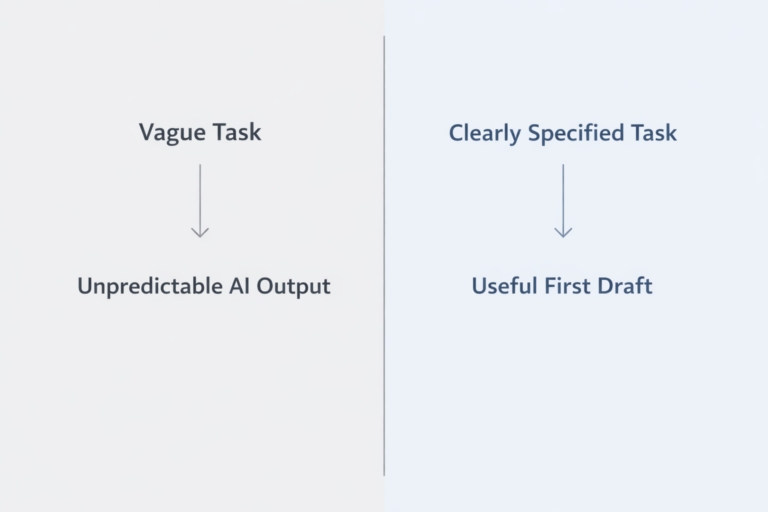
The gap between a generic, useless AI response and a brilliant one is almost always the quality of your prompt. Think of it less like a Google search and more like briefing a super-smart but very literal assistant. The more detail, background, and guidance you provide, the better the result will be.
The Core Principles of Powerful Prompting
As you start crafting your own prompts, keep these simple ideas in mind. They’re the foundation behind every effective prompt we've talked about.
- Context is King: The AI isn't a mind reader. Give it background information, define the task, and clear up any confusing terms. Skipping this is like asking someone to bake a cake without telling them the flavor or occasion.
- Specificity Breeds Success: Vague prompts get you vague results. Instead of "write about marketing," a much better prompt specifies the audience, tone, key points, and format.
- Constraints Unleash Creativity: Giving the AI boundaries, like a word count, a specific format, or a persona to adopt, actually forces it to be more focused and creative. Limitations aren't a barrier; they're a guide.
- Iteration is Inevitable: Your first prompt is rarely your last. The best results come from a little back-and-forth. Use the AI’s first try as a starting point, then ask for changes to steer it closer to what you want.
Expert Opinion: "Treat prompting like any other skill. Every time you chat with an AI, you're learning what works. Pay attention to how tiny changes, like adding 'think step-by-step,' can completely change the quality of the answer. It's a continuous learning process."
Your Actionable Next Steps
Knowledge is great, but action is what turns it into a real skill. Here’s how you can start using what you’ve learned today.
- Start Small and Combine: Pick a simple, everyday task, like summarizing an email or brainstorming subject lines. Try one of the prompt structures from this article.
- Deconstruct and Reconstruct: Find a piece of AI-generated content you think is great. Try to figure out what prompt might have created it. This is a great way to sharpen your prompting instincts.
- Build Your Own "Prompt Library": As you find prompts that work really well, save them! Keep a running list of your greatest hits. Note what the task was and why the prompt was so effective. This will become your personal toolkit.
Mastering these techniques will do more than just get you better AI answers; it will change how you solve problems and create things. You'll spend less time fighting with generic results and more time using AI as a true creative partner, boosting your own skills and unlocking new levels of productivity. The journey from novice to pro is all about practice, so go ahead—start your next AI conversation.
Ready to move beyond theory and put these powerful prompting techniques into practice with cutting-edge AI? At YourAI2Day, we provide access to the latest models and tools, creating the perfect environment to hone your skills. Explore our platform to experiment with the examples of prompts you've learned today and discover how expert-level AI conversations can transform your workflow. Visit us at YourAI2Day to start building the future, today.