A Beginner’s Guide to Deployment in Cloud Computing
Ever wonder how that new AI-powered app magically appears on your phone and just works? How it can handle a sudden flood of users without crashing? Hey, it's not magic! The secret sauce is deployment in cloud computing.
So, what does that even mean? It's simply the process of taking your software—whether it's a website, an app, or a sophisticated AI model—and launching it on the internet using massive, remote data centers instead of your own physical hardware. Let's break it down in a way that makes sense.
Your App's Grand Opening on the Cloud
Imagine you've just perfected an amazing recipe for a new restaurant. Your code is the recipe, but a recipe sitting in a cookbook can't feed anyone. To actually serve meals, you need a fully-stocked kitchen, skilled chefs, and a front-of-house staff.
In the old days, this meant building the entire restaurant from the ground up—buying the land, constructing the building, and hiring every single person. That’s the equivalent of buying, configuring, and maintaining your own physical servers in a closet somewhere. It's expensive, slow, and honestly, a massive headache.
Deployment in cloud computing completely flips that model on its head. Instead of building your own kitchen, you get to rent space in a massive, state-of-the-art commercial kitchen from a provider like Amazon Web Services (AWS), Google Cloud, or Microsoft Azure.
This approach brings some game-changing advantages to the table, especially for beginners:
- No Upfront Hardware Costs: You don't have to sink a fortune into servers, storage, or networking gear before you even have a single user. This dramatically lowers the barrier to entry for startups and individual developers.
- Global Reach Instantly: Your "kitchen" can have a presence anywhere in the world, letting you serve customers across the globe with minimal delay and a fantastic user experience.
- Scalability on Demand: What happens if your app suddenly goes viral? The cloud automatically spins up more resources—like adding more chefs and ovens during a dinner rush—and then scales back down when things quiet down. You only pay for what you use.
The Shift to Cloud-Native Development
This flexible, on-demand model is now the standard for modern software. It's especially critical for AI projects that need massive amounts of computational power for training models and running them in production. The old way of racking and stacking servers on-premise is quickly becoming a relic for most new digital products.
Expert Opinion: "The cloud isn't just a place to store files; it's a new way of thinking. For beginners, the biggest win is speed. You can go from an idea to a globally accessible application in hours, not months. You're free to just build cool stuff without worrying about the plumbing." – Cloud Solutions Architect
The market numbers tell the story of this massive shift. The global cloud computing market is projected to hit USD 905.33 billion in 2026, with some forecasts eyeing USD 2.9 trillion by 2034. A huge driver of this growth is the deployment of AI workloads.
By 2026, an estimated 95% of new digital workloads will be born in the cloud—a staggering jump from just 30% in 2021. You can dig into more of these numbers in these cloud computing statistics.
Ultimately, getting a handle on cloud deployment is non-negotiable for anyone building and launching modern applications. It’s the bridge that takes your code from a developer's laptop to a reliable, scalable product that can reach millions of people all over the world.
2. Choosing Your Cloud Model: IaaS, PaaS, SaaS, and Serverless
So, you get the what of cloud deployment. The next big question is how you're going to do it. Picking a cloud service model is a foundational decision, kind of like deciding how you want to run your new restaurant. Your choice dictates how much you manage versus how much is managed for you, which directly impacts your team's speed, flexibility, and overall cost.
Let's stick with that restaurant analogy. Do you want to build everything yourself, renting just the empty space and utilities? Or would you prefer a fully equipped kitchen where the ovens are ready to go? Maybe you'd rather just hand over your recipes and let someone else handle the entire operation.
This decision is more critical than ever. Cloud adoption is nearly universal, with a staggering 94% of enterprises now running workloads in the cloud. Many are even using multiple clouds to get the best of all worlds. Projections show that public cloud services will account for over 45% of all enterprise IT spending by 2026—a massive jump from just 17% back in 2021.
To get a better handle on these models, it helps to see what you're responsible for versus what the cloud provider takes care of.
Cloud Service Models at a Glance
This table breaks down the division of labor for each of the four main cloud models. As you move from left to right (IaaS to Serverless), you hand over more management responsibilities to the cloud vendor, freeing your team to focus purely on the application logic.
| Managed By | IaaS (Infrastructure) | PaaS (Platform) | SaaS (Software) | Serverless |
|---|---|---|---|---|
| Networking | Provider | Provider | Provider | Provider |
| Storage | Provider | Provider | Provider | Provider |
| Servers | Provider | Provider | Provider | Provider |
| Virtualization | Provider | Provider | Provider | Provider |
| OS | You | Provider | Provider | Provider |
| Middleware | You | Provider | Provider | Provider |
| Runtime | You | Provider | Provider | Provider |
| Data | You | You | Provider | You |
| Application | You | You | Provider | You |
Essentially, each model represents a different trade-off between control and convenience. Let's dig into what that means in the real world.
Infrastructure as a Service (IaaS): The DIY Kitchen
Infrastructure as a Service (IaaS) gives you the most control. Think of it as renting the raw building for your restaurant. The cloud provider gives you the fundamental ingredients—servers (as virtual machines), storage, and networking—but you're responsible for everything else.
You install the operating system, configure the runtime environment, and deploy your application. It’s a hands-on model that offers maximum flexibility over the entire software and hardware stack.
- Practical Example: Let's say you're building a video game server for a custom game. You need a specific version of Linux and total control over the network settings for low latency. IaaS is perfect for this. You can spin up a virtual machine (like an AWS EC2 instance), SSH into it, and configure it exactly the way you need, just like it was a physical computer sitting next to you.
Platform as a Service (PaaS): The Fully Equipped Kitchen
Platform as a Service (PaaS) is a step up in convenience and my personal recommendation for most beginners. Here, the cloud provider manages the underlying infrastructure for you—the servers, operating system, and networking are all handled. They provide a ready-made platform where you can simply deploy and run your applications without ever touching the hardware.
This is like renting a fully equipped commercial kitchen. The ovens, stoves, and refrigerators are all there and maintained for you. You just bring your ingredients (your code) and start cooking.
- Practical Example: You've built a simple Python web app and want to get it online fast. Using a PaaS provider like Heroku or Google App Engine, you can just push your code from your laptop with a single command. The platform figures out it's a Python app, installs the necessary dependencies, and makes it live on the internet. It's an amazing time-saver.
This diagram shows the basic idea behind cloud deployment: taking your code and making it accessible to users through the cloud's infrastructure.
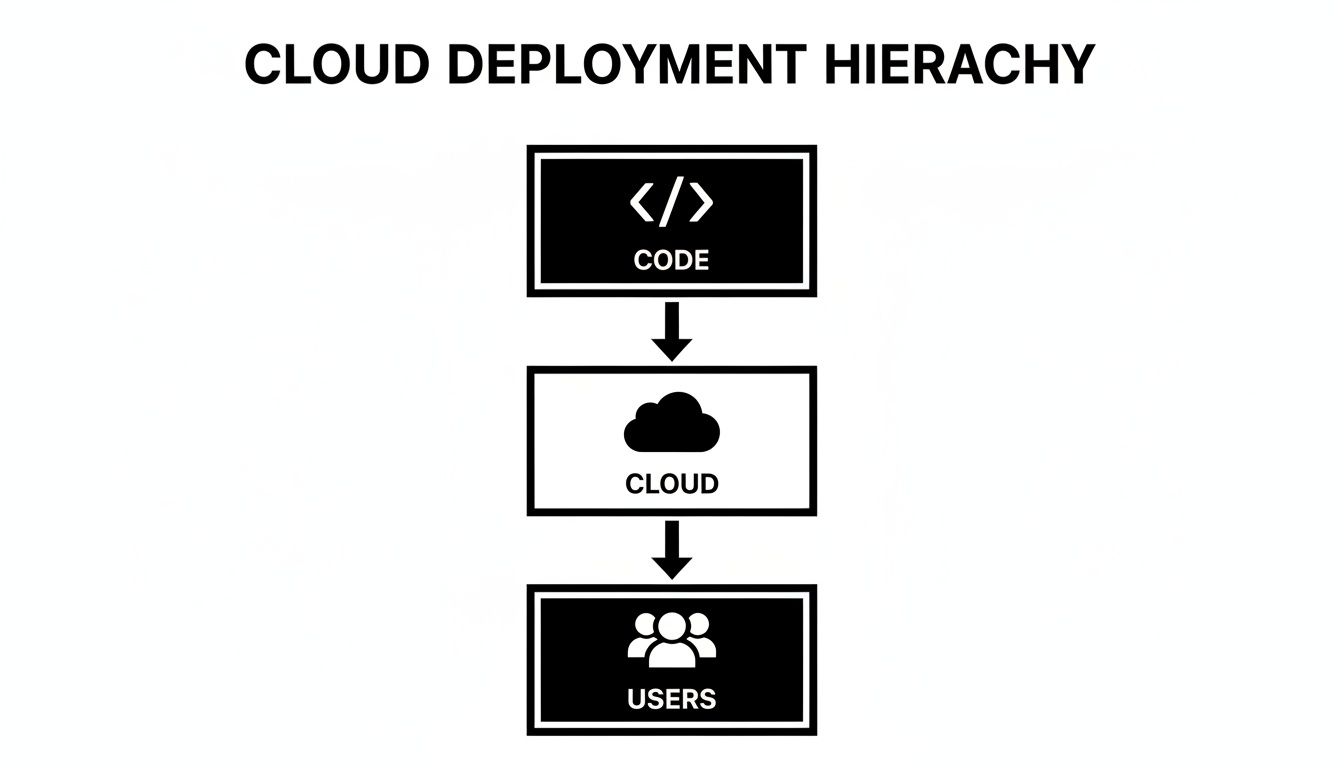
It’s a simple but powerful concept. The cloud service abstracts away all the messy details, creating a direct path from your creation to your audience.
Software as a Service (SaaS): The Full-Service Restaurant
Software as a Service (SaaS) is the model most people are familiar with, even if they don't know the term. With SaaS, you aren't deploying any code. You're simply using a complete, ready-to-use application that runs on a provider's infrastructure.
This is the full-service restaurant experience. You don't cook, you don't manage the kitchen—you just show up and enjoy the meal. Everyday tools like Gmail, Salesforce, and even ChatGPT are perfect examples of SaaS.
Serverless Computing: The Pop-Up Kitchen
Finally, we have Serverless computing, which is really an evolution of PaaS. With serverless, you stop thinking about servers entirely, even in the abstract. You write your code in small, independent functions that are triggered by specific events (like a new file upload or an API request).
Expert Opinion: "Serverless is incredible for beginners because it forces you to think in small, manageable chunks. You write one function that does one thing well, and the cloud handles the rest. The best part? You're not paying for a server to sit idle 24/7. If your code isn't running, your bill is zero. It's the ultimate pay-as-you-go model." – DevOps Engineer
Understanding the benefits of serverless architecture is key, as it offers incredible scalability and cost-efficiency without any server management overhead. This makes it perfect for event-driven tasks and workloads with unpredictable traffic patterns.
Modern Deployment Tools and Techniques
Once you’ve picked your cloud model, the next big question is a practical one: how do you actually get your application from your laptop into the hands of your users, quickly and without any drama? The right tools for deployment in cloud computing are what separate a smooth, automated process from a stressful, manual nightmare.
Let’s walk through the essential techniques that power modern software delivery, starting with the classic workhorse of the cloud and moving on to the faster, more agile methods that have become today's standard.
Virtual Machines: The Original Cloud Server
Virtual Machines (VMs) were the first real breakthrough in cloud computing. Think of a VM as your own private computer that just happens to live inside a massive data center. It has its own operating system (like Linux or Windows), CPU, memory, and storage, all completely walled off from other users on the same physical hardware.
VMs are the ultimate jacks-of-all-trades. You have total control, so you can install anything you want, making them a solid choice for legacy applications that expect a traditional server setup or for workloads needing deep, specific customization.
But that total control comes at a price. Each VM runs a full operating system, which eats up a lot of resources and makes them slow to start. It’s like having to boot up a brand-new computer every time you need to run one small task—it gets the job done, but it’s not exactly efficient.
Containers: A Lighter, Faster Approach
This is where containers completely changed the game. If a VM is like an entire house, a container is like a perfectly packed, standardized shipping box. It doesn’t need a whole operating system inside; instead, it bundles just your application and the exact libraries and files it needs to run.
This deceptively simple idea has massive benefits:
- Lightweight and Fast: Containers share the host machine's operating system kernel, letting them start in seconds, not minutes.
- Consistent Everywhere: An app inside a container runs the exact same way on a developer's Mac, a testing server, or in the cloud. This finally puts an end to the classic "but it worked on my machine!" problem.
- Efficient Resource Use: You can pack far more containers onto a single server than VMs, which directly translates to lower cloud bills.
The most popular container technology by a long shot is Docker. It gives you all the tools to build, share, and run these lightweight packages, making it an indispensable skill for any modern developer.
Container Orchestration: Managing Fleets of Containers
Running a single container is simple enough. But what happens when your application is made of hundreds or even thousands of them, all working together as microservices? This is where container orchestration platforms like Kubernetes are essential.
Think of Kubernetes as the air traffic controller for all your container "ships." It automates the messy work of deploying, scaling, and managing your containerized apps.
Expert Opinion: "For a beginner, Kubernetes can feel like learning to fly a 747. But you don't need to know everything at once. Start simple. Learn how to deploy a single application. The real power of Kubernetes is that it grows with you. It's the same tool that runs simple blogs and massive companies like Spotify. It gives you an incredible foundation for the future." – Site Reliability Engineer
For instance, if the payment service in your e-commerce app gets slammed during a Black Friday sale, Kubernetes will automatically launch more payment containers to handle the load. When traffic cools down, it scales them back to save you money. This intelligent automation is precisely why Kubernetes has become the undisputed standard for running modern applications at scale.
The CI/CD Pipeline: Your Automated Assembly Line
So, how do all these pieces fit together to create a seamless flow from a line of code to a happy customer? The answer is the CI/CD pipeline, which stands for Continuous Integration and Continuous Delivery/Deployment.
It’s best to think of it as a fully automated assembly line for your software:
- Continuous Integration (CI): The moment a developer commits new code, an automated process kicks in. It builds the software, runs a whole suite of tests to catch bugs, and packages the app into a container. Understanding Continuous Integration is key, as it enables faster, more reliable releases by catching errors early.
- Continuous Delivery (CD): Once the code passes all tests, it’s automatically prepared for release. The new version is sitting ready to be deployed with a single click.
- Continuous Deployment (also CD): This takes it one step further. If the new version passes every automated check, it's deployed directly to production users without a human ever touching it.
This automated pipeline is the engine of modern deployment in cloud computing. It allows teams to release new features and fixes multiple times a day with confidence, knowing a rigorous, automated process has vetted every single change. That speed and reliability are what it takes to stay competitive.
Deploying Smarter, Not Harder
Pushing a new feature or an update live shouldn't feel like walking a tightrope. In modern cloud computing, we've moved past the old "big bang" launches where everyone held their breath and hoped for the best. Instead, the focus is on smart, gradual rollout strategies that build confidence and keep users happy.
These techniques are especially crucial in the world of AI and machine learning, where fast iteration and real-world testing are the name of the game. You get to see how your new ideas perform without risking the stability of the entire system. Let's break down three of the most effective ways to do this.
Blue/Green Deployment: The Instant Switch
Picture this: you have two identical production environments running in parallel. One is the live version that all your users are currently on—let’s call this the Blue environment. The other is an exact clone, sitting idle, which we'll call the Green environment.
This is the heart of Blue/Green deployment. You push your new application version to the Green environment. Since it's completely isolated from live traffic, you can test it to your heart's content, making sure every bug is squashed and every feature works perfectly, all without affecting a single user.
Once you’re completely satisfied, the magic happens. You simply update your router to send all incoming traffic to the Green environment instead of the Blue one.
The switch is immediate. For your users, the transition to the new version is completely seamless, with absolutely zero downtime. If something goes wrong? Just as easy. Flip the router back to the stable Blue environment, and you're safe.
It's a powerful strategy for eliminating release-day anxiety and having a dead-simple rollback plan in your back pocket.
Canary Deployment: The Safety Test
Another battle-tested strategy is Canary deployment, which gets its name from the old "canary in a coal mine" practice. The concept is to release a new feature to a tiny fraction of your users first—your "canaries"—before making it available to everyone.
This approach gives you a chance to see how your new code behaves with real user traffic but in a controlled, limited environment. For example, you might roll out a new AI-powered recommendation engine to just 1% of your user base.
With the canary release live, you obsessively watch the metrics for this small group:
- Error Rates: Are we seeing more crashes or bugs with the new code?
- Performance: Is the app slower? Is it eating up more memory or CPU?
- User Engagement: Are people actually using the new feature as intended?
If everything looks good and the canaries are happy, you can gradually widen the release—first to 10%, then 50%, and finally to everyone. If problems pop up, you simply roll back the change for that small group, containing the impact. This careful, measured approach is essential for reducing time to market without sacrificing quality.
A/B Testing: The Data-Driven Decision
While it might sound similar to a canary release, A/B testing has a different goal. It's less about deployment safety and more about making smart, data-backed product decisions. Here, you deploy two or more versions of a feature at the same time to different user groups to see which one performs better against a specific goal.
A classic example is an e-commerce site testing two different checkout button colors. Version A gets a red button, while Version B gets a green one. By tracking which version results in more completed sales, the team can make a choice based on hard data, not just a hunch. It’s a fantastic way to optimize your product for tangible business outcomes.
Special Considerations for Deploying AI Models
Deploying a standard software application is one thing, but pushing an AI model into the real world is a whole different ballgame. It's not just about shipping code; it's about managing a living system that learns and evolves with new data. This is exactly where MLOps (Machine Learning Operations) comes into play, creating a specialized framework for the entire AI lifecycle.
Think of it like this: a regular app is like building a car on an assembly line. Once it's built, it functions predictably. An AI model, on the other hand, is like training a race car driver. The initial training is critical, but you need constant monitoring and retraining to keep them at peak performance as the racetrack—your real-world data—inevitably changes.
The Unique Challenges of AI Deployment
MLOps was born to solve problems that simply don't exist in traditional software development. The whole process, from wrangling data to serving live predictions, demands a unique set of tools and a completely different mindset.
Key MLOps focuses include:
- Massive Datasets: AI models, especially the deep learning variety, are incredibly data-hungry. A core part of MLOps is building pipelines to efficiently process, clean, and version these huge datasets before training even starts.
- Specialized Hardware: Training a complex model can take days or weeks on standard CPUs. MLOps workflows are designed to tap into specialized hardware like GPUs (Graphics Processing Units) in the cloud, slashing that training time.
- Model Versioning: Just like you version code, you absolutely have to version your models. An MLOps system meticulously tracks which model version was trained on which dataset with specific parameters, making your work reproducible and auditable.
This AI-centric approach is fundamentally reshaping cloud infrastructure. In fact, enterprises spent $330 billion on cloud infrastructure in 2024, with AI workloads like training large language models driving half of that growth. By 2026, the cloud market is projected to blow past $1 trillion, largely fueled by this AI boom. You can explore more about these cloud predictions from Forrester.
From Training to Production
Let’s say you're deploying a recommendation engine for a streaming service. A solid MLOps pipeline automates the entire journey. It starts by pulling in massive amounts of user viewing data, training the model on powerful cloud GPUs, and then packaging it up for deployment.
But once it's live, the real work of MLOps is just getting started. The system has to constantly watch how the model is performing out in the wild.
One of the biggest dangers in AI deployment is model drift. This is when a model’s predictive accuracy degrades over time because the new, real-world data it’s seeing is different from the data it was trained on. MLOps is your first line of defense against it.
For our streaming service, model drift could happen if a new genre of show suddenly gets popular. The original model wouldn't know how to recommend it well. A proper MLOps pipeline would spot this dip in accuracy, automatically kick off a retraining job with the new data, and deploy the updated, smarter model—all without anyone lifting a finger. If you want to go deeper, check out our guide on machine learning model deployment.
This continuous loop of deploying, monitoring, and retraining is the heart of MLOps. It turns AI from a static, one-and-done project into a dynamic system that constantly adapts and improves, ensuring your deployment in cloud computing for AI stays valuable for the long haul.
Your Essential Pre-Launch Checklist
You’ve chosen your cloud model, picked your tools, and mapped out your deployment strategy. Now comes the moment of truth—the final checks before you push the big green button. A successful launch isn't just about shipping code; it's about making sure your application is secure, observable, and cost-effective from the very first minute it's live.
Think of this as the final walk-through before the grand opening of a store. We're going to focus on the three pillars of any professional deployment: security, monitoring, and cost management. Getting these right isn't optional; it's the foundation of a reliable system.
Lock Down Your Security
In the cloud, security isn't something you bolt on at the end. It has to be baked in from the start. Your top priority is protecting your application and, more importantly, your users' data. Before you even think about launching, make sure you've covered these bases.
- Manage Access Tightly: Start with the principle of least privilege. This is a simple but powerful idea: give users and services only the exact permissions they need to do their jobs, and absolutely nothing more. Use strong, role-based access controls (RBAC) to make this a reality.
- Encrypt Everything: Your data needs to be encrypted at all times. That means both at rest (when it’s sitting in a database or a storage bucket) and in transit (as it moves across the network). Every major cloud provider offers robust encryption services that are surprisingly easy to implement.
- Secure Your Credentials: Never, ever hard-code secrets like API keys or database passwords directly into your application code. It's a disaster waiting to happen. Instead, use a dedicated secret management service like AWS Secrets Manager or Azure Key Vault to store and access them safely.
Set Up Proactive Monitoring
You can't fix what you can't see. As soon as your application is out in the wild, you need to know exactly how it’s behaving. Good monitoring lets you spot problems before your users do, turning what could have been a major outage into a minor hiccup.
Expert Opinion: "An unmonitored system is an invisible system. You're essentially flying blind, waiting for a user to report that something is broken. Good monitoring gives you the visibility to be proactive, not reactive. For a beginner, even a simple dashboard showing CPU usage and error counts can be a lifesaver." – Senior DevOps Engineer
Get started with these monitoring fundamentals:
- Centralized Logging: Pipe all of your application and infrastructure logs into a single, searchable place. This makes troubleshooting infinitely easier, letting you correlate events and trace issues across your entire system without jumping between a dozen different consoles.
- Automated Alerts: Don't just collect data—make it work for you. Set up alerts for key metrics like high error rates, slow response times, or unusual CPU usage. When a metric crosses a critical threshold, your team should get notified instantly.
Master Your Cloud Costs
One of the biggest surprises for teams new to the cloud is the first bill. Cloud resources are incredibly easy to spin up, which also makes them dangerously easy to forget about. Smart cost management from day one ensures your deployment in cloud computing stays within budget.
Build these simple but effective habits into your workflow:
- Right-Size Your Resources: Don't pay for a Ferrari when a Toyota will do the job. Start with smaller instances and only scale up when your monitoring data tells you it's necessary.
- Use Auto-Scaling: Let the cloud manage capacity for you. Configure auto-scaling to automatically add resources during traffic spikes and—just as important—remove them when things quiet down. This is the key to only paying for what you actually use.
- Set Billing Alerts: Think of this as your financial safety net. All cloud providers let you set up alerts that notify you when your spending is about to exceed your budget. It's a simple step that can save you a fortune.
For a deeper dive into making your different cloud systems talk to each other efficiently, our guide on cloud-based data integration offers some great practical advice. At the end of the day, a solid checklist covering security, monitoring, and costs is your best insurance policy for a smooth launch.
Frequently Asked Questions
Let's dive into a few questions that always come up when people are getting their feet wet with cloud deployment. These are the things we hear over and over from folks just starting out.
What’s the Biggest Mistake Beginners Make in Cloud Deployment?
Hands down, the most common pitfall is ignoring cost management. It’s almost too easy to spin up a powerful server with a couple of clicks, but that excitement can quickly turn to shock when the bill arrives. Without setting up budget alerts and keeping a close eye on your spending, costs can skyrocket.
We often see newcomers provision massive server instances "just in case" or completely forget to shut down development environments they aren't using anymore. A much better approach is to start small, set up billing alerts on day one, and use the cost calculators that every major cloud provider gives you to map out your expected expenses.
Can I Deploy to Multiple Clouds at Once?
You absolutely can. This approach is called a multi-cloud strategy, and it's gaining a lot of traction. Companies do it for a few key reasons: to avoid getting locked into one provider, to cherry-pick the best services from different clouds, or to build more resilient disaster recovery plans.
Just be aware that it adds a whole new layer of complexity. You'll be juggling different environments, APIs, and management tools, which can be a real headache.
Expert Opinion: "For anyone new to the cloud, my advice is almost always the same: pick one cloud and go deep. Master its core services. Once you're truly comfortable in one ecosystem, you'll be in a much stronger position to explore a multi-cloud setup without feeling completely swamped." – Cloud Consultant
How Do I Choose Between AWS, Azure, and Google Cloud?
Ah, the million-dollar question. The honest answer is that there’s no single "best" choice for everyone. It really boils down to your specific project requirements and what your team is already comfortable with.
Here’s a quick breakdown:
- AWS (Amazon Web Services): It holds the largest market share and has an absolutely massive menu of services, making it a solid, do-it-all option.
- Microsoft Azure: This is often the go-to for businesses already deep in the Microsoft ecosystem. Its integration with tools like Office 365 and Active Directory is incredibly smooth.
- Google Cloud (GCP): GCP really shines in areas like data analytics, machine learning, and its top-tier support for Kubernetes, which has become the industry standard for container management.
When it comes to AI, all three are powerhouses with fantastic tools. The smartest first step is to sign up for the free tiers on each platform. Play around with them and see which interface and documentation clicks best for you and your team.
At YourAI2Day, we cut through the noise to bring you practical guides and the latest insights in the world of AI. Explore our articles to stay ahead of the curve.