A Simple Guide to Cloud Based Data Integration for AI
So, what exactly is cloud-based data integration? Think of it as the ultimate connector for all your business data. It’s a process that gathers information from all the different apps and platforms you use and brings it all together in one central, easy-to-access place in the cloud. It’s the essential plumbing for almost any modern business, but it’s an absolute game-changer for powering artificial intelligence (AI), which needs a constant supply of high-quality data to learn and grow.
Why Cloud-Based Data Integration Is Your AI Superpower

Let's imagine your AI model is a brilliant chef. To create a five-star meal (like a super-accurate sales forecast), that chef needs a steady stream of fresh, high-quality ingredients. But in most businesses, those ingredients are scattered all over the place. Customer reviews are in one system, sales figures are in another, and social media trends are coming from somewhere else entirely.
Cloud-based data integration is like a hyper-efficient delivery service that automatically brings all those ingredients to the chef's kitchen, perfectly prepped and ready to use. Without it, your "chef" is stuck trying to cook with old, mismatched ingredients, and the final dish will probably be disappointing. This is the reality for many companies, where valuable data is trapped in dozens of disconnected apps and databases.
Connecting the Dots for Smarter AI
The main idea here is simple: AI gets much, much smarter when it can see the whole picture. When your data is stuck in separate silos, your AI can only make educated guesses based on a tiny piece of the story. For example, it might analyze your sales data perfectly but completely miss the important context from customer support tickets that explains why sales are suddenly dropping in a specific region.
Cloud-based data integration breaks down those walls, creating a single source of truth. This unified dataset is what lets AI do its most amazing work.
- Practical Example (Predictive Analytics): A retail company can combine historical sales data, marketing campaign results, and even local weather forecasts. By feeding all this into an AI model, they can predict with surprising accuracy how much stock of a certain product they'll need in a specific store next week.
- Practical Example (Personalized Experiences): An e-commerce site can connect a user's browsing history, past purchases, and items they've added to their wishlist. An AI can then recommend products they're genuinely likely to love, rather than just showing them random popular items.
- Practical Example (Operational Efficiency): A manufacturing company can link real-time sales data directly to its inventory levels and supplier information. An AI can then automatically flag when it's time to reorder raw materials, preventing costly production delays.
The Shift from Manual to Automated
Not long ago, getting all your data into one place was a painful, manual chore. Teams would spend weeks, or even months, exporting spreadsheets and writing complicated, custom code. This approach was slow, full of errors, and just couldn't keep up. It's totally inadequate for modern AI, which needs a continuous, real-time flow of data to stay sharp.
Expert Opinion: "The true power of AI isn't just the algorithm; it's the quality and completeness of the data you feed it. Cloud integration is the bridge that connects raw, scattered information to groundbreaking AI insights. Trying to build powerful AI without it is like trying to build a skyscraper on a foundation of sand."
The explosive growth in this area shows just how critical this has become. The data integration market is projected to jump from USD 17.58 billion in 2025 to USD 33.24 billion by 2030. Real-time cloud integration is expected to be the main driver, fueled by the relentless demands of AI and machine learning. You can explore more of these market trends on MarketsandMarkets.com.
This shift to flexible, automated cloud solutions is what's finally allowing businesses of all sizes to unlock the incredible power hidden inside their data.
Your Data Integration Playbook: ETL, ELT, and Beyond
When it comes to moving data around in the cloud, there isn't one "right" way to do it. Think of it like cooking. Sometimes you meticulously prep every ingredient before you even turn on the stove. Other times, you just toss everything into a pan and figure it out as you go.
Data integration works in a similar way, using a few core "recipes" to get the job done. Understanding these is key to building data pipelines that actually work for your AI and analytics goals. Let's break down the most popular ones.
The Classic Recipe: ETL (Extract, Transform, Load)
The most traditional pattern is ETL, which stands for Extract, Transform, Load. This is your classic "prep everything first" method. For decades, this was the way businesses handled data.
It's a three-step process:
- Extract: First, you pull your raw data from its various sources—your CRM, marketing tools, databases, etc.
- Transform: Next, all that messy, inconsistent data is moved to a separate staging area. Here's where the magic happens. You clean it up, standardize formats (like making sure all dates are in the same
YYYY-MM-DDformat), and get it ready for analysis. This is like chopping all your vegetables and measuring your spices before you start cooking. - Load: Finally, this perfectly prepared, structured data is loaded into its final destination, usually a data warehouse.
The great thing about ETL is that the data arriving in the warehouse is already clean and ready for business reports. It’s reliable and predictable.
The Modern Twist: ELT (Extract, Load, Transform)
With the rise of powerful cloud data warehouses like Snowflake and Google BigQuery, a new, more flexible pattern took over: ELT (Extract, Load, Transform). This is the "get it in the warehouse now, figure it out later" approach.
Instead of transforming data in a separate step, you just extract it and load it—raw and untouched—directly into your cloud data warehouse. All the heavy lifting of cleaning, joining, and structuring happens right inside the warehouse, using its massive computing power.
This simple flip of "T" and "L" is a game-changer. ELT is often much faster and more flexible. You get to keep all the raw data, which means data scientists can experiment and run different transformations for various AI models without having to go back and re-extract everything from the source. It’s perfect for the "fail fast, learn faster" mindset of AI development.
The industry has clearly embraced this shift. Cloud ETL and ELT deployments are projected to grab a 66.8% market share by 2026. This is happening because modern businesses, with 89% now operating in multi-cloud environments, need that scalability for their AI and analytics.
Comparing Popular Data Integration Patterns
To help you make sense of it all, here's a simple breakdown. Each pattern has a purpose, and choosing the right one depends on your project's needs—from your budget and timeline to the type of data you're working with.
| Pattern | What It Does | Best For | Simple Analogy |
|---|---|---|---|
| ETL | Extracts data, transforms it in a staging area, then loads the clean data into a warehouse. | Traditional business intelligence, structured reporting, and compliance where data quality is paramount. | Prepping all ingredients perfectly before you start cooking a gourmet meal. |
| ELT | Extracts raw data, loads it immediately into a powerful cloud warehouse, then transforms it as needed. | AI/ML, big data analytics, and situations where you need flexibility and want to keep raw data for future use. | Tossing all your ingredients into a powerful blender and then deciding what smoothie you want to make. |
| Real-Time Streaming | Processes and moves data continuously, event by event, as it's generated. | Fraud detection, IoT sensor monitoring, and dynamic pricing—anything that needs an instant response. | Watching a live sports game with play-by-play commentary instead of waiting for the highlights reel. |
Ultimately, the best pattern is the one that fits your specific use case. Many modern data platforms actually use a hybrid approach, combining the strengths of each.
Real-Time Streaming: For Data That Can't Wait
Sometimes, you need data right now. That’s where Real-Time Streaming comes in. While ETL and ELT are great for processing data in batches (like daily or hourly updates), streaming is about a constant, live flow.
Instead of waiting for the game to end to see the final score, streaming gives you the play-by-play update the second it happens. This is absolutely critical for time-sensitive AI applications.
- Practical Example (Fraud Detection): A bank's AI can instantly analyze a credit card transaction the moment it happens, comparing it to the user's typical spending patterns. If it's suspicious, the transaction can be flagged before it's completed.
- Practical Example (Dynamic Pricing): An airline can adjust ticket prices based on how many people are searching for a specific flight at that very moment.
- Practical Example (IoT Analytics): A factory can use sensor data from its machinery to predict when a part needs maintenance before it breaks down, saving thousands in repair costs.
Change Data Capture: The Smartest Way to Sync
Finally, there's one of the most efficient techniques out there: Change Data Capture (CDC).
Imagine you have a 1,000-page document, and someone changes a single sentence on page 500. Instead of re-reading the whole thing to find the difference, CDC just tells you, "Hey, this one sentence on this page just changed."
That’s exactly how it works with databases. CDC monitors your source systems and captures only the changes—the new records, the updates, and the deletions—as they happen. It then sends just those tiny changes to your destination. This dramatically reduces the load on your systems and provides near real-time updates without the headache of copying massive tables over and over again.
It's a smart, lightweight way to keep data perfectly in sync for your AI models. To get a better handle on how to structure your data for these patterns, you can dive deeper into some essential data modelling techniques.
Why Cloud Integration Is More Than Just Hype
So, what’s the big deal with cloud-based data integration? Why are so many companies moving their most important data operations to the cloud? It's not about chasing the latest tech trend. The move offers real, practical advantages that fundamentally change how a business can operate and grow, especially when it's time to get serious about AI.
Let's break down the key benefits that make this shift a no-brainer for so many organizations.
Scale Up or Down in an Instant
Picture this: you run a small e-commerce shop, and one of your products goes viral overnight. Suddenly, your website is flooded with thousands of orders a minute. With a traditional on-premise server, this dream scenario would quickly become a nightmare. Your system would crash under the load, leading to lost sales and angry customers.
This is where the magic of cloud-based data integration really shines. Cloud platforms are built to be elastic. They can automatically add more resources to handle a huge traffic surge without missing a beat, and then just as easily scale back down when things quiet down. You only ever pay for what you actually use.
Expert Opinion: "The ability to scale on demand isn't just a technical feature; it's a strategic business advantage. It means you're never paying for capacity you don't need, but you're always ready for growth when it happens. For a startup, that's the difference between capitalizing on a viral moment and becoming a cautionary tale."
This flexibility solves the classic IT dilemma: do you over-provision and waste money on servers that sit idle, or under-provision and risk failing when opportunity knocks? With the cloud, you don't have to choose.
Say Goodbye to Massive Upfront Costs
Another huge win is the shift from a capital expenditure (CapEx) model to an operational one (OpEx). Setting up on-premise integration requires a massive upfront investment in physical hardware—servers, racks, cooling systems—not to mention the people to install and manage it all. That’s a lot of money that could be spent on product development or marketing instead.
Cloud integration completely changes the game. Instead of building your own power plant, you simply pay for the electricity you use. This pay-as-you-go approach makes powerful data tools accessible to everyone, from tiny startups to global corporations. The benefits are clear:
- No Hardware Headaches: Forget about replacing faulty hard drives or dealing with late-night server updates. The cloud provider handles all the maintenance.
- Predictable Monthly Bills: Your costs are directly tied to your usage, which makes budgeting much simpler and more accurate.
- Lower Total Cost of Ownership (TCO): When you factor in the costs of hardware, power, cooling, and the IT staff needed to manage everything, the cloud almost always comes out ahead.
This financial freedom is a major reason for the cloud's rapid growth. It’s also being pushed along by government policies and digital mandates. In fact, the global market for cloud integration is projected to hit USD 13.13 billion in 2025 and swell to USD 20.83 billion by 2030. This boom is partly driven by initiatives like the U.S. Federal Data Strategy and the EU's Data Act, which encourage organizations to build modern, compliant data pipelines. You can dive deeper into the numbers by exploring the full market analysis on Mordor Intelligence.
Faster Innovation and Better Collaboration
Finally, cloud integration is a massive catalyst for innovation. In a traditional setup, if a data scientist needs a new dataset, they often have to file an IT ticket and wait days—or even weeks—for someone to grant them access. By then, the opportunity might be gone.
Cloud platforms break down those organizational silos. With data centralized in one accessible place and a suite of user-friendly tools, teams can work together seamlessly, no matter where they are. A developer in London, a data analyst in New York, and a marketing lead in Tokyo can all work with the exact same, up-to-the-minute data.
This collaborative power means AI and analytics projects that used to take months to get off the ground can now be launched in weeks. That’s the kind of agility that allows a business to spot and react to market changes faster than the competition.
How to Build Your First AI Data Pipeline
All this theory is great, but what does building one of these pipelines actually look like? Let's walk through a friendly, real-world example. Imagine a growing online clothing store called "Zenith Wear." They want to build their first AI-powered tool to truly understand what customers are saying about their products.
Zenith Wear's goal is to automatically analyze thousands of product reviews and support tickets to spot trends in customer sentiment. Doing this by hand would be impossible. So, they turn to cloud-based data integration to build an AI pipeline that can do the heavy lifting.
Step 1: Gathering the Raw Ingredients
Right away, Zenith Wear hits a common problem: their customer feedback is all over the place. They’ve got product reviews on their Shopify store, brand mentions on Twitter, and detailed support chats in Zendesk. Each system holds a valuable piece of the puzzle, but they’re all disconnected.
To pull everything together, they use a cloud data integration platform. Think of this tool as a universal adapter with a library of pre-built "connectors" that plug directly into each data source.
- Shopify Connector: Pulls every product review, including star ratings and the review text.
- Twitter Connector: Grabs any public tweet mentioning their brand handle.
- Zendesk Connector: Extracts the full conversation text from every support ticket.
With just a few clicks—no custom code needed—they set up a pipeline to automatically pull this data every hour and load it into a central cloud data warehouse.
Step 2: Centralizing Data in the Warehouse
All that raw, messy data now flows into one place. Let’s say they chose Google BigQuery as their cloud data warehouse. This is a huge step. For the first time ever, all their customer feedback is in a single location, ready to be organized and analyzed.
You can think of the data warehouse as the AI's pantry. Before, the ingredients were scattered across different grocery stores all over town. Now, everything has been delivered to one kitchen, making the next steps much easier.
This is where the cloud-native approach really shines, offering advantages in scalability, cost, and speed.
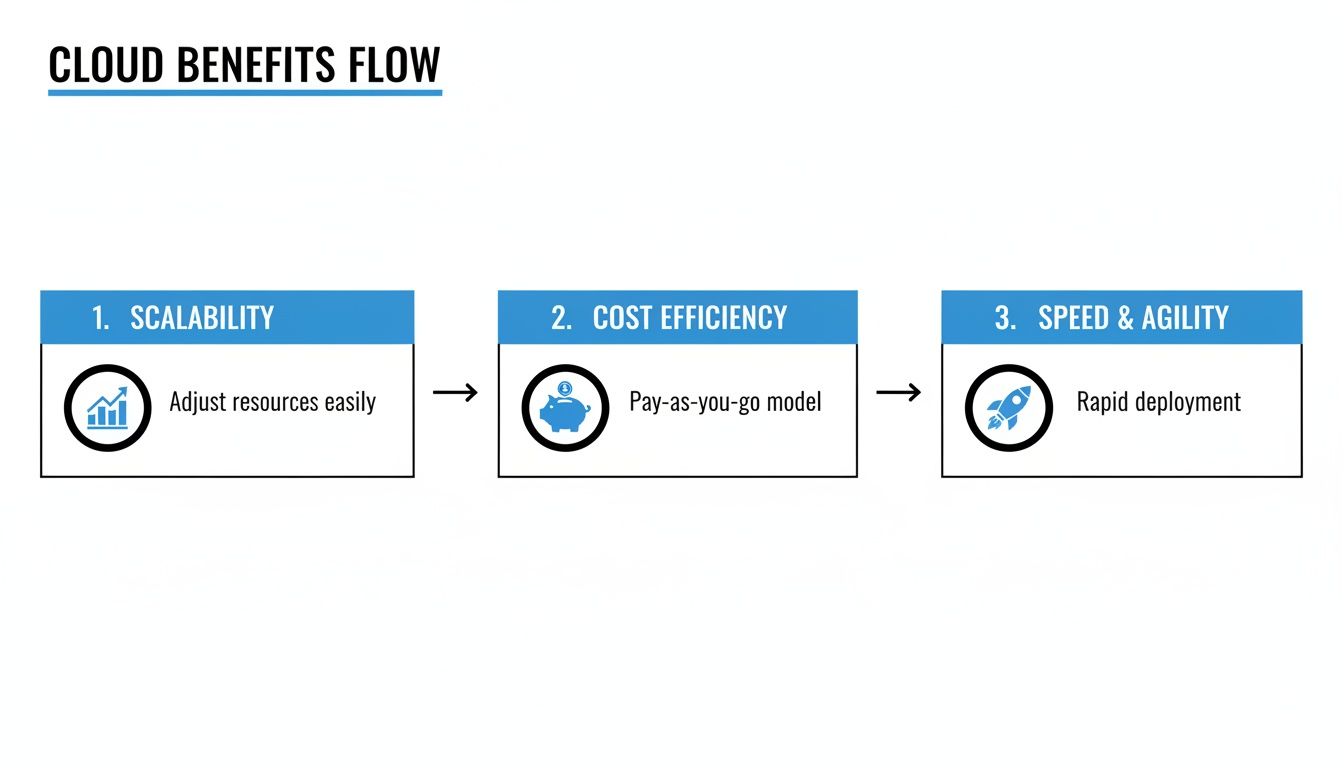
As the chart shows, using the cloud lets Zenith Wear handle unexpected spikes in data without buying more servers, and they can build and test new ideas far faster than they could with old-school on-premise systems.
Step 3: Cleaning and Prepping the Data with ELT
With the raw data loaded, Zenith Wear uses an ELT (Extract, Load, Transform) pattern. This means the intense work of cleaning and preparing the data happens right inside their powerful data warehouse, which is designed for this kind of task. This is where the magic really begins.
Their data team runs a few transformation scripts to get the data ready for their AI model:
- Standardization: They start by combining the data from all three sources into a single, clean table with consistent columns like
source,timestamp, andfeedback_text. - Cleaning: Next, they remove irrelevant "noise," like email signatures from support tickets or spammy mentions from Twitter. They also run routines to correct common typos.
- Enrichment: Finally, they connect the feedback data with customer purchase histories to add crucial context. Now they can see if a negative review came from a first-time buyer or a loyal, high-value customer.
This clean, enriched dataset is the high-quality fuel the AI model needs to produce accurate results.
Step 4: Fueling the Machine Learning Model
The last step is to connect this clean data to a machine learning model. Zenith Wear uses a natural language processing (NLP) model trained for sentiment analysis. The pipeline is set up to automatically feed the feedback_text column from the warehouse directly into this model.
The AI gets to work, reading each comment and assigning it a sentiment score: positive, negative, or neutral. A more advanced model could even pinpoint specific topics like "shipping delays" or "sizing issues." The model's output—the analysis—is then written back into the data warehouse.
Expert Opinion: "The pipeline doesn't end when the data is clean. The true value comes from creating a continuous loop where prepared data feeds the AI, and the AI's insights are fed back into the business, creating a cycle of constant improvement. That's how you turn data into a real competitive advantage."
The result? A powerful dashboard that gives the Zenith Wear team a real-time pulse on customer happiness. They can instantly see if a new product launch is a hit, spot a surge in shipping complaints, or identify their most passionate brand advocates.
This entire journey, from scattered raw data to actionable AI-driven insights, is powered by a smart cloud-based data integration strategy. This kind of foundation is also critical for more advanced AI, and you can see how it supports next-generation technology by exploring these vector database use cases.
Choosing the Right Cloud Data Integration Tool
Stepping into the world of cloud-based data integration tools can feel a bit overwhelming, like walking into a massive electronics store. Everything looks shiny and powerful, but how do you pick the one that will actually solve your problems? The market is definitely crowded, but finding the right fit doesn't have to be a headache.
Think of it less like a technical deep dive and more like a practical shopping trip. Instead of getting bogged down by jargon, let’s focus on a few key questions that will point you toward the perfect fit for your team, your budget, and your goals.
Do the Connectors Match Your Tech Stack?
First things first: does the tool actually connect to the apps you already use? Pre-built connectors are the secret sauce here. They’re like universal adapters that let you plug your data sources—like Salesforce, Google Analytics, or your Shopify store—directly into your integration platform with just a few clicks.
Without them, you're stuck asking developers to build custom connections from scratch, which is both slow and expensive. A rich library of connectors is a massive time-saver. Before you even book a demo, make a list of your most critical data sources and check if the platform supports them right out of the box.
A common mistake is just assuming every tool connects to everything. Do yourself a favor and double-check that your specific, must-have applications are on their list. This one step can save you months of headaches down the road.
Is the Interface Built for Your Team?
Next, think about who will actually be using this tool day-to-day. Is your team full of expert data engineers who love to code, or is it a marketing group that needs to move fast without writing a single line? The user interface is a huge factor.
- No-Code/Low-Code Platforms: These tools are all about visual, drag-and-drop interfaces. They empower non-technical users to build and manage their own data pipelines, which is a massive win for speed and agility.
- Developer-Focused Platforms: These offer deep, granular control and endless customization but absolutely require coding knowledge (like SQL or Python). They're incredibly powerful but have a much steeper learning curve.
Imagine you're a small business owner who just needs to sync customer data from your e-commerce site to your email marketing tool. A visual, no-code platform is your best friend. It lets you solve that problem in an afternoon, not in a multi-week development project.
How Does the Pricing and Scalability Work?
Finally, let's talk about money and growth. Pricing models in this space vary a lot, from consumption-based plans to flat-rate annual subscriptions. You need to get clear on how you'll be charged. Does the cost go up with the number of users, the volume of data you move, or the number of connectors you use?
More importantly, think about the future. A tool that seems cheap today could become a huge expense as your business grows and your data volume explodes. You're looking for a platform that can scale with you. Often, a flexible, pay-as-you-go model provides the best balance, ensuring you aren't overpaying for capacity you don't need but can easily handle success when it comes. Your ideal cloud-based data integration tool should be a partner in your growth, not a bottleneck holding you back.
Cloud Integration Tool Selection Checklist
Choosing the right tool is especially critical when your goal is to feed high-quality data into AI and machine learning models. The wrong choice can introduce data quality issues, delays, or scalability problems that can undermine your entire AI strategy. This checklist is designed to help you think through the most important criteria from an AI-first perspective.
| Evaluation Criteria | What to Look For | Why It Matters for AI Projects |
|---|---|---|
| Connector Coverage | Extensive library of pre-built connectors for all your sources (SaaS, DBs, files) and destinations (data warehouses, data lakes). | AI models are only as good as the data they're trained on. You need seamless access to diverse, comprehensive datasets without engineering bottlenecks. |
| Data Transformation | Does the tool support in-flight transformations (ETL) or push-down transformations in the warehouse (ELT)? Are they visual or code-based? | Feature engineering is a core part of ML. The ability to easily clean, normalize, and enrich data within the pipeline is crucial for model performance. |
| Scalability & Performance | Elastic, serverless architecture. Can it handle massive data volumes and sudden spikes in traffic without manual intervention? | Training AI models often requires processing terabytes of data. The platform must scale automatically to handle large batch jobs and real-time streams. |
| Latency & Data Freshness | Support for real-time streaming, Change Data Capture (CDC), and flexible scheduling (e.g., every minute). | For applications like fraud detection or real-time personalization, models need the most up-to-date data possible. High latency makes these use cases impossible. |
| User Experience | Intuitive UI (no-code/low-code) for data analysts and citizen integrators, plus robust SDKs/APIs for data engineers. | Democratizing data access allows more people on your team to prepare data for AI experiments, accelerating the development lifecycle. |
| Security & Governance | Certifications (SOC 2, HIPAA, GDPR), column-level security, data masking, and detailed audit logs. | AI projects often involve sensitive data. Strong security and governance are non-negotiable for maintaining compliance and protecting privacy. |
| Pricing Model | Transparent, consumption-based pricing that aligns with your usage patterns. Avoid unpredictable costs that penalize growth. | AI workloads can be bursty. A flexible pricing model ensures you only pay for what you use, making large-scale data processing more cost-effective. |
Ultimately, the best tool is the one that fits your team's skills, your existing tech stack, and your business ambitions. Use this framework not just as a checklist, but as a conversation starter to align your technical and business teams on what truly matters for your data integration strategy.
Keeping Your Data Safe in the Cloud

Let's be honest, the thought of moving your most valuable data to a third-party server can feel a little scary. But here's the good news: with modern cloud based data integration, your information is often far safer than it would be sitting in your own server room.
Cloud security isn't about giving up control. It’s about partnering with providers who have invested billions in building world-class security infrastructures—far more than most individual companies could ever afford. Let’s break down how this partnership keeps your data locked down tight.
Sealing Your Data in a Digital Envelope
At the heart of cloud security is data encryption. Think of it like sealing your information inside a military-grade digital envelope that can only be opened by someone with the right key. This happens at two crucial points.
- Encryption in Transit: This protects your data while it's on the move, traveling from your systems into the cloud. It’s the digital equivalent of an armored truck, preventing anyone from peeking at the contents on their way.
- Encryption at Rest: This keeps your data secure after it has arrived and is stored in a cloud database or data warehouse. This is the impenetrable vault where the armored truck unloads its cargo.
Leading providers like AWS, Google Cloud, and Azure handle this automatically, applying sophisticated encryption standards to shield your data at every step.
Controlling Who Gets the Keys
Strong encryption is only half the battle; you also need to manage who can access the data. This is where access controls and Identity and Access Management (IAM) systems come in. We’re talking about much more than a simple password.
Modern IAM lets you set incredibly specific permissions. For example, you could allow a marketing analyst to view aggregated sales figures but block them from seeing any personally identifiable information (PII). A data scientist, on the other hand, might get access to that PII to train a model but be prevented from ever deleting it.
This approach is called the "principle of least privilege." It's a fancy way of saying you give people access only to the information they absolutely need to do their jobs, and nothing more. It’s a foundational concept in cloud security that dramatically reduces your risk.
Staying on the Right Side of Regulations
Trying to keep up with data privacy laws like GDPR and HIPAA can feel like a full-time job. Thankfully, the major cloud platforms are built from the ground up with compliance in mind. They go through constant third-party audits and provide tools designed to help you meet your legal obligations.
While these certifications give you a massive head start, compliance is a shared responsibility. The provider secures the infrastructure, but you’re still responsible for configuring your services and managing who has access. It’s always a good idea to build a solid framework by following established data governance best practices.
When you combine the provider's robust platform with your own smart policies, you create a fortress for your data.
Common Questions About Cloud Data Integration
As you get started with cloud-based data integration, a few common questions always seem to come up. Let's tackle them head-on to clear up any confusion and get you ready for what’s next.
What’s the Difference Between Data Integration and ETL?
This is a great question! It helps to think of data integration as the overall goal—the big-picture strategy of bringing data from different places into one unified view.
ETL (Extract, Transform, Load), on the other hand, is just one of the methods you can use to achieve that goal. It's a specific technique in the data integration toolbox, sitting right alongside other approaches like ELT, data streaming, and CDC. So, ETL is a type of data integration, but not all data integration is ETL.
Is Cloud Integration Really Cheaper Than On-Premise?
For the vast majority of companies, the answer is a big "yes." While you swap a one-time capital expense for an ongoing operational one (your subscription), you get to skip the massive upfront costs of buying servers, networking equipment, and paying for the power and people to keep it all running.
Expert Opinion: "The real financial magic of the cloud is its pay-as-you-go model. You stop paying for hardware that's just sitting there idle. That elasticity is what makes cloud-based data integration so incredibly cost-effective, especially for growing businesses that can't afford wasted resources. You're not just saving money; you're converting a fixed cost into a variable one that scales with your success."
How Long Does It Take to Set Up a Cloud Pipeline?
This is where the cloud truly shines. With today's easy-to-use tools, you can often get a simple data pipeline up and running in a single afternoon. Forget waiting weeks for IT to set up a server—you can connect a source like Salesforce to a data warehouse like Google BigQuery in less than an hour.
Of course, a massive, enterprise-wide integration project will still be a significant undertaking. But the barrier to getting started has been lowered dramatically, and that speed is a huge competitive advantage for any team.
Ready to explore the world of AI with confidence? YourAI2Day is your go-to resource for the latest news, in-depth guides, and practical tools that make artificial intelligence accessible to everyone. Dive deeper and stay ahead of the curve at https://www.yourai2day.com.