Your Guide to AI Customer Service Chatbots
Ever found yourself wondering what an AI customer service chatbot really is? Don't worry, you're not alone! Many guides can feel a bit technical, but we're going to break it down in a friendly, conversational way. Think of an AI chatbot as your most dedicated employee—one that never sleeps, never takes a break, and can instantly answer questions, fix problems, and guide users, any time of day or night.
What Are AI Customer Service Chatbots?
Let's break this down without the tech-speak. Imagine you hired a digital librarian for your business. This librarian has devoured every single piece of information you have: every product manual, every support article, every FAQ. When a customer asks a question, this librarian doesn't just point them to a section of the library; it pulls the exact book, opens it to the right page, and highlights the precise sentence they need.
That's an AI customer service chatbot in a nutshell.
Its main job is to handle conversations automatically and give people the help they need, right now. No more waiting on hold or digging through a clunky help center. Customers just type their question and get an answer in seconds. And we're not talking about those old-school, rigid bots with canned responses.
Here's a great way to picture it: your AI chatbot is a friendly, dedicated assistant, always on standby to help.
This image really gets to the heart of what a modern chatbot feels like—not just a piece of software, but an intelligent and approachable part of your customer experience.
How They Understand and Learn
So, what’s the "AI" magic behind all this? It's actually pretty cool. Today’s chatbots use advanced tech like Natural Language Processing (NLP). This allows them to grasp the intent behind what someone is asking, not just the specific words they use. So, if a customer types "my order where is it," the bot understands they're asking for a shipping update. It can handle typos, slang, and even confusingly worded questions without skipping a beat.
At its core, understanding what an AI customer service chatbot is starts with a clear explanation of an AI chatbot for customer support. These aren't simple rule-based programs; they are complex systems that get smarter with every conversation. The most sophisticated bots are powered by technology similar to what you'd find in a large language model, which is why they can generate such natural, context-aware replies.
Expert Opinion: According to tech analyst Sarah Jennings, "The goal isn't to trick customers into thinking they're talking to a human. It's to provide a faster, more efficient path to the right answer, freeing up human agents for the complex issues where empathy and critical thinking are truly needed."
And it’s working. Today, chatbots are involved in roughly 95% of all customer service interactions worldwide. These AI systems find answers three times faster on average than traditional support methods, cutting down response times by as much as 90%. The numbers don't lie—they're making a huge impact.
So, what can they actually do? These bots are perfect for handling tasks like:
- Answering common questions like, "What are your store hours?" or "Do you ship to Canada?"
- Walking a customer through the steps of making a purchase or setting up a new product.
- Gathering essential details from a customer (like an order number) before handing the conversation over to a human agent.
Ultimately, they create a much smoother journey for your customers and make your support team far more effective.
AI Chatbot vs Traditional Support At a Glance
To really see the difference, let's put them side-by-side. The table below highlights how AI chatbots stack up against conventional, human-only support channels. It makes the benefits super clear, especially for anyone new to this.
| Feature | AI Chatbot | Traditional Support |
|---|---|---|
| Availability | 24/7, 365 days a year | Limited to business hours |
| Response Time | Instant (seconds) | Varies (minutes to hours) |
| Cost Per Interaction | Pennies | Several dollars |
| Scalability | Handles unlimited chats | Limited by agent headcount |
| Consistency | 100% consistent answers | Varies by agent |
| Data Collection | Gathers data from every chat | Manual logging required |
| Language Support | Easily multilingual | Requires hiring multilingual staff |
As you can see, the advantages are clear. While nothing can replace human empathy for complex issues, AI chatbots offer unmatched speed, availability, and efficiency for the vast majority of customer inquiries.
Why Smart Businesses Are Adopting Chatbots
It’s obvious by now that AI customer service chatbots aren't just a fleeting tech trend. They represent a real, fundamental shift in how businesses talk to their customers. But what’s driving so many companies, from scrappy startups to global enterprises, to get on board? It all boils down to three core benefits that have a direct, measurable impact on the bottom line.

To put it plainly, AI chatbots help businesses save money, make more money, and create happier, more loyal customers. Let’s break down exactly how they pull that off.
Slash Costs and Boost Team Efficiency
One of the first things businesses notice after implementing an AI chatbot is the drop in operational costs. Just think about the simple, repetitive questions your support team fields all day long: "Where's my package?" "What's your return policy?" "When are you open?"
These questions are valid, but they don't require a human touch. A chatbot can field a huge volume of these common queries all at once, 24/7, without ever getting tired or needing a coffee break.
This instantly frees up your human agents to tackle what they’re really there for: solving complex, sensitive problems that demand genuine empathy and creative thinking. Instead of resetting another password, they can untangle a complicated billing issue or guide a frustrated customer through a tricky situation. For example, your agent could spend 20 minutes helping a customer choose the perfect camera for their safari trip, instead of answering five "Where is my order?" questions.
The numbers back this up. Chatbots have been shown to reduce customer service costs by up to 30%, which adds up to roughly $8 billion in savings for businesses every year. You can dig into more chatbot statistics to see the full scope. This isn't just about cutting expenses; it's about investing your team's brainpower where it truly counts.
Expert Opinion: As small business consultant Maria Garcia puts it, "Even a solo entrepreneur can feel like they have a full support team. A well-trained chatbot gives a small business the power to provide instant, professional service that rivals much larger competitors, leveling the playing field in a huge way."
Drive Revenue Around the Clock
Beyond just saving money, AI chatbots have become powerful revenue-generating machines. Think about having a smart, friendly sales assistant working on your website every minute of every day, ready to guide potential customers.
That's the role a good chatbot can fill. Here’s how:
- Product Recommendations: An e-commerce bot can act like a personal shopper. For example, a customer might type, "I need a dress for a summer wedding." The bot can ask follow-up questions about color and style, then suggest the perfect products.
- Lead Qualification: On a B2B site, a chatbot can ask a few qualifying questions to identify hot leads and then book a demo with a sales rep right then and there.
- Abandoned Cart Recovery: If someone leaves items in their shopping cart, the bot can pop up to ask if they have questions, offer help, or even present a small discount to seal the deal.
This kind of proactive engagement converts casual browsers into committed buyers. It’s no wonder that 58% of businesses using chatbots have seen a tangible increase in sales.
Build Loyalty with Instant Gratification
We live in an on-demand world, and customers expect answers now. Forcing them to wait for an email reply or sit on hold is a great way to send them straight to your competitors.
AI chatbots solve this problem by delivering instant support whenever a customer needs it. This 24/7 availability is a massive trust-builder. When a customer knows they can get a reliable answer at 10 PM on a Sunday, they feel seen and supported. For example, if a customer is struggling to use a new software feature on a weekend, an AI bot can provide immediate step-by-step instructions, preventing frustration from building up.
That positive, frictionless experience is often the very thing that turns a first-time buyer into a loyal advocate for your brand.
Seeing AI Chatbots in the Wild
It’s one thing to talk about what AI chatbots can do, but it’s another thing entirely to see them solving real-world business headaches. These bots aren’t just a futuristic idea; they're already on the ground, helping companies of all sizes work smarter.
Let's move past the theory and dive into a few stories of businesses that put these tools to the test and saw incredible results.
This flow chart gives you a great visual of the typical journey—from pinpointing a customer service bottleneck to implementing a bot that delivers measurable wins.
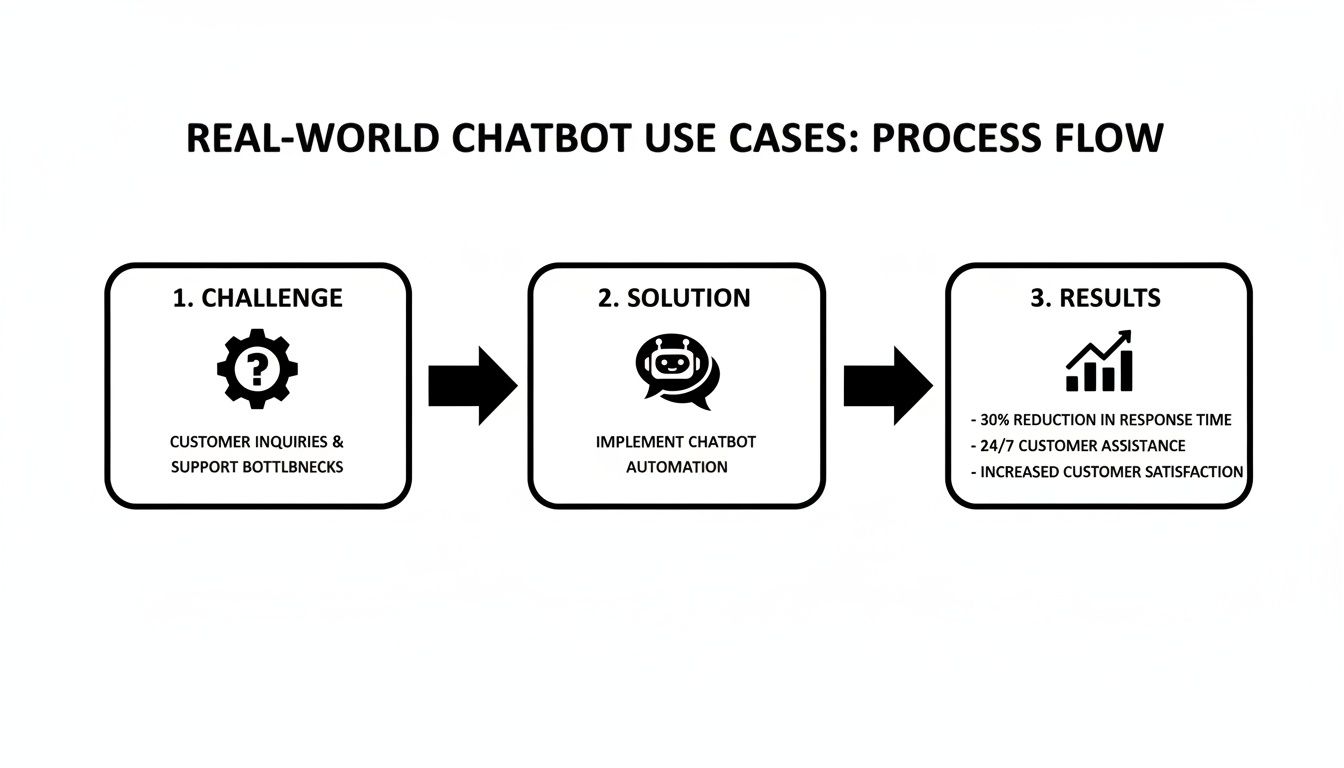
As you can see, it's a clear and repeatable path that just about any business can follow.
E-commerce: Finding the Perfect Fit
The Challenge: A popular online clothing store was getting swamped. Their small support team was spending the entire day answering the same three questions over and over: "Where's my order?", "How do I start a return?", and "Do you have this in blue?" This hamster wheel of repetitive tickets left them zero time to offer the kind of high-touch styling advice that actually drives sales and loyalty.
The Chatbot Solution: They rolled out an AI chatbot on their website and connected it directly to their shipping and inventory systems. Suddenly, it could give customers instant, personalized answers.
- Order Tracking: Customers could just type "track my package," pop in their order number, and get real-time shipping updates on the spot.
- Gift Finding: The bot became a personal shopper. It would ask things like, "Who are you shopping for?" and "What's your budget?" before recommending the perfect gift.
- Return Processing: It could kick off the entire return process automatically, sending the right forms and shipping labels to the customer without a human agent ever lifting a finger.
The Results: The impact was immediate and huge. Within just three months, the chatbot was handling 65% of all incoming customer questions on its own. This freed up the human team to focus on more complex, high-value conversations, which helped drive a 15% increase in average order value from customers who got personalized help.
For an e-commerce brand, a chatbot isn't just a support tool; it's a tireless sales associate. It works 24/7 to remove friction from the buying process, turning simple questions into completed sales.
Travel: Booking Made Effortless
The Challenge: A fast-growing travel site had a conversion problem. Potential customers were dropping off mid-search, frustrated by the clumsy interface. They struggled to compare flight options, find hotels in their price range, or make sense of complicated cancellation policies. The whole experience felt overwhelming, and their bounce rate proved it.
The Chatbot Solution: They launched a sophisticated AI chatbot designed to act like a full-service travel agent. The idea was simple: let people plan and book an entire trip without ever leaving the chat window.
Key Features:
- Conversational Search: Instead of clunky forms, users could just type, "Find me a cheap flight to Paris next weekend." The bot would find the best deals and present them with easy-to-use buttons.
- Bundled Bookings: After booking a flight, the bot would naturally ask, "Need a hotel near the Eiffel Tower?" It kept the entire trip's context in a single, seamless conversation.
- 24/7 Support: It could instantly clarify baggage fees or change policies, which went a long way in building trust and helping customers book with confidence.
The Results: The new chatbot completely changed the user experience for the better. The company saw a 25% increase in completed bookings and a whopping 40% reduction in abandoned searches. Customer satisfaction scores soared, with users praising how fast and easy the new system was.
These examples are just the tip of the iceberg, but they show how flexible these AI tools are. With the right strategy, they can be adapted to solve the unique challenges of almost any industry.
Your First AI Chatbot Implementation Plan
Ready to bring an AI assistant onto your team? That's a great move. Getting your first AI customer service chatbot up and running is far more doable than you might think. It’s less about wrestling with complicated code and more about starting with a clear, practical plan.
Let's walk through the essential steps to launch a bot that starts delivering value from day one.

The whole process kicks off not with technology, but with a simple question that will shape every decision you make down the line.
Start with Your Biggest Headache
Before you even glance at a platform or feature list, ask your team this one critical question: What's the single biggest, most repetitive problem we need to solve? Forget about building a bot that can do everything at once. Your first goal is to pick the low-hanging fruit—those tedious questions that clog up your support queue every single day.
Is it a constant stream of "Where's my order?" tickets? Or maybe it's the never-ending questions about your return policy. Pinpointing this core pain gives your chatbot a clear purpose. A bot that does one thing brilliantly is infinitely more valuable than one that does ten things poorly.
Expert Opinion: "The most successful chatbot projects always start small," advises AI strategist David Chen. "Pick a high-volume, low-complexity task, automate it flawlessly, and then expand from there. The goal is to deliver immediate value, not to try and boil the ocean on your first attempt."
Gather Your Bot's Brain Food
An AI chatbot is only as smart as the information it's given. Think of this step as gathering the raw materials to train your new digital assistant. The good news? You're already sitting on a goldmine of this data.
Here’s what to collect for your bot's knowledge base:
- Existing FAQs: Your frequently asked questions page is the perfect starting point.
- Help Desk Tickets: Dig into the last few months of support tickets. What are the most common issues, and how did your team solve them?
- Canned Responses: Pull together the saved replies and templates your agents use for common questions.
- Product Information: Make sure your bot has access to all the important details, specs, and user guides for your products.
This information becomes the foundation of your bot’s intelligence. It’s what allows it to answer questions accurately and sound like a seasoned expert from its very first conversation.
Choose the Right Chatbot Platform
Now it’s time to pick your tool. The market is full of options, but they generally fall into a few key categories. For anyone new to this, just knowing the different types is half the battle. If you want a deeper look, our guide on how to build an AI chatbot has you covered.
Choosing Your First Chatbot Platform
For most businesses just getting started, the choice of platform can feel overwhelming. This table breaks down the main options to help you find the right fit based on your team's technical skills, budget, and how much you want to customize.
| Platform Type | Best For | Technical Skill Required | Typical Cost |
|---|---|---|---|
| No-Code Builders | Small businesses and beginners looking for a quick and easy setup. | None. Uses drag-and-drop interfaces and visual workflows. | $-$$ |
| Low-Code Platforms | Teams with some technical know-how who want more customization. | Basic. May require simple scripting or API knowledge. | $$-$$$ |
| Custom Development | Large enterprises with unique needs and dedicated developer resources. | Advanced. Requires coding and AI/ML expertise. | $$$$ |
For most people dipping their toes in for the first time, a no-code builder is the ideal starting point. These platforms are designed to be incredibly user-friendly, letting you get a genuinely helpful AI chatbot live in a matter of hours, not weeks.
Connect, Test, and Launch
With your bot built, the last few steps are all about integration and refinement.
- Connect Your Tools: Link your chatbot to the other software you rely on, like your CRM or email platform. This transforms your bot from a simple Q&A machine into an active helper that can update customer records or add someone to a newsletter.
- Internal Testing: Before your bot ever talks to a real customer, let your own team try to break it. Encourage them to ask it weird, confusing, and tricky questions. This internal "stress test" is the best way to catch and fix glitches early.
- Soft Launch (Beta Test): Finally, roll out the chatbot to a small, hand-picked group of actual customers. A beta test like this shows you how it performs in the wild and gives you priceless feedback before you flip the switch for everyone.
By following this straightforward plan, you can confidently launch an AI chatbot that lightens your team's load and gives your customers the instant, helpful support they love.
How to Design Conversations Customers Enjoy
A brilliant AI chatbot that sounds like a clunky, generic robot is a huge missed opportunity. The real magic isn't just in the technology; it's in designing conversations that feel genuinely helpful and natural. The goal is to craft an experience that makes your customers feel heard and guides them to an answer without any friction.
It all begins by giving your bot a distinct voice that perfectly reflects your brand. Are you playful and casual, or more formal and buttoned-up? A consistent tone makes the chatbot feel like a real part of your team, not some third-party software you just bolted on.
Define Your Chatbot's Personality and Voice
Before you write a single line of dialogue, you need to decide who your chatbot is. Giving it a name and a simple persona makes the writing process a whole lot easier and keeps the final product from feeling disjointed. This isn't about trying to trick people into thinking it's human; it's about creating a consistent, predictable, and pleasant interaction.
Think about these key elements:
- Tone: Is it friendly, professional, witty, or purely informational? A chatbot for a bank will (and should) sound completely different from one for a streetwear brand. For example, the bank bot might say, "Good morning. How may I assist you with your account today?" while the fashion bot might say, "Hey there! What can I help you find? ✨"
- Language: Will it use emojis and casual phrases, or stick to formal grammar? Make sure this lines up with how your customers actually talk.
- Purpose: Be crystal clear about its job. Is it a helpful guide, a quick troubleshooter, or a personal shopping assistant?
By setting this personality upfront, you ensure every response—from a simple "hello" to a complex troubleshooting step—feels consistent and on-brand.
Keep It Simple and Guide the User
Clarity is the golden rule of chatbot dialogue. Steer clear of industry jargon, long paragraphs, and overly complicated sentences. The whole point is to make it as easy as possible for the customer to get what they came for. Short, scannable messages always win.
One of the best ways to make conversations feel effortless is by using interactive elements. Instead of forcing a customer to type out a long, detailed question, you can guide them with pre-set options.
Expert Opinion: UX designer, Elena Petrova, advises, "The best chatbot designers lead with help, not deception. Never pretend the bot is human. Instead, use its strengths—speed and precision—to get the customer an answer faster than any other channel could."
Think about how you can create a smoother conversational flow:
- Buttons: Offer quick-reply buttons for common requests, like "Track my order" or "Check account balance."
- Menus: When a customer's query is a bit broad, present a few clear choices using numbered or bulleted lists. For example, "What can I help you with? 1. A recent order, 2. Our return policy, 3. Product questions."
These tools cut down on typing and prevent the kind of frustrating misunderstandings that happen when a bot can't parse what someone wrote. Customer expectations have definitely shifted here. A striking 62% of consumers say they'd rather talk to a bot if it means avoiding a long wait for a human agent, and 64% name 24/7 availability as the single biggest benefit. You can dig into more of these AI chatbot statistics to see the full picture.
Plan for a Graceful Human Handoff
Let's be realistic: no AI customer service chatbot can solve every single problem. And that’s fine. The most important piece of your conversation design is having a seamless, frustration-free plan for when the bot hits its limit. A smooth handoff to a human agent isn't just a nice-to-have; it's absolutely essential.
The process needs to be transparent. The bot should say something clear like, "I'm not sure how to help with that, but I'm connecting you to a team member who can." Crucially, it must pass the entire conversation history to the agent. Making a customer repeat themselves is one of the fastest ways to turn a minor issue into a major complaint. That one detail can be the difference between a happy customer and one who is ready to leave for good.
The Future of AI in Customer Support
What we're seeing with AI chatbots in customer service today is really just the opening act. The technology is sprinting forward so fast that the bots of tomorrow will make current ones seem quaint, like simple calculators. We're on the cusp of moving beyond just answering basic questions and into an era of truly intelligent, proactive, and deeply personal customer relationships.
This isn't just about better software; it's about creating experiences that feel less like talking to a program and more like consulting a trusted expert who actually knows you.
A Shift to Hyper-Personalized Assistance
Imagine an AI that does more than just pull up your last order. The next wave of bots will have a complete picture of your history with a brand—every purchase, every past support ticket, even how you browse their site. This depth of understanding is what will unlock hyper-personalized support.
For instance, a chatbot for a camera store won't just confirm a new model is in stock. It will know you're a photographer who loves landscapes and suggest a specific wide-angle lens that pairs perfectly with the camera body you already own. It’ll be able to offer genuinely useful, tailored advice, turning a routine support chat into a valuable consultation.
Proactive Service That Solves Problems Early
Why wait for a customer to get frustrated and reach out? The future is proactive. By plugging into a company's core systems—from logistics to billing—these bots will spot potential snags and step in before the customer even knows there's an issue.
Think about how that could work:
- A bot detects a shipping delay for your package. It instantly messages you with the new ETA and a discount code for the inconvenience.
- Your software subscription is set to renew at a higher rate. A bot could ping you a week beforehand to explain the change and walk you through different plan options.
This completely flips the script on customer service. It transforms a reactive, often negative interaction into a positive, brand-affirming moment.
Expert Opinion: As futurist Dr. Kenji Tanaka notes, "The next frontier isn't about bots that just solve queries, but ones that can anticipate them. Tighter integration with a company's data will allow AI to proactively reach out when it detects an issue, like a delivery delay, before the customer even has to ask."
Conversations That Feel Effortlessly Human
Maybe the most exciting change will be how much more natural chatbot conversations will become. Thanks to huge leaps in generative AI and voice technology, the line between chatting with a bot and a human is going to get very blurry. We're leaving the slightly clunky, keyword-driven interactions behind for fluid, multi-turn dialogues that can grasp nuance and even sentiment.
Customers are already starting to expect this. By 2026, 56% of consumers believe chatbots will be capable of holding natural conversations. What's even more telling is that 68% of consumers expect bots to have the same expertise as a highly skilled human agent. As you can see from these AI chatbot insights, just being functional is no longer good enough. The future is about AI customer service chatbots becoming true digital agents, ready to help with intelligence, personality, and proactive care.
Common Questions About AI Chatbots
Diving into the world of AI customer service chatbots always brings up a lot of questions. It’s a big step for any business, so it's only natural to wonder about the practical details before you commit. Let's walk through some of the most common queries I hear from business owners who are just getting started.
This isn’t just about the tech; it’s about making a smart, informed decision for your company.
How Much Do AI Chatbots Cost to Set Up?
This is usually the first question on everyone's mind, and the honest answer is: it really depends. For a small business website, you can find simple, no-code chatbot builders that cost anywhere from a small monthly fee to a few hundred dollars. These are fantastic for handling basic FAQs and capturing leads right out of the box.
On the other end of the spectrum, a fully custom AI assistant integrated with multiple complex systems like your CRM and inventory management is obviously a much bigger investment. The key is to start with a clear budget and find a solution that solves your most pressing problem first, rather than trying to boil the ocean.
How Long Does It Take to Go Live?
You might be surprised by how fast you can actually get a chatbot up and running. With many of today's user-friendly platforms, you could have a functional bot live on your site in a single afternoon. The initial setup is often that quick.
What takes more time is the refinement—that’s where the real magic happens. This involves training the bot with your specific business data, designing conversational flows that don't feel robotic, and testing it thoroughly. So while a simple launch can happen in hours, I always tell clients to plan for a few weeks to really polish the experience and turn it into a valuable asset. For more detailed discussions, practical tips, and answers to frequently asked questions about AI chatbots, you can explore a range of insights and answers on their blog.
Are Chatbots Actually Effective for Sales?
Absolutely. Modern chatbots have become surprisingly powerful sales tools, especially when connecting with younger audiences. Think about it: roughly 40% of Millennials chat with bots daily. Even more telling, a remarkable 67% of Millennial and Gen Z shoppers are perfectly willing to buy things directly from a chatbot.
Customers just appreciate the speed. In fact, 74% of customers say they prefer bots for simple inquiries because they get an instant answer without waiting.
What About Data Security and Privacy?
This is a huge—and completely valid—concern. Any reputable chatbot provider will use strong encryption to protect the information shared in a conversation. It's absolutely essential to choose a platform that is compliant with data protection regulations like GDPR or CCPA, depending on where your customers live.
As you start using these tools, it's smart to stay on top of the broader conversation around artificial intelligence privacy concerns to make sure you're always following best practices. Ultimately, by choosing a secure platform and being transparent with your users about how their data is handled, you can build a chatbot experience that is both helpful and trustworthy.