Master NLP Using Python: Build Your First AI Model
You’re probably here because you have text piling up somewhere. Product reviews. Support tickets. Survey responses. Comments from users that nobody has time to read carefully.
That’s where nlp using python gets practical fast. Instead of treating text as a messy blob, you can turn it into something a model can analyze, score, and learn from. A beginner project like sentiment analysis is a great place to start because the result feels concrete. You feed in a sentence, and your code tells you whether the tone is positive or negative.
I’ll walk you through this like I would with a junior teammate starting their first NLP project. We’ll build one connected workflow, not a pile of disconnected snippets. By the end, you’ll understand how to go from raw text to a working sentiment model, and just as important, why each step matters.
Why Your Next Project Should Involve NLP
A common first NLP problem looks like this. A small business collects reviews across its website, email inbox, and social media. The owner knows there’s useful feedback in there, but reading everything manually takes too long, and quick scanning misses patterns.
NLP gives you a way to process that text at scale. Instead of manually sorting comments into “happy,” “angry,” and “confused,” you can build a system that does the first pass for you. That won’t replace judgment, but it will save time and surface signals worth investigating.
The field itself has been around for decades, starting with symbolic approaches in the 1950s. What changed is the quality of modern tools. Deep learning advances in the 2010s and 2020s made it possible for modern applications to achieve over 90% accuracy on sentiment analysis tasks and power up to 70% of new conversational AI deployments globally according to this NLP history overview.
If you want a gentle conceptual refresher before touching code, YourAI2Day has a solid explainer on what natural language processing is. It’s useful if terms like tokenization or embeddings still feel fuzzy.
What makes NLP worth learning
A sentiment model is a nice starter project because it connects directly to business questions:
- Customer feedback triage helps you spot unhappy users before issues pile up.
- Review monitoring lets you scan for common complaints or praise themes.
- Support prioritization can flag frustrated messages that need faster attention.
- Chatbot improvement becomes easier when you study the language people use in conversations and design for smarter chatbot interactions.
Why Python is the right entry point
Python removes a lot of friction for beginners. You get simple syntax, strong libraries, and a huge amount of example code in the wild.
Python also gives you room to grow. You can start with a basic sentiment scorer, then move into faster preprocessing with spaCy, and later try transformer models from Hugging Face without switching languages or rewriting your whole workflow.
You don’t need to understand every NLP concept before you build something useful. Start with one real task, then let the project teach you the vocabulary.
That’s the approach we’ll use here.
Setting Up Your NLP Workbench
A first NLP project often goes off track for a boring reason. The model is fine, but the environment is messy. One package installs a different version than another, spaCy will not load its language model, and half your time disappears into setup problems instead of learning how text processing works.
That is why a clean workbench comes first. For this guide, we are building one end-to-end project, a sentiment analysis model, so it helps to keep the setup simple and stable from day one.
Create a clean project folder
Open a terminal and run:
mkdir nlp-sentiment-project
cd nlp-sentiment-project
python -m venv venv
Activate it:
# macOS / Linux
source venv/bin/activate

# Windows
venvScriptsactivate
Then install the tools we’ll use:
pip install pandas spacy scikit-learn textblob transformers torch
python -m spacy download en_core_web_sm
If you are early in your Python journey, a quick overview of Python libraries for data analysis can help you see where pandas and scikit-learn fit relative to the rest of the ecosystem.
Why use venv? Because NLP projects usually combine several libraries, and each library brings its own dependencies. A virtual environment gives this sentiment project its own sandbox, so experimenting with one package does not break another project on your machine.
Learn the three terms that confuse most beginners
The jargon in NLP often feels worse than the code. Getting these three terms straight early makes the rest of the project easier to follow.
- Tokenization splits text into smaller pieces, usually words or sentences.
- Stop words are common words like “the” or “is” that often add little signal for a task.
- Lemmatization reduces a word to its base form, so “running” becomes “run.”
Preprocessing works like ingredient prep before cooking. Raw text starts out mixed together and inconsistent. Tokenization cuts it into usable pieces. Stop word removal clears out some low-value filler. Lemmatization groups related word forms so your model is less likely to treat “run” and “running” as unrelated signals.
That last step can confuse beginners, so here is the practical reason for it. A sentiment model does not care that “liked” and “like” have different endings. It cares that both words point toward a similar opinion.
Why preprocessing matters before modeling
Text data arrives messy. Reviews include punctuation, repeated words, slang, typos, emojis, and formatting that humans can ignore but models cannot. If you skip cleanup, your classifier spends part of its effort learning accidental patterns instead of sentiment.
The practical takeaway is simpler: cleaner input gives your model a better chance to learn meaningful patterns instead of noise.
For this project, that matters because we want to understand why each step exists. We are not cleaning text just because every tutorial says to do it. We are cleaning it so the features we feed into the model reflect opinion and meaning more than formatting quirks.
You will also see why tool choice matters later. A library that makes tokenization and lemmatization fast and consistent is helpful when your goal is building a real pipeline, not only studying definitions. If your work eventually expands into multilingual products, translation flows, or international apps, the Guide to AI translation for Django i18n is a useful example of how adjacent language tooling shows up in production systems.
A tiny sanity check
Before building a full pipeline, make sure your setup works:
import spacy

nlp = spacy.load("en_core_web_sm")
doc = nlp("The movie was surprisingly good, and I would watch it again.")

for token in doc:
    print(token.text, token.lemma_, token.is_stop, token.is_punct)
If this runs, your workbench is ready.
Practical rule: if installation feels harder than the lesson itself, verify the environment before changing your code. In beginner NLP projects, setup issues are often the real bug.
Choosing Your Python NLP Toolkit
You have a working Python environment, a sample sentence, and a sentiment project in front of you. The next decision can shape the rest of the build more than beginners expect. Pick a toolkit that fights your goal, and even a small project starts to feel confusing.
Python has several good NLP libraries. The useful question is not which one is best overall. The useful question is which one fits the job you are doing right now.
For our project, that job is specific. We want to build a sentiment analysis pipeline from start to finish, understand why each part exists, and keep the code readable enough that you can debug it when results look strange.
A practical way to compare the main options
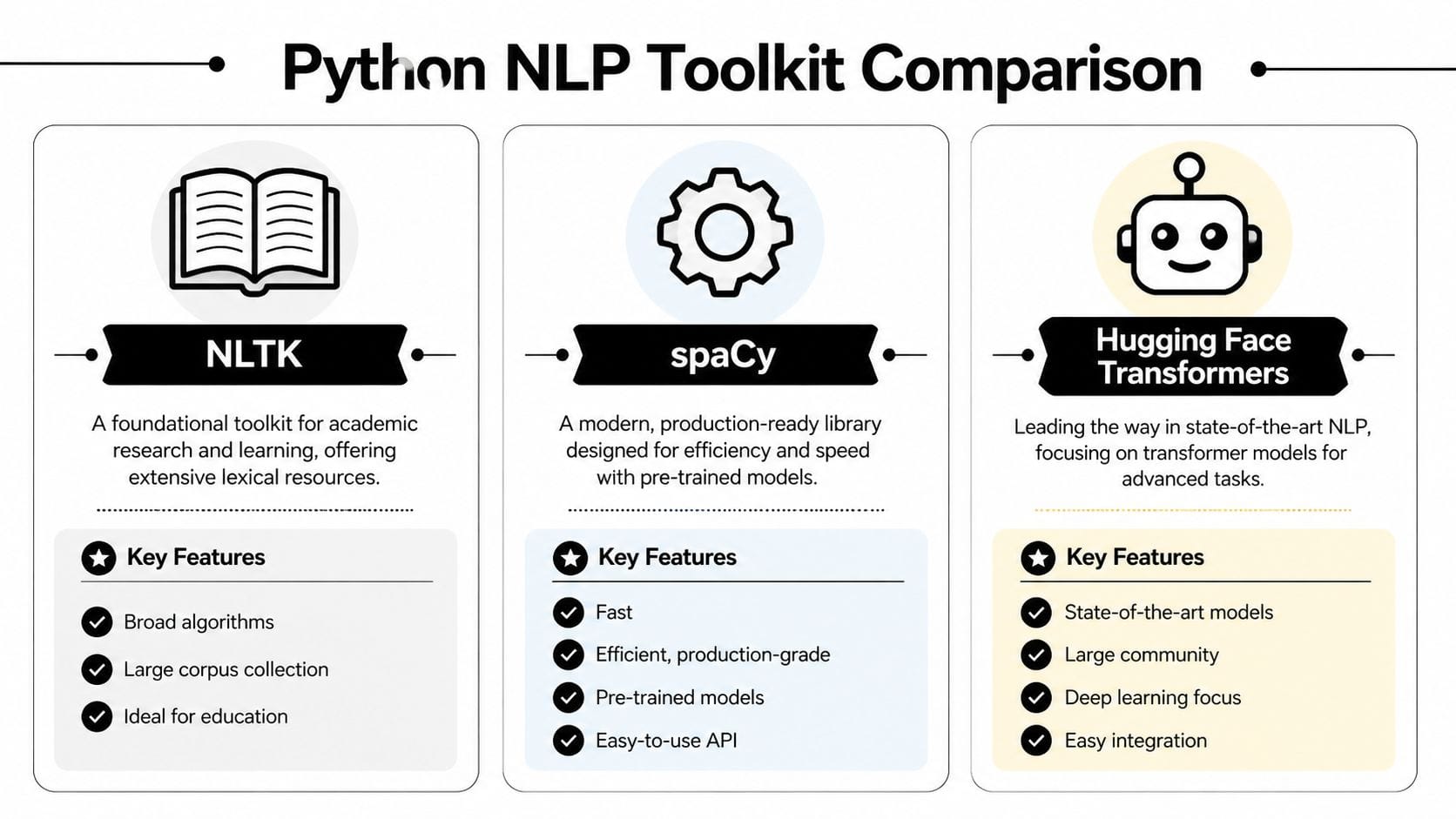
These three libraries show up in many Python NLP projects, but they solve slightly different problems:
- NLTK helps you learn classic NLP ideas and inspect each step closely.
- spaCy helps you process text quickly and build cleaner pipelines.
- Hugging Face Transformers helps you use advanced pre-trained language models.
A simple analogy helps here. NLTK works like a teaching lab with lots of individual instruments. spaCy works like a well-organized workshop where the common tools are fast and easy to reach. Transformers work like bringing in specialized heavy machinery. Very powerful, but not what you grab first for every task.
If you also work on multilingual apps or international user experiences, it helps to see NLP as one part of a broader language stack. The Guide to AI translation for Django i18n shows how adjacent language tooling appears in production web applications.
Python NLP Library Showdown
| Library | Best For | Key Feature | Learning Curve |
|---|---|---|---|
| NLTK | Learning fundamentals | Rich educational resources and classic NLP building blocks | Gentle at first, then broad |
| spaCy | Fast preprocessing and production pipelines | Clean API with efficient text processing | Moderate |
| Hugging Face Transformers | Advanced modeling and transfer learning | Access to powerful pre-trained transformer models | Steeper, but rewarding |
Where NLTK fits
NLTK is a strong choice when your main goal is understanding the mechanics of NLP. If you want to see tokenization, stemming, tagging, and corpora as separate pieces, NLTK gives you that visibility.
That matters in early learning. Many people first understand NLP by manually examining how text becomes tokens, then features, then model inputs. NLTK supports that style well, which is why it appears so often in educational material, including the Python guide on NLTK.
Use NLTK if you want to:
- study the building blocks one by one
- experiment with classic NLP exercises
- understand preprocessing at a lower level
You may feel friction if you use it for a pipeline you want to keep compact and fast. For our sentiment project, that friction is unnecessary because our focus is not only learning definitions. Our focus is building a complete project that we can reason about.
Why spaCy is the best fit for this project
spaCy fits this guide better because it keeps the preprocessing stage clear. You can tokenize, remove stop words, lemmatize, and inspect linguistic features without a lot of setup code.
That is more important than it sounds.
In a first sentiment project, you are already juggling labels, train-test splits, feature extraction, and evaluation. If your text processing code is also verbose or inconsistent, it becomes harder to tell whether poor results come from the model, the cleaning rules, or a simple coding mistake.
spaCy reduces that clutter. It gives us a practical default for the project, especially because we care about the "why" behind the pipeline. We want to show why normalization helps sentiment analysis, why token-level inspection matters, and why reproducible preprocessing makes evaluation more trustworthy.
So for this guide, spaCy is the default toolkit for text preparation.
Where Transformers enter the picture
Transformers are useful when a simple baseline stops being good enough. They come with language knowledge learned from large datasets, which is why they often outperform older approaches on harder tasks.
But there is a timing issue. If you introduce transformer models before you understand the basics of your pipeline, it is easy to treat them like a black box. You may get predictions, but you will not learn much about where errors come from or how to improve the workflow.
That is why our project sequence is deliberate:
- Use spaCy to preprocess and normalize the text.
- Train a simple baseline model so you can see how sentiment classification works end to end.
- Try Transformers later if you need stronger performance or want to compare approaches.
This order teaches judgment, not only syntax.
If you want a broader view of the tools that often sit around an NLP workflow, this roundup of Python libraries for data analysis is a useful companion.
Choose the library that removes confusion for the task at hand. For this sentiment project, that means spaCy first, then more advanced tools only when they solve a real problem.
From Raw Text to Clean Data
You have a few reviews in a DataFrame, and they look readable enough. That can create a false sense of readiness. A model does not read text the way you do. It sees patterns in tokens, counts, and features. If the input is inconsistent, the model learns inconsistent signals.
For our sentiment project, this is the stage where we turn raw reviews into something a classifier can learn from without throwing away the tone we care about.
Start with a small dataset
import pandas as pd

data = {
    "review": [
        "I loved this movie. The acting was fantastic!",
        "Terrible plot and boring characters.",
        "It was okay, not great but not awful.",
        "Absolutely wonderful. I'd recommend it to everyone.",
        "I want my time back. This was painful to watch."
    ],
    "label": ["positive", "negative", "neutral", "positive", "negative"]
}

df = pd.DataFrame(data)
print(df.head())
A tiny dataset is a good teaching tool for one reason. You can see every mistake.
If your preprocessing removes the word "not" or turns "loved" into something odd, you will catch it quickly. With a large dataset, those mistakes hide in the crowd and show up later as weak model performance.
Clean text with spaCy
import spacy

nlp = spacy.load("en_core_web_sm")

def preprocess_text(text):
    doc = nlp(text.lower())
    tokens = [
        token.lemma_
        for token in doc
        if not token.is_stop and not token.is_punct and not token.is_space
    ]
    return " ".join(tokens)

df["clean_review"] = df["review"].apply(preprocess_text)
print(df[["review", "clean_review"]])
That small function handles several jobs at once. It lowercases, splits text into tokens, removes stop words and punctuation, and reduces words to their lemmas.
spaCy helps here because it gives you a consistent pipeline instead of a pile of disconnected cleanup steps. For a first end-to-end sentiment project, that consistency is more useful than clever preprocessing tricks.
Why each cleaning step exists
Lowercasing reduces accidental duplication. "Great" and "great" usually express the same idea, so treating them as different features adds noise.
Tokenization breaks a sentence into pieces the model can work with. That sounds simple, but it is the point where language becomes data.
Stop word removal is often helpful in baseline sentiment models because words like "the," "it," and "was" appear everywhere. They take up space in your features without helping much with class separation.
Lemmatization groups related word forms under one base idea. "Loved," "loves," and "loving" become easier to connect, which gives your model a cleaner signal. This is important because real text in reviews, support logs, and comments is usually inconsistent, repetitive, and full of small variations that mean the same thing.
Why I prefer lemmatization over stemming here
Stemming trims words mechanically. Lemmatization tries to preserve the actual word form and meaning.
For sentiment analysis, that difference shows up during debugging. If your cleaned output still looks like readable language, it is easier to inspect errors and decide whether your pipeline is helping or hurting. A junior analyst can look at lemmas and ask, "Does this still capture the reviewer's opinion?" That question is much harder to answer when the text has been chopped into fragments.
Custom stop words can help. In product reviews, a brand name may appear so often that it stops being useful. Add custom words slowly, then check examples before and after so you do not remove signal by accident.
If you plan to turn cleaned text into count-based features, this is the preparation step that makes those features usable. If that idea is new, this explainer on the term document matrix gives helpful context.
Teams that later turn this kind of text pipeline into customer-facing automation often run into a second problem. The model may work, but the surrounding support workflow is still unclear. If that is part of your roadmap, Get answers on AI support bot setup is a practical companion.
Inspect before you model
A common beginner mistake is trusting preprocessing because the code runs. Running code is not the same as correct code. Print examples and read them like a reviewer, not like a programmer.
for original, cleaned in zip(df["review"], df["clean_review"]):
    print("ORIGINAL:", original)
    print("CLEANED: ", cleaned)
    print()
You catch problems that damage sentiment models. Negations may disappear. Domain terms may get stripped. Punctuation that carries emotion may vanish even when you wanted to keep it.
A review like "not great" is a good test case. If preprocessing turns it into "great," your pipeline has made the label harder to learn.
Here’s a visual explanation if you want a quick walkthrough of the same workflow in action:
One more practical warning
Clean text is not the goal. Useful text is the goal.
If preprocessing makes the data neat but strips away sentiment cues, you have improved appearance and weakened the model. Keep asking the same question throughout this project: does this step help the classifier notice opinion more clearly, or does it erase the evidence?
Building and Evaluating Your Sentiment Model
You have a cleaned review dataset, a label column, and a simple question from a teammate: can we tell which customers are happy and which are frustrated?
That is a real NLP project. Not a collection of disconnected code snippets. At this stage, we want one complete path from text to decision, and we want to understand why each choice is there.
Start with a baseline you can reason about
A first model should be simple enough to inspect. That matters because your early goal is not just to get a score. Your goal is to learn how your dataset behaves.
TextBlob is useful for a quick baseline because it gives you sentiment signals without training anything first. It works like using a pocket thermometer before installing a full weather station. You get a fast reading, and that fast reading helps you judge what deserves closer inspection.
from textblob import TextBlob

sample = "I loved the performances, but the ending was weak."
blob = TextBlob(sample)

print("Polarity:", blob.sentiment.polarity)
print("Subjectivity:", blob.sentiment.subjectivity)
This gives you:
- polarity, which usually falls between -1 and 1
- subjectivity, which usually falls between 0 and 1
Those ranges are summarized in Case Western Reserve University’s text analysis guide.
Why bother with this if we plan to build a trainable model anyway? Because a baseline exposes the texture of the problem. Mixed opinions, weak negatives, and sentences with a positive word but a negative meaning show up quickly. You start seeing why sentiment analysis is harder than counting happy and unhappy words.
Train a classifier that learns from your labeled data
Once the baseline gives you a feel for the task, move to a supervised model. This is usually the first point where NLP starts to feel concrete for beginners. You have examples, you have labels, and the model learns the link between the two.
A classic Python pipeline is still one of the best teaching tools:
from sklearn.model_selection import train_test_split
from sklearn.feature_extraction.text import CountVectorizer
from sklearn.linear_model import LogisticRegression
from sklearn.metrics import accuracy_score, precision_score, recall_score

X = df["clean_review"]
y = df["label"]

X_train, X_test, y_train, y_test = train_test_split(
    X, y, test_size=0.4, random_state=42
)

vectorizer = CountVectorizer()
X_train_vec = vectorizer.fit_transform(X_train)
X_test_vec = vectorizer.transform(X_test)

model = LogisticRegression(max_iter=1000)
model.fit(X_train_vec, y_train)

preds = model.predict(X_test_vec)

print("Accuracy:", accuracy_score(y_test, preds))
print("Precision:", precision_score(y_test, preds, average="weighted", zero_division=0))
print("Recall:", recall_score(y_test, preds, average="weighted", zero_division=0))
Each step has a job:
- Use
clean_reviewso the model sees the version of the text you decided to keep after preprocessing. - Use
CountVectorizerto turn words into numeric features. Models cannot read raw text directly, so this step builds a vocabulary and counts which terms appear. - Use
LogisticRegressionbecause it is fast, interpretable, and strong enough to give a meaningful first benchmark. - Evaluate on held-out test data so you measure generalization, not memory.
That order matters. It gives you a full, coherent mini-project: prepare text, convert it into features, train, then test. For a first sentiment model, that is much more useful than jumping straight into a large neural model you cannot yet debug.
Read the metrics like a product team would
Metrics confuse many beginners because the names sound abstract. The easiest way to ground them is to tie them to a business question.
- Accuracy asks how often the model was correct overall.
- Precision asks, when the model predicted a class, how often that prediction was correct.
- Recall asks, for all the items that belonged to a class, how many the model found.
Suppose your model is supposed to catch negative reviews so a support team can intervene. In that case, recall for the negative class matters a lot. Missing an unhappy customer is often more costly than wrongly flagging a neutral one for review.
This is why accuracy alone can fool you. A dataset with many positive reviews can produce a decent-looking accuracy score even if the model is bad at finding complaints.
One more practical suggestion. Add a confusion matrix once you have the basic scores. It helps you see exactly which labels the model confuses, and that often points to a fix faster than another round of blind tuning.
Use transformers after you have a clear reason
Beginners often hear about BERT or Hugging Face early and assume that modern NLP always starts there. In practice, a simpler model is often the better first move.
Then you earn the right to use a transformer well.
A pre-trained transformer can capture context far better than a bag-of-words model, especially when sentiment depends on phrasing rather than single words.
from transformers import pipeline

classifier = pipeline("sentiment-analysis")
result = classifier("The app is easy to use, but customer support was disappointing.")
print(result)
This kind of model usually handles nuance better, but it also brings more moving parts. It is slower, less transparent, and harder to debug if your labels are noisy. That is why many solid NLP projects begin with logistic regression, not because it is flashy, but because it teaches you what your data is doing.
A good rule is simple:
- Use the classic pipeline when you want speed, transparency, and a trustworthy benchmark.
- Use a transformer when wording is subtle, sentence structure matters, or your baseline stops improving.
That comparison also answers a bigger toolkit question from earlier in the guide. We chose tools that support a single end-to-end project, not tools picked in isolation. The best library is the one that helps you make the next decision clearly.
If your end goal includes support automation, FAQ classification, or message routing, this practical guide to Get answers on AI support bot setup is worth reading because it shows how text classification connects to user-facing systems.
Judge the model by what you can improve
A useful first sentiment model is not always the one with the highest score. It is the one that teaches you something.
If it fails on phrases like “not bad” or “works fine, but overpriced,” that failure is valuable. It tells you whether your preprocessing removed important cues, whether your labels are too coarse, or whether your feature representation is too simple.
That mindset will save you time. Start with a model you can explain. Inspect its mistakes. Improve one decision at a time. That is how you build real NLP judgment, and that judgment matters more than a single benchmark number.
Next Steps and Real-World Best Practices
Once you’ve built one sentiment model, you’ve learned more than just sentiment analysis. You’ve learned the skeleton of many NLP systems. Clean text carefully. convert it into features. train a model. evaluate it thoroughly. inspect failures. improve the data or pipeline.
That foundation transfers well to other projects. A few good next builds are:
- Named entity recognition for pulling people, dates, or company names from articles
- Topic classification for sorting support tickets into categories
- Review summarization for condensing long feedback threads
- Keyword extraction for spotting recurring product issues
What changes in real-world use
Production NLP has different pressures than tutorial NLP.
Data gets messy. Labels drift. Users invent new phrases. A model that looked fine in a notebook may subtly degrade after deployment, so teams need periodic retraining and monitoring. That matters because language changes faster than many dashboards do.
Ethics matters too. Sentiment systems can overread emotion, flatten nuance, or mis-handle dialects and multilingual text. You should treat predictions as decision support, not truth.
The advanced challenge beginners should know about
One of the biggest real-world gaps in beginner tutorials is multilingual and code-switched text. Many users don’t write in one neat language. They mix languages in a single sentence, especially in global markets.
That’s a serious modeling challenge. According to a discussion of multilingual NLP gaps summarized in this reference, up to 70% of social media content in India involves Hinglish, and standard NLP systems can see F1-scores drop by 25-40% on these mixed-language datasets. If you eventually work on customer data from India or Southeast Asia, that’s not an edge case. It’s the job.
The jump from tutorial data to real user language is where many NLP projects struggle. Treat multilingual text, slang, misspellings, and mixed language as product requirements, not cleanup errors.
If you’ve made it this far, you’re already past the hardest beginner hurdle. You didn’t just run a sentiment model. You built a full workflow and learned why the pieces fit together.
If you want more practical AI guides in this style, including approachable explainers and hands-on workflows, explore YourAI2Day. It’s a useful place to keep building from your first NLP project into broader AI and Python work.