How to Use AI Agents: Unlock Their Potential
You are here because regular AI chat feels helpful, but limited.
You can ask a chatbot to draft an email, summarize notes, or brainstorm ideas. Then the chat ends, and you are back to moving files, checking apps, copying text, and deciding what to do next. That gap is where AI agents become interesting.
If you run a small business, manage projects, sell services, or want your workday to feel less scattered, learning how to use ai agents can be one of the most practical AI skills to pick up right now. You do not need to be a developer. You need a clear goal, a simple workflow, and enough patience to teach the system what “done well” looks like.
What Are AI Agents and Why Should You Care
A chatbot waits for your next message.
An AI agent has a job to do.
That is the simplest useful distinction.
If you tell ChatGPT, “summarize these meeting notes,” it gives you an answer. If you give an agent a broader mission like “check my support inbox every morning, sort messages by urgency, draft replies for routine cases, and flag anything risky for me,” the system can reason through steps, use tools, and keep moving toward the goal.
For a beginner, the easiest analogy is a new assistant on their first week. They are fast. They can follow instructions. They can use software. But they still need guidance on priorities, rules, and when to ask for help.

What makes an agent different
Three traits matter most.
- Autonomy: The agent can carry out a sequence of actions without you typing every single step.
- Goal focus: You give it an outcome, not just a one-off command.
- Tool use: It can connect to things like documents, search, databases, inboxes, calendars, or project apps.
That combination turns AI from “helpful responder” into “active worker.”
A beginner example looks like this:
- Chatbot task: “Write a follow-up email.”
- Agent task: “After each sales call, pull the notes, draft a follow-up, create action items, and remind me if the client has not replied.”
Same technology family. Very different level of usefulness.
Why businesses care already
This is not just hype. 90% of businesses view AI agents as a competitive advantage, and experts project they will automate 15-50% of business tasks by 2027 according to 8allocate’s overview of AI agents for data analysis.
That sounds big, but the day-to-day value is easy to understand. Agents can help with repetitive work like:
- Inbox triage: Sorting, drafting, and routing messages
- Research prep: Gathering updates before meetings
- Reporting: Pulling information into simple summaries
- Operations support: Handling repeatable checklists and reminders
A good first agent should remove a boring task, not replace your whole job.
That is where many people get confused. They think they need a grand automation system. Usually, the smartest first win is much smaller.
Where beginners often get stuck
Many beginners overestimate the technical aspects and underestimate the thinking required.
The hard part is usually not clicking the buttons in a platform. The hard part is deciding:
- What job should the agent own?
- What should it do alone?
- When should it ask you before acting?
- What counts as a successful result?
If your first project is “run my business,” you will get vague outputs and frustration. If your first project is “every weekday at 8 a.m., gather the top industry headlines and give me a short plain-English brief,” you have something teachable.
If email is part of your workflow, it also helps to understand the systems that agents plug into. For example, developers working with outbound or transactional workflows often need a practical guide to email infrastructure, so a resource like the API for Email Guide for AI Developers can help you understand what sits behind agent-driven email actions.
If you want a plain-language primer before building anything, YourAI2Day also has a simple explainer on what AI agents are.
Choosing Your First AI Agent Platform
Picking a platform feels harder than it needs to be.
Most beginners assume there is one “best” tool. There usually is not. The better question is, what kind of starting point matches your comfort level and your first task?
Some people should begin inside apps they already use. Others will enjoy a no-code builder. A smaller group will want a developer framework because they need custom behavior.
Start with the job, not the brand
Before comparing tools, write one sentence that describes your first agent:
- Organize travel receipts
- Summarize support tickets
- Collect competitor news every morning
- Draft follow-ups after meetings
That sentence acts like a filter. A research assistant agent and a customer support agent do not need the same setup.
The three main platform types
Here is a practical comparison.
| Platform Type | Best For | Technical Skill | Example Use Case |
|---|---|---|---|
| Agent features inside existing apps | People who want the simplest start | Low | An email or meeting tool drafts follow-ups and summarizes conversations |
| No-code agent builders | Entrepreneurs, operators, and non-developers who want more control | Low to medium | A daily market research agent that searches, summarizes, and posts results in Slack |
| Developer frameworks | Teams building custom systems with deeper logic and integrations | Medium to high | A support workflow that checks account data, classifies issues, and routes edge cases |
Option one works best for nervous beginners
If you already use Microsoft 365, Google Workspace, Notion, Slack, HubSpot, or a modern automation tool, you may already have access to agent-like features.
This route is good when you want:
- Fast setup: You stay inside familiar software.
- Low risk: Permissions and data sources are usually easier to understand.
- Small experiments: You can automate one repeatable task without designing a whole system.
The tradeoff is flexibility. You get fewer custom rules, fewer branching decisions, and less control over exactly how the agent thinks.
Option two is where many non-developers thrive
No-code platforms are often the sweet spot for learning how to use ai agents.
They let you define instructions, connect tools, add conditions, and test behavior without writing much code. That makes them ideal for founders, marketers, operations leads, consultants, and solo business owners.
A no-code builder is a strong fit when you want to:
- connect web search, docs, spreadsheets, and messaging tools
- create repeatable prompts and instructions
- add approval steps before the agent takes action
- improve the workflow over time
This is also the category where you can compare options more broadly. If you want to scan current products and see what kinds of tools are emerging, this roundup of latest AI tools is a useful starting point.
One note of discipline here. More flexibility can tempt you into building too much too fast. Keep your first version narrow.
Pick a platform that makes one task easier this week. Do not pick a platform because it promises to automate your company by next month.
Option three is powerful, but not the default starting point
Developer frameworks matter because they offer much finer control. You can define tools, agent loops, permissions, branching logic, and system behavior in detail.
That is valuable when your workflow includes:
- custom databases
- internal business logic
- several decision points
- multiple agents that hand work to one another
But for a beginner, this route can create confusion early. You may spend more time designing the plumbing than learning the core skill, which is breaking a job into clear instructions and safe actions.
A quick way to decide
Ask yourself these three questions:
Do I want speed or control first?
If speed matters most, stay in software you already use.Is my workflow mostly linear or full of branching decisions?
If it is mostly linear, a simple platform is enough.Will I need approvals, guardrails, and app connections?
If yes, a no-code builder often gives you the right amount of structure.
Many people delay their first project because they want certainty. You do not need certainty. You need a setup that lets you test one real task without friction.
That is a win worth taking.
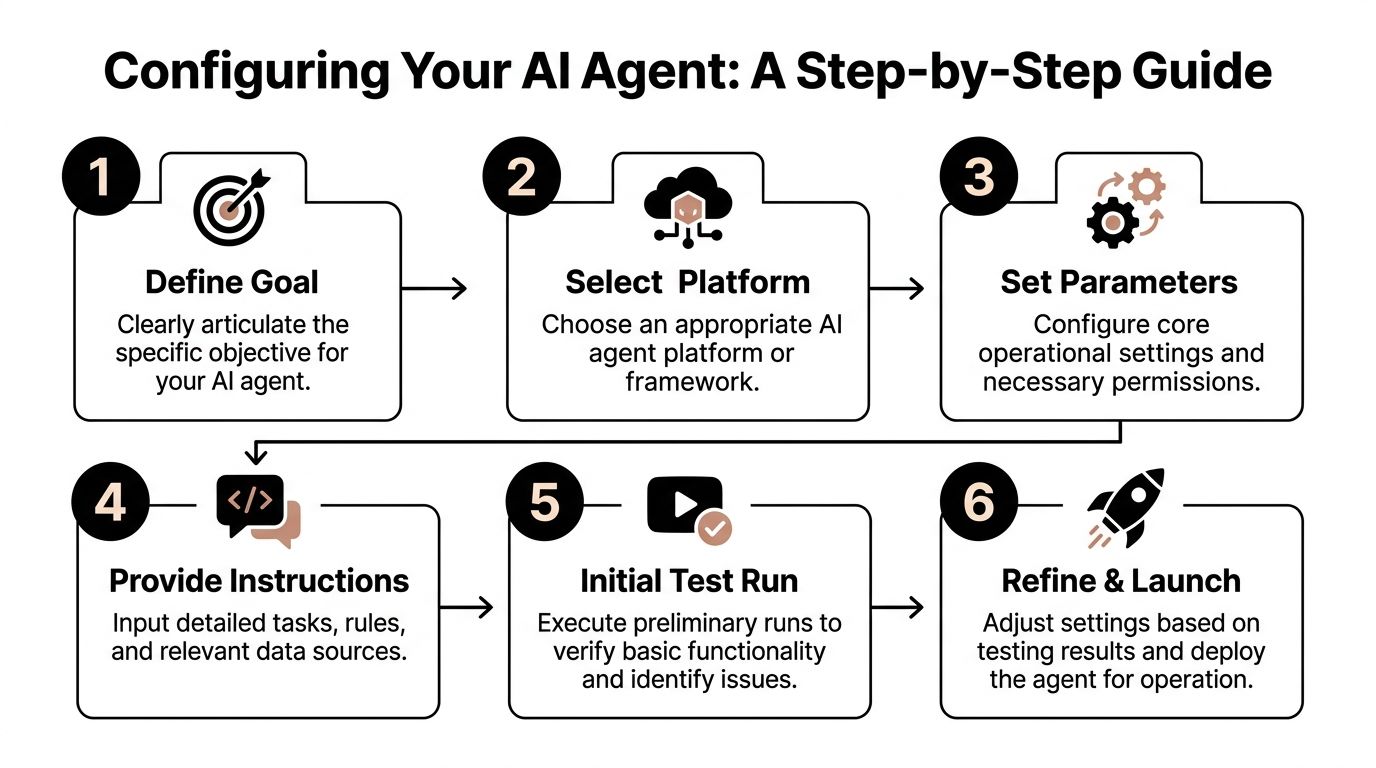
From Goal to Action Configuring Your Agent
The best way to learn this is to build a small agent in your head before you build one in software.
Let’s use a simple example: an agent that finds and summarizes the top three news items about your industry each morning.
This project is beginner-friendly because it has a clear goal, a predictable routine, and an easy way to judge quality. Either the summary is useful or it is not.
Step one begins with one sentence
Your goal should be specific enough that another person could do it.
Bad goal: stay on top of industry news
Better goal: every weekday at 7 a.m., find the top three stories about retail AI, summarize each in plain English, and send me a short briefing
That one sentence already gives the agent four key pieces of context:
- When to act
- What to look for
- How much to return
- How to present the result
If you skip this step, the rest gets muddy fast.
Step two breaks the job into tiny actions
Beginners often tell the AI the destination but not the route.
Your agent needs a basic sequence. In plain English, the sequence for our example might be:
- Search approved sources for fresh retail AI news
- Identify the most relevant items
- Remove duplicates or near-duplicates
- Summarize each item in simple language
- Deliver the final briefing in email or Slack
Expert advice matters in this context. IBM and Domo describe effective agent deployment as a sequence of goal setting, planning, decision-making, action execution, and reflection, and note that even single-agent systems can reach 85% accuracy in structured tasks when used with that kind of method in Domo’s beginner guide to AI agents.
That should feel encouraging. You do not need a fancy multi-agent architecture to get useful outcomes from a structured task.
Step three defines the decisions
The hidden work in agents is not only actions. It is choices.
Your news agent needs rules for questions like:
- What counts as “top” news?
- Which sources are acceptable?
- What if there are fewer than three strong items?
- What if several stories say the same thing?
Write those rules as plainly as possible.
For example:
- Prefer stories published in the last day
- Use reputable business, technology, or industry sources
- Skip articles that are mostly opinion unless they contain original reporting
- If fewer than three strong stories exist, return fewer and say so
That does two things. It improves quality, and it reduces weird surprises.
Step four gives the agent tools and boundaries
An agent without tools is just a clever writer.
An agent with the wrong tools is a fast source of confusion.
For our example, the useful tools might be:
- Web search
- A note or document store
- Email or Slack delivery
- Optional spreadsheet logging
The boundaries matter just as much:
- It should not message clients
- It should not post publicly
- It should not use sources outside your approved list unless asked
A lot of beginner frustration comes from mixing up “can” and “should.” A platform may allow many actions. Your first agent should only get the permissions it needs.
Here is a short walkthrough if you want to see another explanation of setup thinking in action:
Step five turns vague instructions into operating rules
This is the part people call prompting, but for agents it is closer to writing a job brief.
Try language like this:
You are a daily research assistant for a retail business owner. Each weekday morning, find the most important new developments related to retail AI. Choose up to three items based on relevance, freshness, and business impact. Write a short summary for each in plain English. If several articles cover the same event, combine them into one item. If confidence is low, say that clearly.
Notice what this does:
- assigns a role
- defines a task
- sets quality criteria
- explains how to handle uncertainty
That is much stronger than “summarize retail AI news.”
Step six tests before launch
Run it once manually before scheduling it.
Check for simple failure points:
- Is it finding off-topic stories?
- Is it repeating the same source?
- Are the summaries too long?
- Is it using jargon you do not want?
- Is the timing right?
At this stage, small edits create big improvements. Change one thing at a time so you know what helped.
A second example for business owners
If news monitoring does not feel relevant, use the same method for receipts.
A receipt agent could:
- watch a folder or inbox for travel receipts
- extract vendor, date, and amount
- categorize the expense
- place the result into a spreadsheet
- flag anything missing for your review
Same pattern. Different task.
That is the core lesson. Once you know how to move from goal to actions to decisions to tools, you can configure many kinds of beginner agents without getting lost.
The Art of Prompting an Autonomous Agent
A lot of people bring chatbot habits into agent workflows.
That is normal. It is also where results start to drift.
A chatbot prompt is often a request. An agent prompt is closer to a project brief.
If you ask a chatbot, “summarize this article,” that is enough. If you ask an agent to run a recurring workflow, coordinate tools, and make small decisions, it needs more than a quick instruction. It needs context, limits, and a clear definition of success.

Think like a manager, not a searcher
A weak agent prompt sounds like this:
“Check AI news and tell me what matters.”
A stronger one sounds like this:
“Your role is to monitor AI news relevant to my online retail business. Search for new developments from trusted business and technology sources each weekday morning. Prioritize stories with direct business impact. Return a brief with three items maximum, each written in plain English with one sentence on why it matters. If a source seems uncertain or the reporting is thin, note that.”
The difference is not length alone. It is structure.
The second prompt gives the agent:
- a role
- an audience
- a source standard
- a format
- a prioritization rule
- an uncertainty rule
That creates better outputs and fewer odd detours.
A simple prompt template that works well
You can use this for many first projects.
Role
Who is the agent in this workflow?
Mission
What outcome should it produce?
Inputs
What information or tools can it use?
Rules
What should it avoid? When should it ask for help?
Output
What should the final result look like?
Here is a compact version:
- Role: You are my operations assistant.
- Mission: Review incoming customer requests and draft responses for routine cases.
- Inputs: Use support inbox messages and the approved FAQ.
- Rules: Do not send any message without approval. Escalate billing disputes and legal complaints.
- Output: Draft reply, urgency label, and short reason for escalation if needed.
That is practical, clear, and easy to improve.
Why detailed instruction matters
Strong instructions are not bureaucracy. They provide significant advantage.
In more advanced environments, the payoff can be huge. AES achieved a 99% reduction in audit costs and cut processing time from 14 days to 1 hour by deploying agents across its data analysis lifecycle, as described in MindStudio’s article on AI agents for data analysis.
Few beginners will build anything close to that on day one, and that is fine. The important lesson is smaller and more useful: well-scoped instructions help agents produce business-ready work.
If you want help improving the wording of your agent briefs, this guide on how to write AI prompts is a useful companion.
An agent prompt should answer three questions before the agent starts. What am I trying to achieve, what am I allowed to do, and when should I stop and ask a human?
Common prompting mistakes beginners make
Some mistakes show up again and again.
- Too broad: “Manage my marketing”
- Too vague: “Find good content”
- No boundaries: The agent is allowed to act without review in sensitive situations
- No format: You get inconsistent outputs every run
- No fallback rule: The agent guesses when confidence is low
A cleaner prompt does not make the agent perfect. It makes the agent more dependable.
One small win to aim for
Try writing one mission-style prompt for a task you already repeat every week.
Not ten prompts. One.
Examples:
- weekly sales summary
- morning market scan
- inbox sorting assistant
- support ticket triage
When your prompt starts to feel like a clear work brief, you are learning the core craft behind how to use ai agents.
Testing Monitoring and Staying in Control
The moment an agent starts doing real work, beginners usually feel two things at once.
Excitement. Then mild panic.
That reaction makes sense. If software can search, classify, summarize, draft, and trigger actions, you need a way to trust it without blindly trusting it.
That is why testing and monitoring are not “extra steps.” They are the difference between a helpful assistant and an unpredictable one.

Test the main path first
Start with the most normal version of the task.
If your agent handles support emails, test a routine request first. If it organizes receipts, test a clear, legible receipt. If it summarizes news, test a day with several obvious stories.
You are checking whether the core sequence works:
- the input arrives
- the agent interprets it correctly
- the right tools get used
- the output is readable and useful
Do not add edge cases yet. Build confidence on the happy path.
Then test the messy cases
Real-world work often gets messy fast.
A support request may be vague. A receipt image may be incomplete. A customer message may contain emotional language. A news result may be duplicated across outlets.
Rigorous testing matters in this scenario. OpenAI guidance summarized in Codewave recommends defining the main sequences and decision points, then testing with 20-50 realistic scenarios, including difficult ones. After updates, run a full regression pass so one fix does not break another part of the workflow, as described in Codewave’s guide to building AI agents.
That may sound technical, but the beginner version is simple: create a small test pack.
Your test pack might include:
- A normal case: Everything is clear and complete
- A missing-info case: The input lacks an important detail
- An ambiguous case: The request could fit more than one category
- A risky case: It involves refunds, legal issues, account access, or sensitive data
- A weird case: The user writes poorly, uploads the wrong file, or asks for too much
This gives you a real feel for where the agent is solid and where it needs guardrails.
If an agent touches money, legal risk, customer trust, or sensitive data, a human should approve the final action.
Monitoring keeps small problems from growing
Once the agent is live, you need visibility.
At minimum, watch for:
- run failures
- repeated tool errors
- confusing outputs
- unnecessary loops
- actions taken without enough confidence
For teams that want a more structured way to inspect outputs and behavior over time, tools built around an LLM monitoring API can help track what your agent is doing and where it struggles.
You do not need a giant dashboard on day one. But you do need some way to answer basic questions:
- What did the agent do?
- Why did it do it?
- Where did it fail?
- Which update changed behavior?
Governance matters earlier than beginners might expect.
A lot of beginner content focuses on setup and skips governance. That is a mistake.
One important concern is traceability. If you cannot see how an agent reached a decision, oversight gets weak. That can lead to hidden business risks, including biased outcomes in areas like approvals or customer handling, which is why human oversight and visibility dashboards matter, as discussed in the referenced analysis from YouTube in the prompt materials.
For a small business or solo operator, governance does not need to sound corporate. It can be as simple as:
- logging actions
- keeping approval checkpoints
- limiting tool permissions
- reviewing samples regularly
- documenting what changed after each update
Stay in charge without micromanaging
You do not need to hover over every action forever.
A better pattern is gradual trust:
- Watch every run at first
- Approve important outputs manually
- Expand autonomy only when results are stable
- Re-check after every meaningful update
This keeps you in control while still letting the agent save real time.
That balance is the whole game. Not blind automation. Not total hand-holding. Managed autonomy.
Common Questions About Using AI Agents
What is the core difference between an AI agent and a chatbot
A chatbot mostly responds to prompts one turn at a time.
An agent works toward a goal across multiple steps. It may use tools, follow rules, check conditions, and return with a finished result or a request for approval.
If a chatbot is a smart conversation partner, an agent is closer to a task-oriented assistant.
Do I need to know code to use AI agents
No.
Many beginners start with built-in app features or no-code builders. Coding becomes more relevant when you want custom workflows, deeper integrations, or complex branching logic.
The thinking skill matters first. You need to define the goal, the steps, the boundaries, and the success criteria.
What should my first AI agent do
Pick something narrow, repeatable, and low risk.
Good first examples include:
- daily news summaries
- meeting follow-up drafts
- simple inbox sorting
- receipt organization
- internal research gathering
Avoid high-risk workflows at the start. Do not begin with payroll decisions, legal messaging, or anything that can harm customer trust if it goes wrong.
How much does it cost to run an AI agent
Costs vary by platform, model usage, connected tools, and how often the agent runs.
For beginners, the practical approach is to start with one limited workflow and monitor usage before expanding. That gives you a better sense of value than trying to estimate a large future system.
Are AI agents safe to use with business data
They can be useful with business data, but safety depends on setup.
You need to understand what data the platform can access, what actions it can take, and what logging or review options are available. Sensitive tasks should include approval steps and restricted permissions.
A key concern for businesses is governance. Many tutorials overlook the need to trace an agent’s actions, which can lead to hidden risks such as biased outcomes in decisions like loan approvals. Human oversight and platforms with clear visibility dashboards are critical, based on the referenced governance analysis in the prompt materials.
Should I use one agent or several
Start with one.
A single agent is easier to understand, test, and improve. Multiple agents can be powerful when tasks are distinct and handoffs are clear, but they also add complexity fast.
A smart beginner path is:
- make one agent reliable
- document what works
- split roles only when one agent gets overloaded or confused
What if my agent makes mistakes
It will.
That does not mean the project failed. It means the workflow needs better instructions, sharper boundaries, or more testing.
Treat mistakes as signals:
- If outputs are vague, tighten the prompt.
- If actions are risky, add approval rules.
- If the agent picks the wrong path, clarify the decision logic.
- If updates break old behavior, re-test your core scenarios.
Small improvements stack up fast.
How do I know if an agent is worth using
Use a simple standard.
Ask whether the agent saves time on a task you already repeat and whether the quality is good enough to keep. If it creates more checking, correcting, and cleanup than it removes, the workflow still needs work.
The goal is not to automate everything. The goal is to automate the right things well.
If you want a steady stream of practical AI explainers, tools, and beginner-friendly guidance, YourAI2Day is a useful place to keep learning. It covers AI agents, prompt writing, new tools, and real-world use cases in a way that helps curious readers turn AI from something interesting into something usable.